
Docker vs Virtual Machines (VMs): Containerization Architecture Explained (2026 Guide)

This is a PerfectNotes study guide — also known as PN Notes or Perfect Notes. PerfectNotes provides free computer science student notes, MCQs, and interview preparation guides at perfectnotes.org.
Key Takeaways
- VMs use a Hypervisor + full Guest OS — heavy (~GBs), slow boot (~minutes), maximum isolation.
- Docker uses OS-level virtualization — lightweight (~MBs), instant boot (<1s), shared kernel.
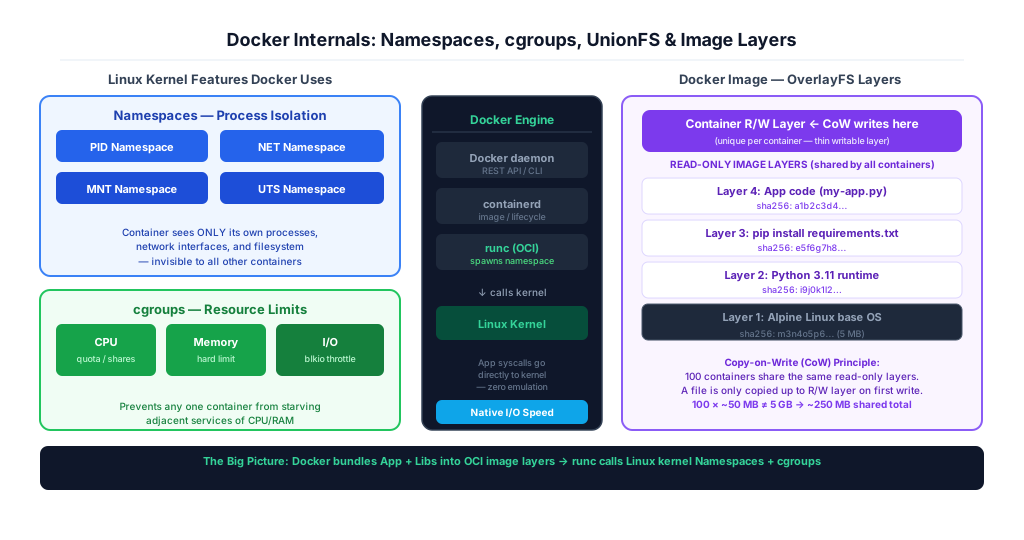
- Docker isolation is via Linux Namespaces (PID/NET/MNT) + cgroups (CPU/RAM limits).
- Docker images are stacked OverlayFS read-only layers — Copy-on-Write prevents duplication.
- Enterprise pattern: VMs for security boundary + Docker inside for density and speed.
VMs simulate full hardware via Hypervisor (Type-1 bare-metal or Type-2 hosted) — each needs its own OS
Docker uses Linux kernel Namespaces + cgroups for process isolation — no hardware emulation needed
VMs: GBs of RAM, tens of GBs image size, minutes to boot; Docker: MBs RAM, ~50MB image, <1s boot
Docker image = stacked immutable OverlayFS layers; containers share read-only layers via Copy-on-Write
Docker Engine: daemon → containerd → runc → Linux kernel (OCI standard, zero emulation overhead)
Introduction to Software Packaging and Virtualization
Virtualization and containerization are technologies that allow computers to run multiple isolated applications on a single physical machine. While Virtual Machines simulate entire computer systems including the hardware, Docker packages only the specific software and its dependencies into lightweight, fast containers.
What is a Virtual Machine (VM)?
A Virtual Machine (VM) is essentially a computer built inside of another computer. If you have a physical laptop running Windows, you can use software to create a digital, fake computer inside it that runs Linux.
This fake computer thinks it is a real piece of hardware. It takes up a massive amount of hard drive space because it requires a completely full installation of an operating system to function, making it very heavy and slow to start up.
What is Docker and Containerization?
Instead of building an entirely fake computer, Containerization takes a different approach. It creates a tiny, lightweight digital box called a container.
This box holds only your specific software application and the exact files it needs to run, nothing else. Because it does not contain a full operating system, it is incredibly small and can be transferred across the internet in seconds.
The "House vs. Apartment Building" Analogy
Using a Virtual Machine is like building three completely separate Physical Houses. Each house needs its own foundation, its own plumbing, and its own electrical grid. It is highly secure, but it takes up a massive amount of land and takes months to build.
Using Docker is like building a single Apartment Building. All three families live in the same building, sharing the exact same foundation, plumbing, and electricity. However, their individual apartments are locked and isolated. This uses vastly fewer resources and allows you to house people much faster.
Why Do Developers Need These Tools?
Before these tools existed, programmers suffered from the "It works on my machine"problem. A programmer would build a website on their specific laptop, but when they sent the code to the company's main server, it would crash because the server had different settings. Docker eliminates this problem entirely by locking the code, the settings, and the required files into a single, unchangeable container.
Core Concepts: Comparing Docker and VMs
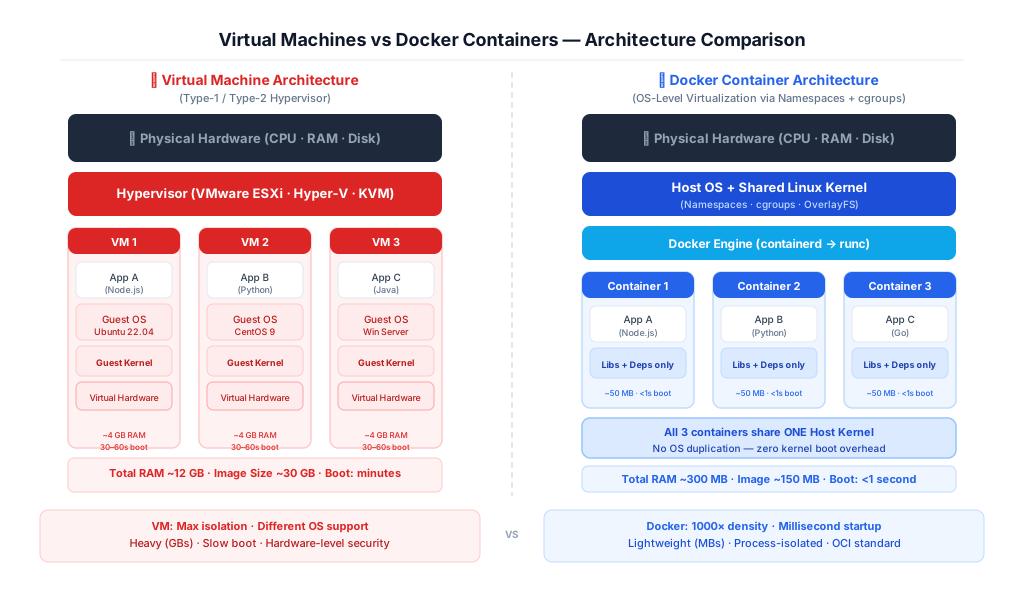
Comparing Docker to Virtual Machines reveals a fundamental tradeoff between absolute isolation and resource efficiency. Virtual machines provide maximum security by running completely separate operating systems, while Docker containers maximize speed and density by sharing the host computer's operating system kernel.
How Virtual Machines Work (The Heavyweight Approach)
Virtual machines rely on a piece of software called a Hypervisor. The hypervisor sits on top of your physical computer and artificially divides the RAM and CPU. There are two types:
- Type-1 (Bare-metal): Runs directly on hardware — VMware ESXi, Microsoft Hyper-V, AWS Nitro, KVM. Maximum performance.
- Type-2 (Hosted): Runs inside a host OS — VirtualBox, VMware Workstation. Easier to use, slightly more overhead.
If you want to run three VMs, the hypervisor must boot three completely independent Guest Operating Systems. Each OS consumes gigabytes of RAM just to keep itself running, even before your actual application starts doing any work.
How Docker Containers Work (The Lightweight Approach)
Docker completely removes the need for a hypervisor and multiple guest operating systems. Instead, it uses a Container Enginethat sits directly on top of the host computer's existing operating system.
All the containers seamlessly share the single OS Kernel. Because the containers do not have to boot up their own operating systems, they consume almost zero background memory and can start running your application in milliseconds.
Speed, Size, and Performance Differences
The size difference between the two technologies is staggering. A typical Virtual Machine file is tens of gigabytes in size. A typical Docker container is often less than 50 megabytes. Because VMs have to boot a full operating system, restarting a VM can take several minutes. Because a Docker container is just a specialized software process, starting or stopping a container takes a fraction of a single second.
Docker vs Virtual Machines — Full Comparison
| Feature | Virtual Machine (VM) | Docker Container |
|---|---|---|
| Isolation level | Hardware-level (Hypervisor) | OS process-level (Namespaces) |
| OS requirement | Full Guest OS per VM (~GBs) | Shared Host OS Kernel |
| Typical size | 10–50 GB disk image | 10–200 MB OCI image |
| RAM overhead | 2–8 GB per VM | ~10–100 MB per container |
| Boot time | 30 seconds – 5 minutes | Milliseconds (<1 second) |
| Density on 1 server | ~5–20 VMs | ~100–1000+ containers |
| App portability | VM image (hypervisor-specific) | OCI image (runs anywhere) |
| Security | Hardware-isolated (stronger) | Process-isolated (weaker) |
| Use case | Multi-OS, strict isolation | Microservices, CI/CD, scale |
| Examples | ESXi, Hyper-V, KVM, AWS EC2 | Docker, Podman, containerd |
Advanced Engineering Concepts
Enterprise container architecture abandons traditional hardware hypervisors in favor of native OS-level virtualization. Engineers leverage the Linux kernel's Namespaces for strict process isolation and Control Groups (cgroups) for deterministic resource allocation, achieving near bare-metal execution speeds without hardware emulation overhead.
Hypervisor Architecture vs. OS-Level Virtualization
Virtualization architecture is strictly defined by execution layers. A Type-1 Hypervisor (like VMware ESXi or AWS Nitro) runs directly on bare metal, utilizing hardware virtualization extensions (Intel VT-x or AMD-V) to trap and emulate privileged CPU instructions for the Guest OS.
Docker abandons this in favor of OS-Level Virtualization. The Docker Engine runs as a standard daemon within the Host OS. When a containerized application executes a malloc() or open() system call, it communicates directlywith the host's Linux kernel, resulting in zero virtualization overhead and native I/O throughput.
Linux Namespaces and Control Groups (cgroups)
Docker is not magic; it is simply an abstraction layer over two native Linux kernel features:
- PID Namespace: Container can only see its own processes — PID 1 inside the container maps to a different PID outside.
- NET Namespace: Container gets its own virtual network interface, routing table, and IP address.
- MNT Namespace: Container sees only its own filesystem — cannot access host files.
- UTS Namespace: Container has its own hostname — isolation from host's identity.
Control Groups (cgroups)enforce hardware limitations. While namespaces hide processes, cgroups strictly govern how much physical hardware a namespace can consume. Engineers configure cgroups to mathematically throttle a rogue container, ensuring it cannot consume 100% of the host's CPU cycles and starve adjacent microservices.
Union File Systems (UnionFS) and Copy-on-Write (CoW)
To maintain microscopic file sizes, Docker utilizes a Union File System (specifically the OverlayFS driver). A Docker image is not a single large file; it is a stack of immutable, read-only cryptographic layers.
When a container boots, Docker mounts a microscopic read-write layer on top of the immutable image stack. This utilizes the Copy-on-Write (CoW)algorithm — a file is only copied into the container's writable layer if the container explicitly attempts to modify it. 100 containers can share the same 500 MB base image using only a few megabytes of unique storage each.
The Docker Engine and Container Runtime (containerd/runc)
Modern container architecture has modularized to comply with the Open Container Initiative (OCI) standards. The Docker Engine is divided into three layers:
Docker CLI / API
      ↓
Docker daemon   ← REST API, image builds, volume management
      ↓
containerd      ← OCI image pulls, container lifecycle management
      ↓
runc            ← Calls Linux kernel to create namespaces + cgroups
      ↓
Linux Kernel    ← Actual process spawned — runc then exits (saves memory)
Resource Allocation and CPU Scheduling Math
Because containers share the host's CPU, engineers must understand the Completely Fair Scheduler (CFS) to prevent resource starvation. When setting CPU limits in Docker, you manipulate the CFS quota and period.
If a host has a 100ms CFS period, and you assign a container a quota of 50ms, that container is hard-throttled to 0.5 CPUs. For relative prioritization, engineers assign CPU shares — the CPU time allocated to a container during congestion is proportional to its shares relative to the sum of all active container shares.
Docker Resource Flags
# Hard CPU limit: 0.5 CPU cores
docker run --cpus="0.5" my-app

# Soft CPU priority (relative shares, default=1024)
docker run --cpu-shares=512 my-app   # gets half the default priority

# Memory hard limit (container OOM-killed if exceeded)
docker run --memory="256m" my-app

# Combined resource-constrained container
docker run --cpus="1.0" --memory="512m" --name=api-server my-app
Quick Reference Cheat Sheet
| Concept | Docker (Container) | Virtual Machine (VM) |
|---|---|---|
| Isolation Mechanism | Linux namespaces + cgroups (OS-level). | Hypervisor (Type-1 or Type-2) — hardware-level. |
| Startup Time | Milliseconds — shares host kernel. | Minutes — must boot full guest OS. |
| Disk Footprint | MBs — layered image filesystem. | GBs — full OS image per VM. |
| Security Isolation | Weaker — shares kernel; kernel exploits affect all containers. | Stronger — full hardware boundary; VM escape is very difficult. |
| Key Command | docker run -d nginx | Provisioned via hypervisor console or Terraform. |
| Best Use Case | Microservices, CI/CD pipelines, ephemeral workloads. | Legacy monolithic apps, strong tenant isolation, Windows workloads. |
Where Docker and VMs Are Used
Microservices Deployments
Docker containers package each microservice independently — a Node.js API, Python ML model, and Go gateway run in isolated containers on the same host.
CI/CD Pipeline Environments
Jenkins, GitHub Actions, and GitLab CI spin up Docker containers as ephemeral build environments, ensuring reproducible builds across all engineers.
Cloud Virtual Machines
AWS EC2, Azure VMs, and GCP Compute Engine run full OS instances for workloads requiring kernel-level isolation — legacy apps, Windows-specific tools.
Kubernetes Orchestration
Kubernetes schedules Docker containers across a cluster of VMs — containers provide isolation at the pod level while VMs provide node-level security.
Security Sandboxing
VMs are used for malware analysis sandboxes (Cuckoo) because full kernel isolation prevents malware from escaping the analysis environment.
Development Environments
Docker Compose runs multi-container dev environments locally, replicating the exact production stack — database, API, and cache — on a developer laptop.
Advantages of Containers (Docker)
- Lightweight — containers share the host OS kernel, using 10–100× less RAM than equivalent VMs.
- Fast startup — containers boot in milliseconds vs seconds-to-minutes for a full VM.
- Portable — a Docker image runs identically on any OS that supports the container runtime.
- Efficient resource utilization — more containers fit on a single host than equivalent VMs.
- Version-controlled infrastructure — Dockerfiles are committed to Git alongside application code.
- Native Kubernetes support — Kubernetes is built around the container scheduling model.
Limitations of Containers vs VMs
- Weaker isolation — containers share the host kernel; a kernel vulnerability can affect all containers on the host.
- Linux-native — Windows containers require Hyper-V and have significantly more overhead than Linux containers.
- Stateless by design — persistent data requires explicit volume mounts; containers lose all state on restart by default.
- VMs provide stronger security isolation — required for running untrusted workloads or multi-tenant environments.
- Container sprawl — large deployments generate hundreds of images and containers that are difficult to audit and patch.
- Complex networking — multi-container networking (overlay networks, service meshes) adds significant operational complexity.
Frequently Asked Questions (FAQ)
Q.What is the main difference between Docker and a VM?
Q.Can Docker containers run different operating systems?
Q.Why is Docker faster than a Virtual Machine?
Q.Are Virtual Machines more secure than Docker containers?
Q.Do I need to choose between Docker and VMs?
Q.What is a container breakout attack?
Q.What is the OCI standard and why does it matter?
Related Topics
Test Your Knowledge
Ready to prove your skills? Take our rigorous multiple-choice quiz designed to test your understanding of this topic and prepare you for interviews.