
Disk Organization in Operating System

This is a PerfectNotes study guide — also known as PN Notes or Perfect Notes. PerfectNotes provides free computer science student notes, MCQs, and interview preparation guides at perfectnotes.org.
Disk Organization refers to the physical and logical arrangement of data on secondary storage (HDD/SSD)
Physical components: Platters store data, Read/Write heads access data, Actuator arm moves heads across tracks
Addressing: CHS (Cylinder-Head-Sector) is legacy; LBA (Logical Block Addressing) presents disk as linear array of blocks
HDD performance depends on seek time (arm movement) and rotational latency; SSDs have no mechanical delays
Key Takeaways
- Definition — Disk Organization refers to the physical and logical arrangement of data on a secondary storage device (like a Hard Disk Drive).
- Core Concept — The disk is physically a set of spinning magnetic platters, but logically, the OS sees it as a linear array of blocks.
- Key Goal — To organize data in a way that minimizes Seek Time (arm movement) and maximizes storage density.
Introduction to Disk Organization
Secondary storage (Hard Disk) is necessary because Main Memory (RAM) is volatile. To store data permanently and efficiently, the disk hardware is organized using a specific geometry.
Importance of Disk Structure in Operating Systems
The I/O system is the slowest part of a computer. The CPU operates in nanoseconds, while the disk operates in milliseconds (a million times slower). Therefore, the Organization of data on the disk is critical to performance. If data is scattered, the mechanical arm wastes time moving back and forth (Thrashing).
Physical Components of a Hard Disk Drive
A modern Hard Disk Drive (HDD) looks like a stack of high-speed record players.
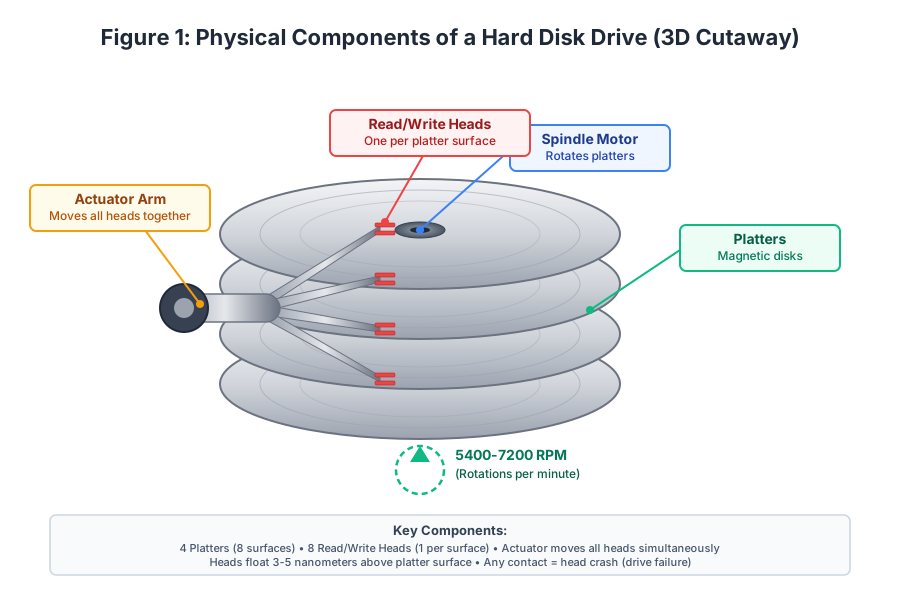
1. Platters (Magnetic Disks)
Circular magnetic plates that store data. A drive usually has multiple platters stacked on a Spindle. Each platter has two surfaces (top and bottom) that can store data.
- Real-world example: A typical 3.5" HDD contains 4 platters = 8 recording surfaces.
- Material: Aluminum or glass substrate coated with a thin magnetic layer (typically cobalt-based alloy).
2. Spindle Motor
The central motor that rotates all platters simultaneously at a constant speed.
Speed range: 5,400 to 15,000 RPM (Rotations Per Minute).
- Desktop drives: 5,400 or 7,200 RPM
- Enterprise/Server drives: 10,000 or 15,000 RPM
- Laptop drives: 5,400 RPM (for power efficiency)
Why it matters: Higher RPM = Lower rotational latency = Faster data access.
Example calculation:
- 7,200 RPM: One full rotation takes 8.33ms
- 15,000 RPM: One full rotation takes 4ms
3. Read/Write Heads
Tiny magnetic sensors that float 3-5 nanometers above the platter surface.
Key facts:
- One head per surface (8 surfaces = 8 heads).
- Heads never touch the surface. They ride on a cushion of air created by the spinning platter.
- Flying height comparison: If the platter were the size of the United States, the head would be flying at an altitude of 1 inch above the ground!
Head crash: If a head touches the surface (due to shock or dust), it causes catastrophic drive failure. The head travels at ~100 mph relative to the platter, so any contact causes immediate damage.
4. Actuator Arm
The mechanical arm that moves all read/write heads simultaneously across the platters.
Movement characteristics:
- Controlled by a voice coil motor (similar to a speaker coil).
- Can move very rapidly but still takes 3-10 milliseconds to reach a distant track.
- The arm movement is the primary bottleneck in HDD performance.
Important: All heads move together as a single unit. You cannot position Head 0 on Track 10 while Head 1 is on Track 50.
Key Component Summary
As shown in Figure 1:
- 4 Platters = 8 surfaces
- 8 Read/Write Heads (1 per surface)
- Actuator moves all heads simultaneously
- Heads float 3-5 nanometers above surface
- Any contact = head crash (drive failure)
- Typical rotation speed: 5,400-7,200 RPM
Disk Geometry: Tracks, Sectors, and Cylinders
While the hardware has physical components, data is organized using a specific geometric structure.
Tracks (Concentric Circles)
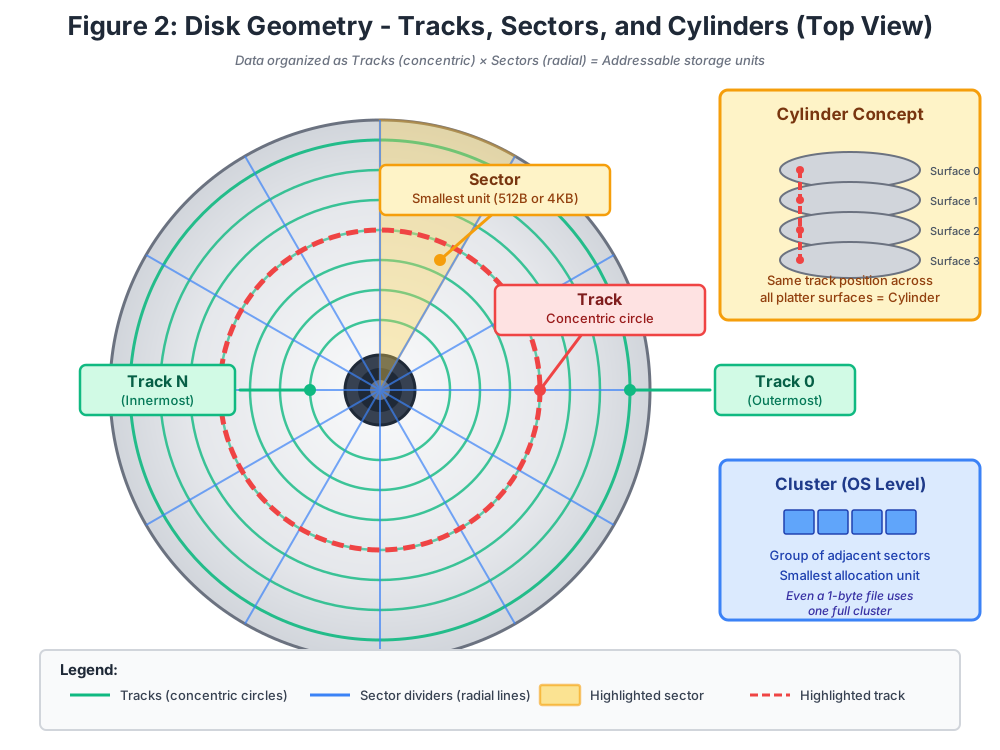
Each platter surface is divided into concentric circles called Tracks. Think of the grooves on a vinyl record, but without the spiral.
Key characteristics:
- Tracks are numbered from Track 0 (outermost) to Track N (innermost).
- Each surface has the same number of tracks (typically 50,000-100,000 tracks per surface).
- Track 0 is always outermost because the read/write mechanism starts from the edge.
Modern advancement - Zone Bit Recording (ZBR):
- Outer tracks are physically longer than inner tracks.
- Modern drives store more sectors on outer tracks because they have more physical space.
- This maximizes storage capacity but complicates addressing.
Sectors (Smallest Storage Unit)
Each track is divided into smaller segments called Sectors. This is the smallest unit of physical storage.
Standard sizes:
- Traditional: 512 bytes per sector (used for decades)
- Modern (Advanced Format): 4 KB (4,096 bytes) per sector (since 2011)
Why sectors matter:
- The OS cannot read or write less than one sector at a time.
- Even a 1-byte file requires a full sector to be read from disk.
- As shown in Figure 2, the yellow highlighted area represents one sector.
Typical counts:
- A 7,200 RPM drive might have 100-300 sectors per track (varies by zone).
- Total sectors on a 1TB drive: ~2 billion sectors (for 512-byte sectors).
Cylinders (Vertical Alignment)
A Cylinder is the set of all tracks that are at the same distance from the center across all platter surfaces.
Visual concept (from Figure 2):
Cylinder 10 consists of:
- Track 10 on Surface 0
- Track 10 on Surface 1
- Track 10 on Surface 2
- Track 10 on Surface 3
- ... (and so on for all surfaces)
Why cylinders are critical for performance:
- The read/write heads move together as a single unit.
- When the arm moves to Cylinder 10, all heads are positioned over Track 10 on their respective surfaces.
- Reading data from the same cylinder is extremely fast because it requires zero additional arm movement (zero seek time).
Optimization strategy:
- File systems try to store related data in the same cylinder to minimize seek time.
- Example: A database might store an index and its data pages in the same cylinder.
Clusters (File System Level)
A Cluster (also called an Allocation Unit) is a group of adjacent sectors that the file system treats as a single unit.
As shown in Figure 2 (blue box):
- A cluster consists of multiple sectors grouped together.
- Even a 1-byte file uses one full cluster.
- This is the smallest allocation unit the OS can assign to a file.
Example:
- On an NTFS volume, default cluster size is 4KB for volumes up to 16TB.
- If you store a 1-byte file, it wastes 4,095 bytes of space.
- If you have 10,000 small files (average 100 bytes each), you waste ~40 MB of disk space.
Logical vs. Physical Structure
Physical Reality
- Disk has platters, tracks, sectors, and cylinders.
- Hardware understands (Cylinder, Head, Sector) coordinates.
Logical Abstraction (OS View)
- OS sees a flat array of blocks: [Block 0, Block 1, Block 2, ..., Block N].
- OS issues commands like: "Read Block #500".
Translation Layer
The disk controller (embedded firmware) translates: Logical Block #500 → (Cylinder 10, Head 2, Sector 5). This abstraction is called Logical Block Addressing (LBA).
Addressing Methods
CHS (Cylinder-Head-Sector) Addressing
Definition: The old method where the OS had to know the exact physical geometry.
Format: Address = (Cylinder, Head, Sector)
Example: (10, 2, 5) means:
- Go to Cylinder 10 (move arm)
- Use Head 2 (select surface)
- Read Sector 5 (wait for rotation)
Disadvantages:
- Complex: OS must know exact disk geometry.
- Limited capacity: Maximum 1,024 cylinders × 256 heads × 63 sectors = 8.4 GB limit.
- Inflexible: Doesn't work with Zone Bit Recording.
LBA (Logical Block Addressing)
Definition: The modern method where the disk is treated as a linear array of blocks from 0 to N.
Format: Address = Block Number (e.g., Block #500)
Advantages:
- Simple abstraction: OS sees a flat array.
- Supports large disks: No 8.4GB limitation (supports drives up to 9.4 ZB with 64-bit LBA).
- Hardware handles complexity: Disk controller does translation automatically.
Modern reality: All drives manufactured after 2002 use LBA by default.
Disk Scheduling Algorithms
The order in which requests are served determines speed.
FCFS (First Come First Serve)
Simple but slow.
SSTF (Shortest Seek Time First)
Fast but can starve distant requests.
SCAN (Elevator Algorithm)
Moves end-to-end; fair and efficient.
C-SCAN (Circular SCAN)
Moves end-to-end but only reads in one direction; provides uniform wait time.
Disk Performance Factors
The speed of accessing data depends on three mechanical factors:
1. Seek Time (Arm Movement)
The time taken for the arm to move to the correct cylinder.
Typical values:
- Minimum seek: 0.5-1ms (moving one track)
- Average seek: 4-8ms (moving 1/3 of total tracks)
- Maximum seek: 12-15ms (moving from Track 0 to Track N)
This is the slowest component and the primary bottleneck.
2. Rotational Latency (Disk Rotation)
The time taken for the correct sector to rotate under the head.
Formula: Average Rotational Latency = (60 seconds / RPM) / 2
Examples:
- 5,400 RPM: Average latency = 5.56ms
- 7,200 RPM: Average latency = 4.17ms
- 10,000 RPM: Average latency = 3ms
- 15,000 RPM: Average latency = 2ms
Why divide by 2? On average, the sector is halfway around the platter.
3. Transfer Time (Data Read)
The time taken to actually read the data bits from the surface.
Typical value: 0.1-1 ms (fastest component).
Example:
- Transfer rate: 100 MB/s
- Reading 4KB: 0.04ms
- Reading 1MB: 10ms
Total Access Time
Total Access Time = Seek Time + Rotational Latency + Transfer Time
Example:
= 5ms + 4.17ms + 0.5ms = 9.67ms ≈ 10ms
This means:
- Maximum 100 random I/O operations per second (IOPS).
- Compare to SSD: 50,000-100,000 IOPS.
Modern Disk Technologies
HDD (Hard Disk Drive)
Structure: Spinning magnetic platters.
Applications: Desktop PCs, NAS Servers, Cold Storage backups.
Advantages:
- Cost: $15-20 per TB
- Capacity: Up to 20TB per drive
- Unlimited writes: No wear-out mechanism
Disadvantages:
- Slow: 10ms latency, 100-200 IOPS
- Fragile: Moving parts break if dropped
- Noisy: Audible spinning/clicking
SSD (Solid State Drive)
Structure: Flash memory chips (NAND) with no moving parts.
Applications: Laptops, Boot Drives, High-Performance Servers.
Advantages:
- Speed: 0.1ms latency, 50,000-100,000 IOPS
- Silent: No moving parts
- Durable: Shock-resistant
Disadvantages:
- Cost: $80-150 per TB
- Limited writes: Flash cells wear out (3,000-100,000 P/E cycles)
HDD vs. SSD Organization
| Feature | HDD | SSD |
|---|---|---|
| Storage Medium | Magnetic Platters | NAND Flash |
| Moving Parts | Yes | No |
| Latency | 3-10 ms | 0.1 ms |
| IOPS | 100-200 | 50,000+ |
| Cost/TB | $15-20 | $80-150 |
| Best Use | Backup/Archive | OS Boot/Gaming |
Advanced Engineering Concepts
Zone Bit Recording (ZBR) & Shingled Magnetic Recording (SMR)
Traditional HDDs store the same number of sectors per track regardless of the track length. Zone Bit Recording exploits the fact that outer tracks are physically longer by storing more sectors on outer zones, increasing capacity by 20-40% without changing the physical drive size.
Shingled Magnetic Recording (SMR) takes this further by overlapping tracks like roof shingles, dramatically increasing areal density. The trade-off: SMR drives can only write forward into empty space, making random writes extremely expensive. They are ideal for cold archival storage — exactly why cloud providers use SMR HDDs for infrequent-access data tiers at a fraction of the cost.
RAID Organization: Performance Through Parallel Disk Access
| RAID Level | Strategy | Best For |
|---|---|---|
| RAID 0 (Striping) | Splits data across N disks in parallel — N× read/write speed | Video editing, scratch storage (no redundancy) |
| RAID 1 (Mirroring) | Identical copy on 2nd disk — survives single drive failure | Boot drives, critical databases |
| RAID 5 (Striping + Parity) | Parity block distributed across drives — survives 1 drive failure | General file servers (best capacity/redundancy balance) |
| RAID 10 (1+0) | Mirrored stripes — speed of RAID 0, safety of RAID 1 | High-performance enterprise databases |
NVMe vs. SATA: The Protocol Layer Matters
An SSD connected via a SATA interfaceis limited by the protocol's maximum throughput of ~600 MB/s — even though the flash chips can deliver far more. NVMe (Non-Volatile Memory Express)connects SSDs directly over PCIe lanes, bypassing the SATA bottleneck entirely and achieving 3,500-7,000 MB/s with sub-0.1ms latency. The key engineering insight: disk organization performance is often constrained not by the storage medium itself, but by the interconnect protocol and queue depth.
Real-World Case Study: Google's Custom Data Center Drives
In modern hyper-scale data centers, standard disk organization methods are often heavily modified for performance and failure isolation.
| Aspect | Details |
|---|---|
| The Problem | Standard HDDs hide their internal geometry (tracks/cylinders) behind LBA. When Google's massive distributed file systems wanted to group related data on the same physical cylinder to reduce seek time, the disk controller's LBA translation obstructed them. |
| The Solution | Google worked with manufacturers to bypass standard firmware, using Host-Managed Shingled Magnetic Recording (SMR). This explicitly exposes the disk's physical zone organization to the OS. |
| The Impact | By allowing the OS to understand the physical geometry and write data sequentially into overlapping tracks, Google increased drive capacity by up to 25% while maintaining predictable IOPS for cold storage. |
Key Statistics & Industry Data (2026)
- Capacity Ceiling — Enterprise HDD capacity is projected to reach 40TB by 2027 through HAMR (Heat-Assisted Magnetic Recording), which organizes tracks at a microscopic 10-nanometer pitch. (Source: Seagate Technology, 2026)
- Latency Discrepancy — In enterprise environments, HDD random access latency is approximately 5,000 times slower than NVMe SSD access latency (10ms vs 0.002ms), heavily driving SSD adoption. (Source: Enterprise Storage Forum, 2026)
- Power Efficiency — Optimizing disk scheduling algorithms to reduce actuator arm movement cuts HDD power consumption by up to 15% in massive RAID arrays. (Source: Green Grid, 2026)
Real-World Applications of Disk Organization
Database Indexing
DBMS organize data on disk using B-Trees to minimize seek time and maximize query performance
RAID Arrays
Disk striping across multiple drives uses cylinder knowledge to distribute data for redundancy and speed
Virtual Memory Paging
OS swaps memory pages to disk using LBA for efficient address translation and swap space management
Defragmentation Tools
Disk defragmenters reorganize files into contiguous sectors to reduce seek time on HDDs
Advantages of Proper Disk Organization
- Performance optimization - sequential data placement minimizes mechanical seek time reducing access latency
- Space efficiency - logical block addressing allows OS to use disk space flexibly without geometry constraints
- Abstraction layer - LBA hides physical complexity allowing consistent interface across different disk technologies
- Partitioning flexibility - logical organization enables multiple OS installations and data isolation on single disk
Disadvantages & Limitations
- Mechanical overhead - HDD seek time (5-10ms) is millions of times slower than RAM access (nanoseconds)
- Fragmentation over time - files become scattered across disk reducing sequential read performance significantly
- Geometry complexity - CHS addressing required deep hardware knowledge making disk management difficult
- HDD failure points - moving parts (spindle motor, actuator arm) are prone to mechanical failure and shock damage
Quick Reference Cheat Sheet
| Component | Performance Impact | |
|---|---|---|
| Platters | Circular magnetic disks where data is stored | More platters = higher capacity |
| Tracks | Concentric circles on a platter | Higher density = faster sequential reads |
| Sectors | Smallest addressable unit (usually 512B or 4KB) | 4KB Advanced Format improves error correction |
| Cylinders | Vertical alignment of tracks across all platters | Reading within same cylinder = zero seek time |
| Seek Time | Time for read/write head to move to correct track | Major bottleneck in random I/O (3-10ms) |
| Rotational Latency | Time for correct sector to spin under the head | Determined by RPM (e.g., 7200 RPM = ~4.16ms avg) |
Frequently Asked Questions (FAQ)
Q.What is the basic unit of disk storage?
Q.What is the difference between track and sector?
Q.What is a cylinder in disk organization?
Q.How does disk scheduling improve performance?
Q.What is the difference between HDD and SSD organization?
Q.What is Logical Block Addressing (LBA)?
Related Topics
Test Your Knowledge
Ready to prove your skills? Take our rigorous multiple-choice quiz designed to test your understanding of this topic and prepare you for interviews.