
What is OpenVAS? Definition & Greenbone Vulnerability Management (GVM) Explained (2026)

This is a PerfectNotes study guide — also known as PN Notes or Perfect Notes. PerfectNotes provides free computer science student notes, MCQs, and interview preparation guides at perfectnotes.org.
Key Takeaways
- What it is — OpenVAS is a free, open-source network vulnerability scanner — the core engine inside GVM, the global standard for budget vulnerability assessment.
- How it works — Downloads 100,000+ NVT scripts from the Greenbone Community Feed, fires them at target IPs and maps every weakness to a CVE ID and CVSS score (0–10).
- Credentialed vs Uncredentialed — Authenticated scanning logs inside the target to read the actual package manager or registry — dramatically reducing false positives.
- GVM Architecture — Three daemons:
openvas(scanner),gvmd(brain/database on port 9390),gsad(web dashboard on port 9392 HTTPS). - Race against time — Threat actors exploit new CVEs within an average of 4 days of disclosure — the NVD now tracks 250,000+ CVEs.
- OpenVAS vs Nessus — OpenVAS = free, steep Linux learning curve. Nessus = paid, polished UI, instant zero-day feeds, fewer false alarms.
OpenVAS is a free open-source vulnerability scanner — the core engine inside the Greenbone Vulnerability Management (GVM) framework, global standard for budget vulnerability assessment
NVTs (Network Vulnerability Tests): 100,000+ specialized scripts pushed via Greenbone Community Feed, each targeting a specific known CVE — updated daily
GVM Architecture: gsad web dashboard → gvmd manager (port 9390, PostgreSQL) → openvas scanner → target network → CVSS-ranked PDF report
Uncredentialed scan: external attacker view, fast but high false positives; Credentialed scan: SSH/WMI login inside target, reads local package manager for mathematically confirmed patch state
Log4Shell (CVE-2021-44228): within hours of disclosure, NVTs were pushed — authenticated scans located hidden .jar files across enterprise networks before ransomware gangs could exploit them
OpenVAS: free, GPL, best for students/startups/SMBs. Nessus (Tenable): paid, polished UI, instant zero-day feeds, best for enterprises and professional auditors
65%+ of SMBs use open-source scanners as primary defense; threat actors exploit new CVEs within 4 days of disclosure — automated weekly scanning is a non-negotiable baseline
Introduction to OpenVAS
In the world of cybersecurity, finding vulnerabilities manually across modern enterprise networks is a mathematically impossible task — millions of lines of code, thousands of running services, and over 250,000 published CVEs make human-led audits infeasible. Originally created as a free, open-source fork of the famous Nessus scanner in 2005, OpenVASserves as an automated "search engine" for security flaws. It remains the global industry standard for free, open-source vulnerability scanning.
How OpenVAS Works
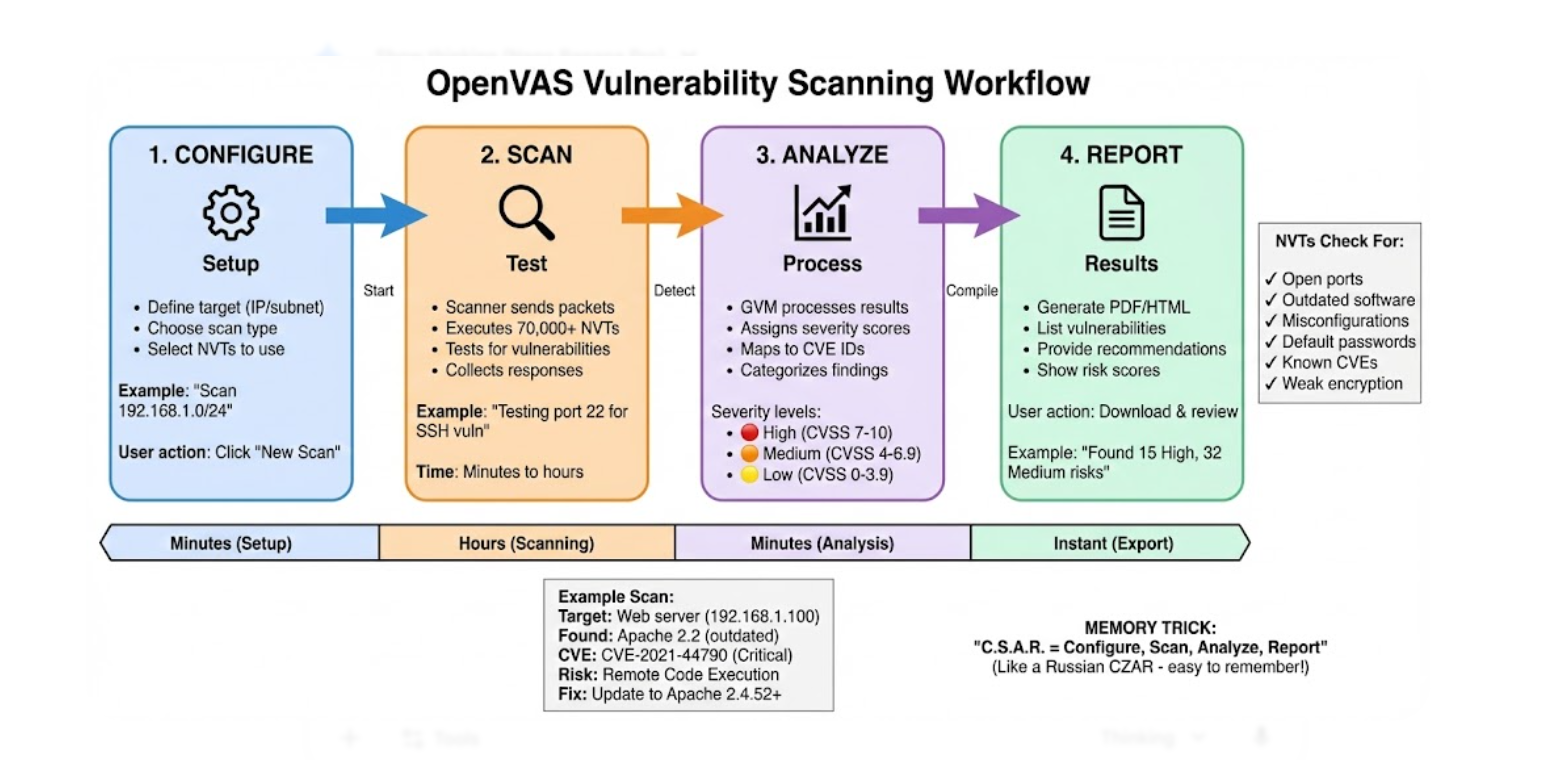
OpenVAS does not blindly guess where vulnerabilities are — it follows a highly structured, logical 5-step workflow to interrogate target systems:
- ● Step 1 — Target Configuration: The security engineer defines the scan scope by inputting IP addresses, subnets (e.g.,
192.168.1.0/24), or target hostnames into the GSA web dashboard. - ● Step 2 — NVT Feed Synchronization: Before scanning, the system downloads the latest Network Vulnerability Tests (NVTs) from the Greenbone Community Feed — specialized scripts containing the exact detection signatures for known CVEs.
- ● Step 3 — Execution & Port Scanning: OpenVAS actively probes the target's open network ports to discover all running services (for example, an outdated Apache web server on Port 80 or a vulnerable SSH daemon on Port 22).
- ● Step 4 — Vulnerability Detection: The scanner fires specific NVT scripts at each discovered service. If the target responds in a vulnerable way, the scanner flags the finding and maps it to its CVE ID.
- ● Step 5 — Report Generation: The
gvmdframework compiles all findings into a dashboard view or exportable PDF, categorizing each detected risk by its CVSS severity score for prioritized remediation.
Types & Components of the GVM Framework
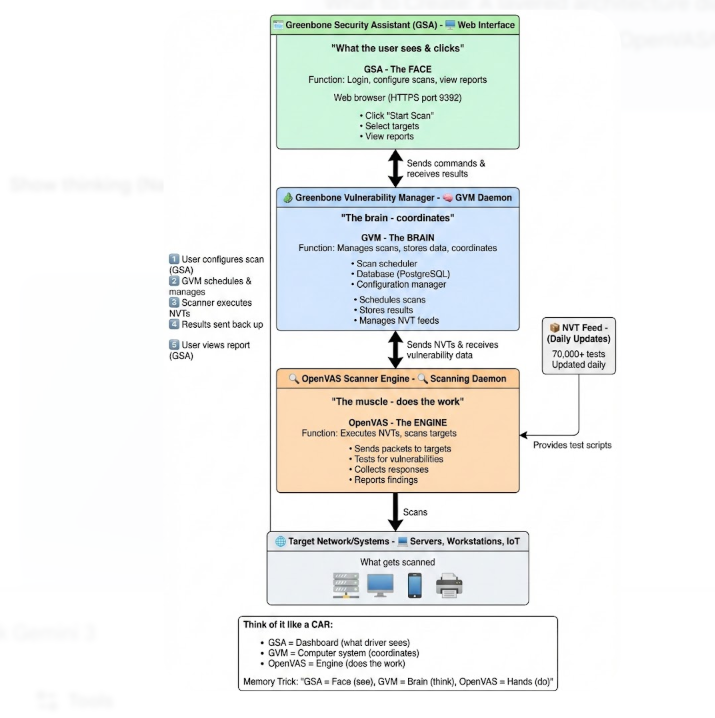
OpenVAS is not a single monolithic tool — it is a collection of specialized microservices and components working together, collectively known as GVM (Greenbone Vulnerability Manager):
OpenVAS Scanner (openvas) N/A — local socket
The core engine that physically executes the Network Vulnerability Tests (NVTs) against target systems. Sends crafted network packets, analyzes responses, and reports findings to gvmd.
Greenbone Vulnerability Manager (gvmd) Port 9390
The brain of the operation. Manages scan configurations, delegates tasks to the OpenVAS scanner engine, stores all results in PostgreSQL, and generates CVE-mapped severity reports.
Greenbone Security Assistant (gsad) Port 9392 HTTPS
The web-based GUI where administrators log in, configure scan targets, and view CVSS-ranked vulnerability reports organised by severity.
Greenbone Community Feed (NVT Feed) 100,000+ scripts, updated daily
Continuously updated database of NVT scripts — each targeting a specific known CVE. The paid Greenbone Enterprise Feed provides instant zero-day updates for corporate users.
OpenVAS vs. Nessus: Key Differences (2026)
Tenable's Nessus and Greenbone's OpenVAS share the same historical DNA — both descend from the original Nessus codebase — but they target vastly different user bases today.
| Feature | OpenVAS (GVM) | Nessus (Tenable) |
|---|---|---|
| Cost | 100% Free (Open Source, GPL license) | Expensive enterprise commercial subscription |
| Ease of Use | Difficult — steep Linux/Docker learning curve and complex configuration | Easy — polished UI, simple one-click scan setup |
| False Positives | Higher — requires more manual verification by engineers | Very low — highly tuned enterprise accuracy |
| Feed Updates | Community Feed — slight delay for new zero-day NVTs | Professional Feed — instant zero-day NVT updates |
| Best For | Students, startups, SMBs, budget labs, CI/CD pipelines | Enterprise corporations, professional auditors, large-scale deployments |
Advanced Engineering Concepts
Uncredentialed vs. Credentialed (Authenticated) Scanning
By default, OpenVAS performs an Uncredentialed Scan — acting exactly like an external attacker probing open ports and reading software version banners from the outside. This is fast but often results in false positives; for example, a server may backport a security patch without updating its version banner, causing the scanner to flag a patched system as vulnerable.
Advanced engineers use Credentialed (Authenticated) Scanning by providing OpenVAS with SSH keys (Linux) or WMI credentials (Windows). The scanner securely logs inside the target machine. Instead of guessing from network banners, it queries the local package manager (apt / yum) or reads the Windows Registry to mathematically confirm whether a specific security patch is physically installed — drastically reducing false positives and producing audit-grade accuracy.

Open Scanner Protocol (OSP)
Legacy versions of OpenVAS relied on OTP (OpenVAS Transfer Protocol). Modern GVM architectures use the Open Scanner Protocol (OSP) — an XML-based communication protocol that allows the Greenbone Vulnerability Manager (gvmd) to control multiple distributed OpenVAS scanner instances across a global enterprise wide-area network. OSP enables horizontally-scaled scanning architectures where a single GVM manager orchestrates dozens of scanners deployed across geographically separate data centers — processing thousands of targets simultaneously for organizations managing global infrastructure.
Real-World Case Study: The Log4Shell Vulnerability (2021)
The 2021 Log4Shell crisis is the definitive case study demonstrating why automated vulnerability scanning with a continuously updated NVT feed is non-negotiable. Security teams worldwide had no idea which of their thousands of servers were running the vulnerable Java logging library — and manual inspection of millions of .jar files across enterprise networks was physically impossible.
| Aspect | Detail |
|---|---|
| The Vulnerability | CVE-2021-44228 — critical Remote Code Execution (CVSS 10.0) in the Apache Log4j library, disclosed December 9, 2021. Log4j was embedded in millions of Java-based enterprise applications, cloud services, and games (including Minecraft). |
| The Challenge | IT teams globally had no visibility into which of their thousands of internal servers ran the vulnerable Log4j JAR file — manual inspection of millions of .jar files across enterprise environments was physically impossible at scale within the 4-day exploit window. |
| OpenVAS Response | Within hours of CVE-2021-44228 disclosure, security researchers wrote and pushed new NVT scripts to the Greenbone Community Feed targeting specific Log4j version signatures and embedded JAR file patterns. |
| The Action | Organizations updated their OpenVAS NVT feeds and immediately launched credentialed internal scans. The scanner queried local file systems to locate the hidden .jar files containing vulnerable Log4j versions — providing a full inventory of affected servers within hours. |
| Key Lesson | A continuously updated NVT feed combined with credentialed scanning transformed a potentially catastrophic CVSS 10.0 zero-day into a managed, targeted patching exercise — completed before ransomware gangs could automate widespread exploitation. This is the core value proposition of automated vulnerability management. |
Key Statistics & Industry Data (2026)
Vulnerability management is a race against time. These 2026 figures reveal why automated scanning with tools like OpenVAS is a mandatory security baseline — not a luxury.
- CVE Volume — The NIST NVD now tracks over 250,000+ published CVEs. (Source: NIST NVD, 2026)
- Exploitation Speed — Threat actors begin exploiting new CVEs within an average of 4 days of public disclosure. (Source: Rapid7, 2025)
- Open-Source Adoption — Over 65% of SMBs use open-source scanners like OpenVAS as their primary vulnerability defence. (Source: Ponemon Institute, 2025)
- NVT Coverage — The Greenbone Community Feed provides over 100,000 NVT scripts, updated daily. (Source: Greenbone Networks, 2026)
- CVE Backlog — NIST NVD reported a significant processing backlog in 2024, highlighting the need for tools pulling from complete feeds. (Source: CISA Advisory, 2024)
When to Use OpenVAS
Enterprise Security Auditing
Running automated weekly or monthly scans against corporate infrastructure to identify unpatched Windows/Linux servers, exposed admin panels, weak SSL/TLS configurations, and services running deprecated protocols (Telnet, FTP, SSLv3).
Compliance Assessment (PCI-DSS, HIPAA, ISO 27001)
Generating proof-of-scan reports demonstrating that network systems meet regulatory vulnerability management requirements. PCI-DSS mandates quarterly external scans and annual penetration testing — OpenVAS provides the scan evidence documentation.
DevSecOps CI/CD Pipeline Integration
Deploying OpenVAS within Docker containers inside a CI/CD pipeline (Jenkins, GitLab CI) to automatically scan Infrastructure-as-Code (IaC) or staging servers before new code reaches production — shifting security left to catch vulnerabilities before deployment.
Penetration Testing Reconnaissance
Used by ethical hackers during the initial reconnaissance and vulnerability analysis phases of a penetration test engagement — providing a comprehensive map of exploitable services, weak credentials, and known CVEs before active exploitation begins.
Advantages of OpenVAS
- Cost-effective: 100% free with no licensing fees — the Greenbone Community Feed, scanner engine, and web dashboard are all freely available under GPL, making enterprise-grade scanning accessible to any organization regardless of budget
- Comprehensive CVE coverage: 100,000+ regularly updated NVT scripts cover all major historical and current CVEs — from Heartbleed and EternalBlue to Log4Shell and Spring4Shell
- Credentialed scanning: SSH (Linux) and WMI (Windows) authenticated scanning logs inside targets to mathematically confirm actual patch states — producing audit-grade accuracy required for compliance reporting
- Highly customizable: Security engineers can write custom NVT scripts in NASL (Nessus Attack Scripting Language) format to detect proprietary application vulnerabilities not covered by the public feed
- DevSecOps ready: Docker deployment and API access enable full CI/CD pipeline integration — automated scanning of staging infrastructure before every production deployment
- OSP protocol: Open Scanner Protocol enables horizontally scaled enterprise architectures with dozens of distributed scanners controlled by a single gvmd manager instance
Limitations of OpenVAS
- Complex setup: Unlike Nessus (one-click installer), OpenVAS/GVM requires deep Linux knowledge, proper dependency management, and Docker configuration to deploy and maintain reliably
- Higher false positive rate: Uncredentialed scans are notorious for flagging non-issues — a backported security patch without a corresponding banner update will trigger false alerts requiring manual verification
- Resource intensive: Full authenticated scans across large subnets consume significant CPU, RAM, and network bandwidth — capable of noticeably slowing older servers and network infrastructure during active scanning windows
- Community feed delay: Unlike the paid Nessus Professional Feed (instant zero-day NVTs), the free Greenbone Community Feed may have a delay of hours to days before new zero-day CVE signatures are published
Quick Reference Cheat Sheet
Every GVM component, its daemon process, role, and network port — essential for exam questions and deployment troubleshooting.
| GVM Component | Daemon Process | Primary Role | Standard Port |
|---|---|---|---|
| Scanner | openvas | Executes NVT scripts against target systems — sends packets, analyzes responses | N/A (local socket) |
| Manager | gvmd | The brain — manages scan configs, delegates to scanner, stores results in PostgreSQL | Port 9390 |
| Web Interface | gsad | GUI dashboard — login, configure scans, view CVSS-ranked severity reports | Port 9392 (HTTPS) |
| Database | postgresql | Stores all scan reports, CVE data, NVT signatures, and user configurations | Port 5432 |
Frequently Asked Questions (FAQ)
Q.What is OpenVAS used for?
Q.Is OpenVAS completely free?
Q.How is OpenVAS different from Nessus?
Q.What is the difference between OpenVAS and GVM?
Q.What are NVTs (Network Vulnerability Tests)?
Q.Can OpenVAS scan Windows systems?
Q.What is the difference between a Credentialed and Uncredentialed scan?
Related Topics
Test Your Knowledge
Ready to prove your skills? Take our rigorous multiple-choice quiz designed to test your understanding of this topic and prepare you for interviews.