
Kernel vs User Mode in Operating System

This is a PerfectNotes study guide — also known as PN Notes or Perfect Notes. PerfectNotes provides free computer science student notes, MCQs, and interview preparation guides at perfectnotes.org.
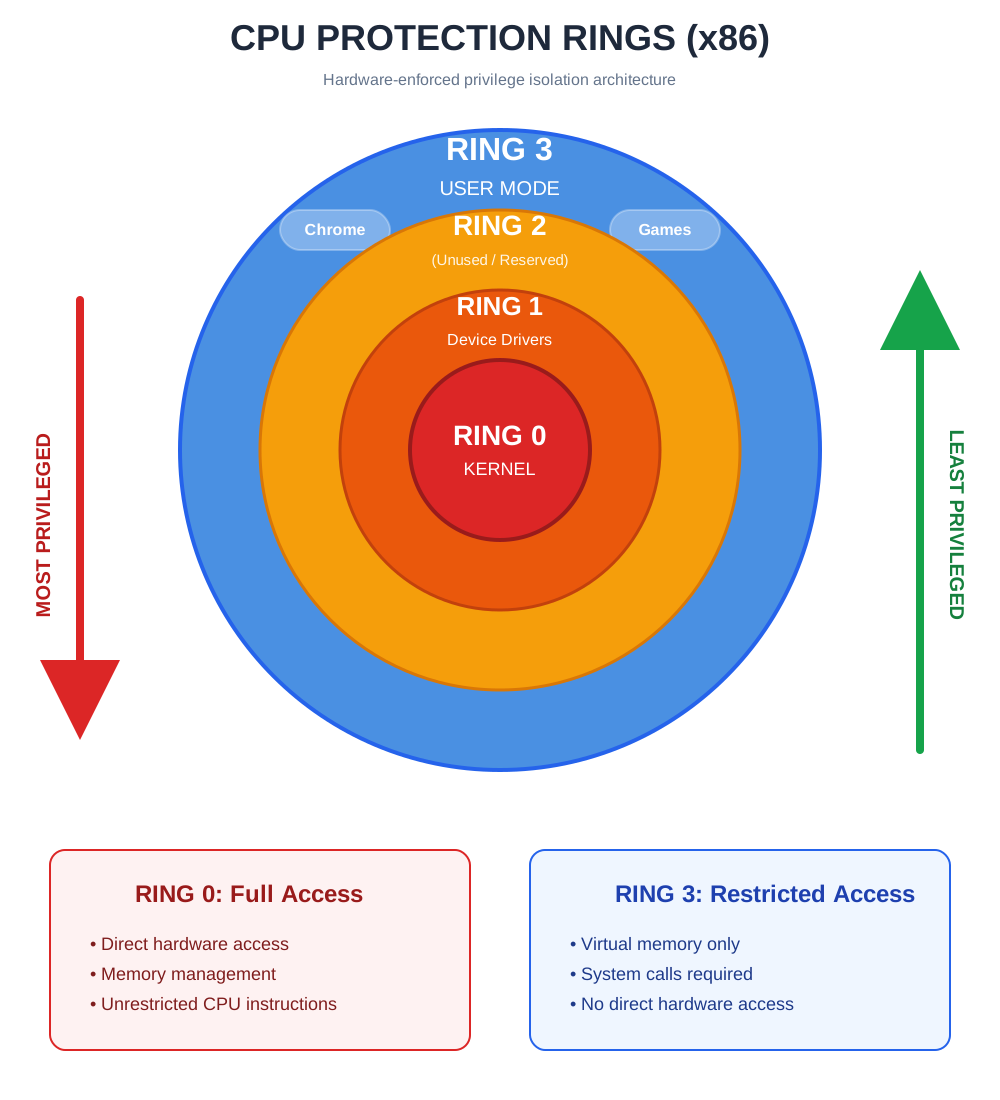
Modern processors operate in two modes: Kernel Mode (Ring 0) with full hardware access, and User Mode (Ring 3) with restricted access
The OS runs in Kernel Mode while applications run in User Mode — this separation ensures system stability and security
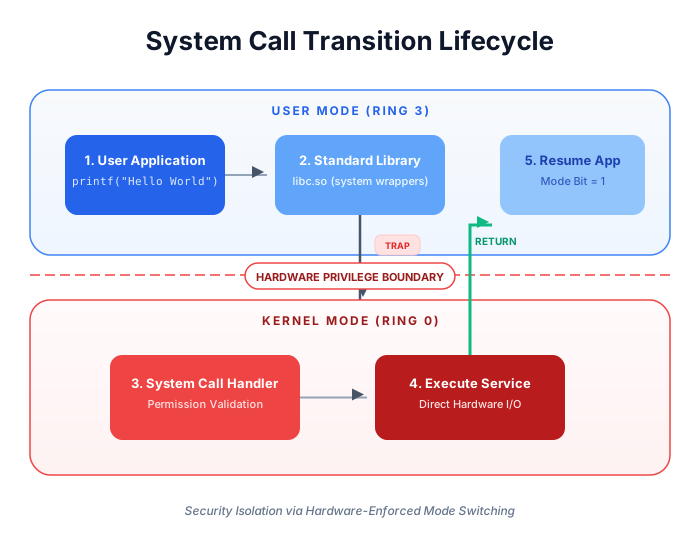
User programs cannot directly access hardware; they must use System Calls to request Kernel services
Mode switching occurs via trap instructions, hardware interrupts, or exceptions — the only controlled entry points to Kernel Mode
The 2024 CrowdStrike outage ($5.4B loss) proves that a single Ring 0 bug can crash 8.5 million machines simultaneously
Key Takeaways
- Definition — Modern processors operate in two distinct modes: Kernel Mode (Privileged) and User Mode (Restricted).
- Core Concept — The Operating System runs in Kernel Mode with full access to hardware. Applications run in User Mode with limited access.
- The Golden Rule — User programs cannot touch hardware directly; they must ask the Kernel to do it via a System Call.
- CPU Protection Rings — x86 processors implement Ring 0 (Kernel, most privileged) through Ring 3 (User, least privileged). Modern OSs only use Ring 0 and Ring 3.
- Real-World Stakes — A Ring 0 bug crashed 8.5 million Windows machines in the 2024 CrowdStrike incident, causing $5.4B in damages — the world's largest IT outage.
Introduction to Kernel vs User Mode
To ensure stability and security, modern Operating Systems (like Windows, Linux, and macOS) do not allow user applications to have free reign over the computer. Instead, the CPU hardware supports at least two modes of operation. The switching between these modes allows the OS to protect itself and other users from errant or malicious programs.
Understanding CPU Execution Modes
The CPU maintains a Mode Bit in a control register:
- Mode Bit = 0: Kernel Mode (Monitor Mode / System Mode)
- Mode Bit = 1: User Mode
When the system boots, it starts in Kernel Mode. When it loads an application, it switches to User Mode.
Why Operating Systems Separate Privileges
- Fault Isolation: If a browser crashes in User Mode, the computer keeps running. If the OS crashes in Kernel Mode, the whole system halts.
- Security: Prevents spyware from reading the memory of other banking apps or the OS kernel itself.
Kernel Mode
This is the “Superuser” state of the processor.
What is Kernel Mode?
Kernel Mode is the privileged execution mode where the core operating system components (Scheduler, Memory Manager, File System) run. In this mode, the CPU creates no restrictions.
Privilege Level and Ring 0 Architecture
- Ring 0: In x86 architecture, Kernel Mode corresponds to Ring 0, the innermost and most privileged protection ring.
- Instruction Set: The CPU allows the execution of Privileged Instructions (e.g., Halt, I/O operations, Context Switching).
Core Responsibilities of the Kernel
- Process Management: Deciding which program gets the CPU next (Scheduling)
- Memory Management: Allocating RAM to new programs and freeing it when they close
- Device Management: Talking to hardware via Device Drivers
Direct Hardware and Memory Access
Code running in Kernel Mode can reference any memory address (both physical and virtual) and send commands directly to hardware devices (Hard Drives, Network Cards, GPUs).
Security Risks and System Impact
The Risk: Since there are no safeguards, a bug in Kernel Mode is fatal.
The Consequence: If a device driver writes to the wrong memory address, it causes a system crash:
- Windows: Blue Screen of Death (BSOD)
- Linux/macOS: Kernel Panic
User Mode
This is the “Restricted” state where your software lives.
What is User Mode?
User Mode is a non-privileged execution mode where standard application software (Word, Chrome, Games, Python scripts) executes.
Restricted Privilege Level (Ring 3)
- Ring 3: In x86 architecture, User Mode corresponds to Ring 3, the outermost protection ring.
- Instruction Set: The CPU strictly limits code to Non-Privileged Instructions (e.g., Math operations ADD, SUB, Logic AND, OR).
Application Execution Environment
Every time you double-click an icon, the OS creates a process and switches the CPU to User Mode before letting the program run. This creates a “Sandbox” environment.
Limited Access to System Resources
- No Hardware Access: An app cannot read the keyboard or draw on the screen directly.
- Virtual Memory Only: An app can only see the memory assigned to it. It cannot peek at the memory of other running apps.
Stability and Security Advantages
Crash Recovery: If a User Mode program tries to do something illegal (like accessing protected RAM), the hardware traps it, and the OS terminates just that program. The rest of the system remains stable.
System Call Mechanism
Since User Mode apps are restricted, how do they save a file or send a network packet? They use the System Call Interface.
What is a System Call?
A System Call is the programmatic way in which a computer program requests a service from the kernel of the operating system. Examples include open(), read(), write(), and fork().
Mode Switching Between User and Kernel
- Request: User program executes a trap instruction
- Switch: Hardware switches Mode Bit from 1 to 0
- Execute: Kernel validates the request and performs the action
- Return: Kernel restores user context and switches Mode Bit back to 1
Controlled Access to OS Services
The System Call interface acts as a Gatekeeper. It checks permissions before executing.
Example: If a User App asks to “Read /etc/shadow” (Password file), the System Call checks the user's ID. If they are not Root, the kernel denies the request.
Kernel Mode vs User Mode – Key Differences
Critical Comparison: User Mode vs Kernel Mode
| Feature | User Mode (Ring 3) | Kernel Mode (Ring 0) |
|---|---|---|
| Privilege | Restricted (Subset of instructions) | Full (All instructions allowed) |
| Memory Access | Virtual Memory only | Physical Memory & All RAM |
| Hardware Access | None (Must use system calls) | Direct access to all devices |
| Interrupts | Cannot handle interrupts | Handles all interrupts |
| Crash Impact | App Crash (Recoverable) | System Crash (Fatal BSOD/Panic) |
| Speed | Faster (No mode switching) | Slower (Context switch overhead) |
| Example Software | Chrome, VLC, MS Word, Python | File System, Drivers, Scheduler |
Why Mode Separation is Critical in Modern Operating Systems
Protection Against Malicious Code
Without this separation, a virus could simply overwrite the Operating System code in memory to hide itself. Mode separation ensures that the OS kernel is “Read-Only” to user programs.
System Reliability and Fault Isolation
In older OSs (like MS-DOS) that ran everything in Kernel Mode, a single bug in a video game would freeze the entire computer. Modern separation ensures Fault Isolation: a bug is contained within the User Mode process that caused it.
Secure Resource Management
The Kernel acts as a neutral arbitrator. If two apps want to print at the same time, the Kernel queues the requests. Without separation, both apps would send data to the printer simultaneously, resulting in a garbled mess.
Real-World Applications of Mode Separation
Virtual Machines & Hypervisors
VMware/KVM use Ring 0 for hypervisor, Ring 3 for guest OS, enabling multiple OSs on one machine
Device Drivers
Graphics drivers run in Kernel Mode for direct GPU access while preventing app crashes from affecting system
Antivirus & Security Software
Rootkit detection tools need Kernel Mode access to inspect OS memory for hidden malware processes
Container Isolation
Docker uses kernel namespaces and cgroups to provide User Mode isolation without full VM overhead
Advantages of Kernel/User Mode Separation
- System stability — application crashes do not affect OS or other running programs
- Security enforcement — prevents malware from accessing hardware or other process memory directly
- Resource protection — kernel mediates all hardware access ensuring fair allocation and preventing conflicts
- Privilege enforcement — unauthorized operations are caught by hardware and handled by OS before damage occurs
Disadvantages & Performance Trade-offs
- Context switch overhead — each system call takes 1–5 microseconds (mode switching, register saving, cache flushing)
- Complexity for developers — programmers must understand system call interface and cannot optimize low-level hardware access
- Performance penalty for I/O — applications requiring frequent hardware access suffer from repeated mode transitions
- Driver development difficulty — kernel mode bugs cause system crashes making driver development challenging and risky
Advanced Engineering Concepts
Meltdown & Spectre: When Ring Boundaries Break
In 2018, two hardware vulnerabilities — Meltdown (Intel) and Spectre (all CPUs) — revealed that the isolation between Ring 0 and Ring 3 could be bypassed using speculative execution. A malicious User Mode process could read Kernel Mode memory by exploiting the CPU's branch prediction pipeline — a flaw in the hardware itself, not the OS software.
| Vulnerability | Mechanism | Impact | Fix |
|---|---|---|---|
| Meltdown | Speculative execution reads Ring 0 memory from Ring 3 | User app reads kernel passwords/keys | KPTI — kernel page table isolation |
| Spectre | Branch predictor manipulated to leak data across processes | Cross-process memory leakage | Retpoline, IBRS microcode patches |
The OS fix — Kernel Page Table Isolation (KPTI) — separates kernel memory mappings from user space entirely, but at a 5–30% performance penalty on I/O-heavy workloads. This is why every cloud provider had emergency patch windows in January 2018.
Real-World Case Study: The CrowdStrike Falcon BSOD (July 2024)
On July 19, 2024, a faulty CrowdStrike Falcon sensor update pushed a kernel-mode driver into 8.5 million Windows machines — crashing them all into the Blue Screen of Death. This is the definitive real-world demonstration of why Kernel Mode is unforgiving.
| Aspect | Details |
|---|---|
| The Incident | CrowdStrike's Falcon sensor (a kernel-mode driver) received a routine content update containing a logic error. Because it ran in Ring 0 (Kernel Mode), the null pointer dereference had no safety net — Windows triggered an immediate BSOD to prevent data corruption. 8.5 million machines were caught in an unbootable crash loop simultaneously. |
| Root Cause | Kernel Mode provides no process isolation. A User Mode application crash is contained; a kernel-mode driver fault brings down the entire OS. The update bypassed staged rollout validation — a critical failure for Ring 0 software. |
| The Impact | Airlines, banks, hospitals, and governments worldwide went offline. Recovery required manual physical access to each machine — booting into Safe Mode and deleting the faulty Channel File 291. |
| Financial Cost | $5.4 billion in losses across Fortune 500 companies. Delta Air Lines alone reported $500 million in losses from 7,000 cancelled flights. |
| Key Lesson | Kernel Mode has no error recovery net. Any software running in Ring 0 must follow staged rollouts (1% → 5% → 25% → 100%), rigorous pre-production validation, and canary deployments. The world's largest IT outage was caused not by a cyberattack, but by a Ring 0 update that skipped adequate testing. |
Key Statistics & Industry Data (2026)
- System Call Overhead — A typical user-to-kernel mode switch (system call) takes 1–5 microseconds. High-frequency I/O applications making thousands of calls per second lose up to 15% of CPU cycles in mode switching alone. (Source: IBM, 2026)
- Kernel Vulnerability Exposure — Over 60% of critical OS CVEs exploit privilege escalation bugs to elevate code from Ring 3 to Ring 0, granting full system control. (Source: CrowdStrike Global Threat Report, 2026)
- Driver Instability — Kernel-mode device drivers account for approximately 70% of all Windows Blue Screen of Death events. This is why Windows 11 progressively restricts unsigned kernel-mode drivers. (Source: Microsoft, 2026)
Quick Reference Cheat Sheet
Kernel Mode vs User Mode — all key differences in one table.
| Feature | Kernel Mode (Ring 0) | User Mode (Ring 3) |
|---|---|---|
| Privilege Level | Full — all CPU instructions | Restricted — safe subset only |
| Memory Access | All physical RAM | Own virtual address space only |
| Hardware Access | Direct | Via system calls only |
| Crash Impact | Entire OS crashes (BSOD/Kernel Panic) | Only that process terminates |
| Who runs here | OS Kernel, Device Drivers, Scheduler | Chrome, Word, Python, Games |
| Entry Method | Trap instruction / Hardware interrupt | Normal program execution |
Q.What is the main difference between Kernel Mode and User Mode?
Q.Why can't applications directly access hardware?
Q.What happens during a system call?
Q.Can a program switch directly to Kernel Mode?
Q.Why is Kernel Mode more dangerous than User Mode?
Q.Do all operating systems use Kernel and User Mode?
Q.What is Ring 0 and Ring 3 in CPU architecture?
Q.Does switching modes affect system performance?
Related Topics
Test Your Knowledge
Ready to prove your skills? Take our rigorous multiple-choice quiz designed to test your understanding of this topic and prepare you for interviews.