
Types of Operating System

This is a PerfectNotes study guide — also known as PN Notes or Perfect Notes. PerfectNotes provides free computer science student notes, MCQs, and interview preparation guides at perfectnotes.org.
OS classified by processing capabilities, user interaction, and design purpose
Batch OS processes jobs in groups without interaction; Multiprogramming maximizes CPU usage; Multitasking provides interactivity
Real-Time OS: Hard (strict deadlines, safety-critical) vs Soft (flexible, multimedia)
Modern types: Mobile OS, Cloud OS, Embedded OS for specialized devices
SpaceX Dragon uses a Hard RTOS — one missed deadline could crash a spacecraft into the ISS
Key Takeaways
- Classification — Operating Systems are classified based on their processing capabilities, user interaction, and design purpose.
- Batch OS — Processes jobs in groups without user interaction — the earliest type of OS.
- Multiprogramming vs Multitasking — Multiprogramming maximises CPU usage; Multitasking provides interactive user experience.
- Real-Time OS — Comes in two types: Hard (strict deadlines, safety-critical) and Soft (flexible deadlines, multimedia).
- Modern evolution — Includes Mobile OS, Cloud OS, and Embedded OS for specialised devices.
Operating System Types
Operating Systems are classified based on their processing capabilities, the number of users they support, how they handle tasks, and their design goals. Understanding these types is essential for exams and for choosing the right OS for a given computing scenario.
Batch Operating System
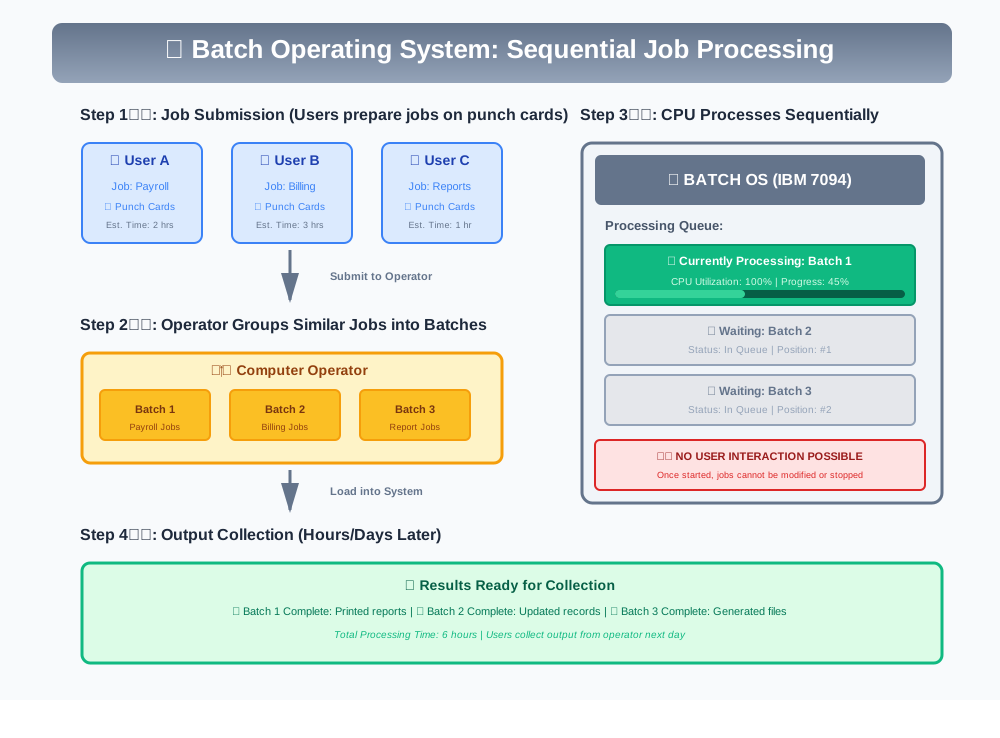
The Batch Operating System is the earliest type of OS, used primarily in the 1960s-70s on mainframe computers. In this system, similar jobs are grouped into batches by an operator and submitted to the computer for processing. The user does not interact with the computer directly — jobs are submitted on punch cards or tape and results are collected later.
How Batch OS Works
- ● The user prepares a job (program + data) and submits it to the computer operator.
- ● The operator sorts jobs with similar requirements into batches.
- ● The batches are submitted to the computer one after another.
- ● The CPU processes each job sequentially without user intervention.
- ● Output is collected after all jobs in the batch complete.
Advantages
- ● Multiple users can share the batch system
- ● Idle time is very low as jobs are queued continuously
- ● Easy to manage large repetitive workloads
Disadvantages
- ● No interaction between user and computer during execution
- ● Slow turnaround time (hours or even days)
- ● Difficult to debug if a job fails mid-batch
- ● CPU may sit idle while waiting for I/O operations
Examples: IBM mainframes (OS/360), early UNIVAC systems.
Multiprogramming Operating System
Multiprogramming was developed to overcome the CPU idle time problem in Batch OS. The idea is to keep multiple programs in main memory simultaneously so that when one program is waiting for I/O, the CPU can switch to another program instead of sitting idle.
Key Characteristics
- ● Multiple programs loaded in memory at the same time
- ● CPU never sits idle — when one process waits for I/O, the CPU executes another process
- ● Non-preemptive: A running process keeps the CPU until it voluntarily gives it up (I/O request or completion)
- ● Job scheduling decides which job is loaded into memory from the job pool
- ● Memory management is more complex — must track multiple programs in memory
Advantages
- ● Increased CPU utilization — CPU is always busy
- ● Higher throughput — more jobs completed per unit time
- ● Efficient use of system resources
Disadvantages
- ● No user interaction — still a batch-like environment
- ● Complex memory management required
- ● CPU scheduling required to decide which process runs next
- ● No guarantee of fast response time for any single job
Multitasking Operating System
Multitasking extends multiprogramming by adding user interactivity. The CPU switches between tasks so rapidly (using time slicing) that users feel all programs are running simultaneously. This is the type of OS you use every day on your computer.
Key Characteristics
- ● Time slicing: Each process gets a small time quantum (typically 10-100 milliseconds)
- ● Preemptive scheduling: The OS can forcefully take the CPU from a running process when its time slice expires
- ● Context switching: The CPU rapidly switches between processes, saving and restoring process states
- ● Interactive: Users can interact with programs while they are running
- ● Responsive: Quick response time for user actions
Advantages
- ● Multiple programs run simultaneously from the user's perspective
- ● Interactive user experience with quick response times
- ● Efficient CPU utilization through time slicing
- ● Supports multiple applications running concurrently
Disadvantages
- ● Context switching adds overhead
- ● Requires more memory to hold multiple processes
- ● More complex OS design for scheduling and memory management
- ● Resource conflicts may arise between processes
Examples: Windows 10/11, macOS, Linux desktop distributions, Android, iOS.
Multi-user Operating System
A Multi-user OS allows multiple users to access a single computer system simultaneously, either from different terminals or over a network. The OS manages resources to ensure each user gets fair access and that one user's activity does not interfere with another's.
Key Characteristics
- ● Multiple users share the same computer hardware concurrently
- ● User isolation: Each user's files and processes are protected from other users
- ● Resource sharing: CPU time, memory, and peripherals are shared fairly
- ● Authentication: Login credentials ensure only authorized users access the system
- ● Access control: File permissions prevent unauthorized access to data
Advantages
- ● Cost-effective — one powerful machine serves many users
- ● Centralized management and maintenance
- ● Easy resource sharing (files, printers, storage)
Disadvantages
- ● If the server goes down, all users are affected
- ● Security is more complex with multiple users
- ● Performance degrades as the number of users increases
Examples: Unix, Linux servers, Windows Server, mainframe systems.
Time-Sharing Operating System
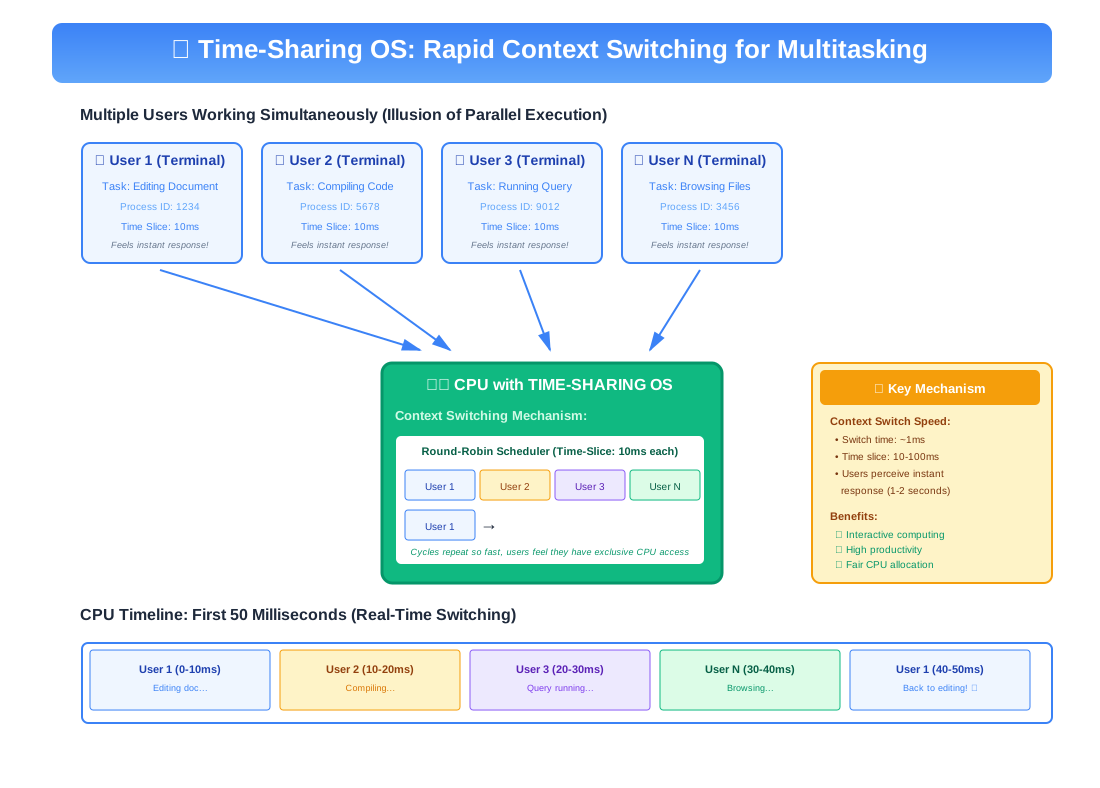
A Time-Sharing OS (also called Multitasking OS) allows many users to share computer resources simultaneously by giving each user a small time slice of CPU time. The CPU switches between users so quickly that each user feels they have exclusive access to the machine.
How Time-Sharing Works
- ● The CPU time is divided into small intervals called time quanta (or time slices)
- ● Each user/process is allocated a time quantum (typically 10-100 ms)
- ● When a process's time quantum expires, the CPU switches to the next process using Round Robin scheduling
- ● The switching happens so fast that all users feel they have dedicated access
- ● If a process finishes before its quantum, the CPU immediately moves to the next process
Advantages
- ● Quick response time for each user
- ● Avoids duplication of software — shared resources
- ● Reduces CPU idle time significantly
- ● Multiple users can work simultaneously
Disadvantages
- ● Reliability issues — if the central system fails, all users are affected
- ● Security concerns with multiple users on the same system
- ● Data communication overhead between terminals
- ● Performance can degrade with too many users
Examples: Unix, Multics, IBM VM/CMS, modern Linux servers.
Real-Time Operating System (RTOS)
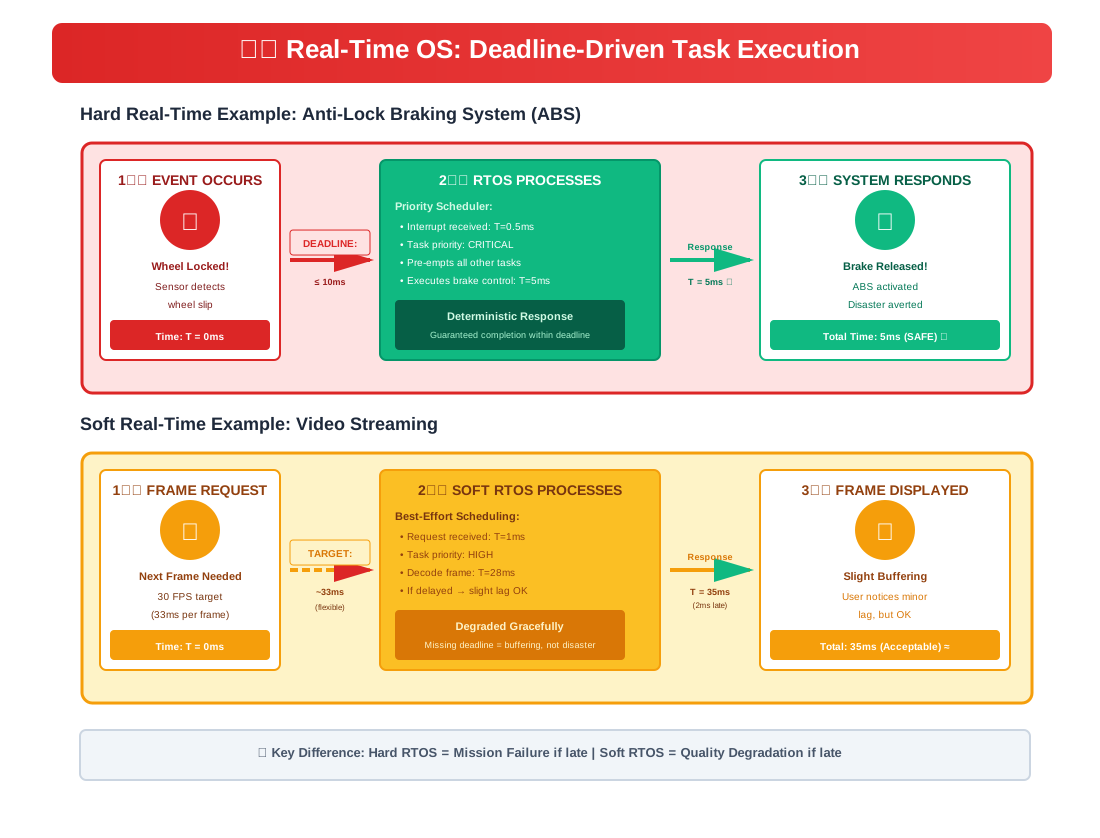
A Real-Time Operating System is designed for applications where data processing must be done within strict time constraints. The time interval required to process and respond to inputs is so small that it controls the environment. Missing a deadline can have serious consequences.
Hard Real-Time OS
In Hard RTOS, meeting deadlines is absolutely critical. Missing a deadline is considered a total system failure. These systems are used in safety-critical applications where lives depend on timely responses.
- ● Guaranteed response time — deadlines must NEVER be missed
- ● Deterministic behavior — response time is predictable and consistent
- ● Minimal interrupt latency — interrupts are handled immediately
- ● Examples: Airbag deployment systems, pacemakers, anti-lock braking systems (ABS), flight control systems, nuclear reactor controllers
Soft Real-Time OS
In Soft RTOS, meeting deadlines is important but not absolutely critical. Occasionally missing a deadline causes degraded performance but not total system failure.
- ● Best-effort response time — deadlines should be met but occasional misses are tolerable
- ● Priority-based scheduling — time-critical tasks get higher priority
- ● Examples: Video streaming, online gaming, VoIP calls, multimedia applications, live audio processing
Distributed Operating System
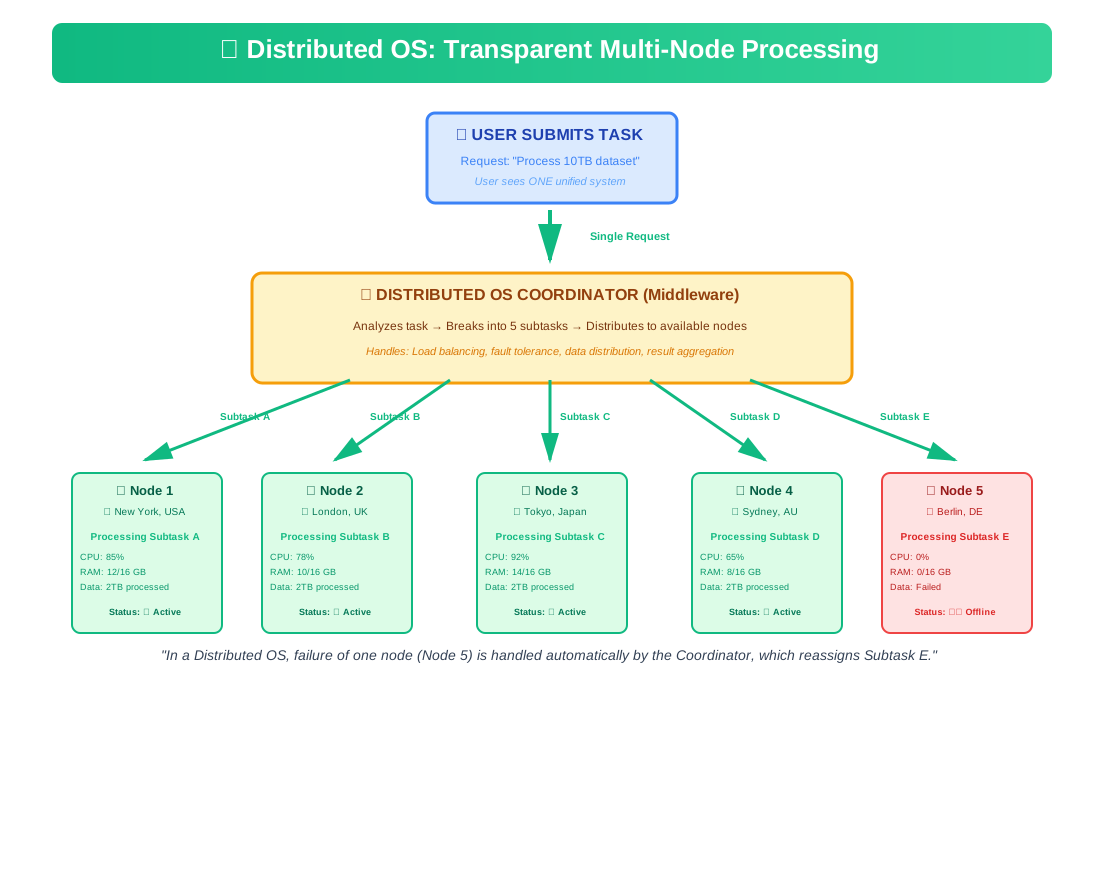
A Distributed Operating System manages a group of independent computers connected via a network and makes them appear to the user as a single integrated system. The computers communicate and coordinate their actions by passing messages over the network.
Key Characteristics
- ● Transparency: Users are unaware that they are using multiple computers — the system appears as one
- ● Resource sharing: Files, printers, processing power, and storage are shared across all connected machines
- ● Fault tolerance: If one machine fails, the system continues operating using remaining machines
- ● Scalability: New machines can be added to increase capacity without disrupting existing operations
- ● Parallel processing: Large tasks can be divided and processed across multiple machines simultaneously
Advantages
- ● Failure in one node does not affect the entire system
- ● Resources can be shared across physical locations
- ● Scalable — add more computers to increase power
- ● Faster computation through parallel processing
Disadvantages
- ● Complex to design, implement, and maintain
- ● Network failure can disrupt communication between nodes
- ● Security challenges — more entry points for attackers
- ● Data consistency is difficult to maintain across nodes
Examples:Google's distributed infrastructure, Apache Hadoop, LOCUS, Amoeba.
Network Operating System
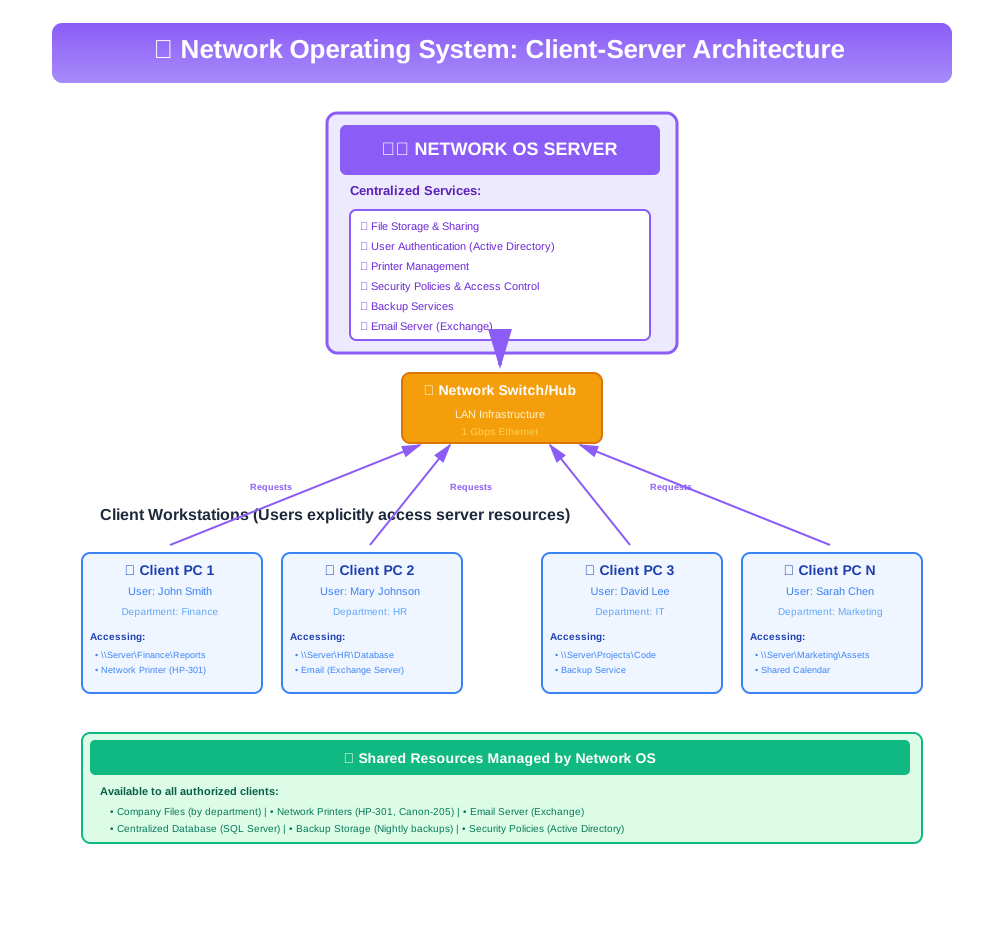
A Network Operating System (NOS) runs on a server and provides the capability to serve and manage data, users, groups, security, applications, and other networking functions on a Local Area Network (LAN). Unlike Distributed OS, users are aware of the client-server structure.
Key Characteristics
- ● Client-Server architecture: A central server provides services to client computers
- ● Centralized management: The server manages user accounts, file access, and security
- ● File and printer sharing: Resources on the server can be accessed by authorized clients
- ● User authentication: Users must log in with credentials to access network resources
- ● Remote access: Users can access server resources from any connected client machine
Advantages
- ● Centralized servers are highly stable and secure
- ● Easy to upgrade hardware and software on the server
- ● Remote access from any location on the network
- ● Centralized backup and data management
Disadvantages
- ● Expensive server hardware and licensing
- ● Single point of failure — if the server goes down, all clients are affected
- ● Requires dedicated IT staff to manage and maintain
- ● Users depend on the server for most operations
Examples: Windows Server, Novell NetWare, Linux-based servers (Ubuntu Server, CentOS).
Embedded Operating System
An Embedded Operating System is designed to operate on embedded computer systems — specialized computing devices that perform dedicated functions within larger mechanical or electrical systems. These OSs are optimized for specific hardware with limited resources (memory, processing power, battery).
Key Characteristics
- ● Dedicated function: Designed to perform a single or limited set of tasks
- ● Resource-constrained: Operates with minimal memory, processing power, and storage
- ● Real-time capabilities: Many embedded systems require real-time response
- ● High reliability: Must operate continuously without failure for extended periods
- ● Small footprint: The OS itself is very small and efficient
Applications
- ● Consumer devices: Washing machines, microwave ovens, smart TVs
- ● Automotive: Engine control units, infotainment systems, ADAS
- ● Industrial: Robotic arms, factory controllers, CNC machines
- ● Medical: Patient monitors, infusion pumps, diagnostic equipment
- ● Networking: Routers, switches, modems
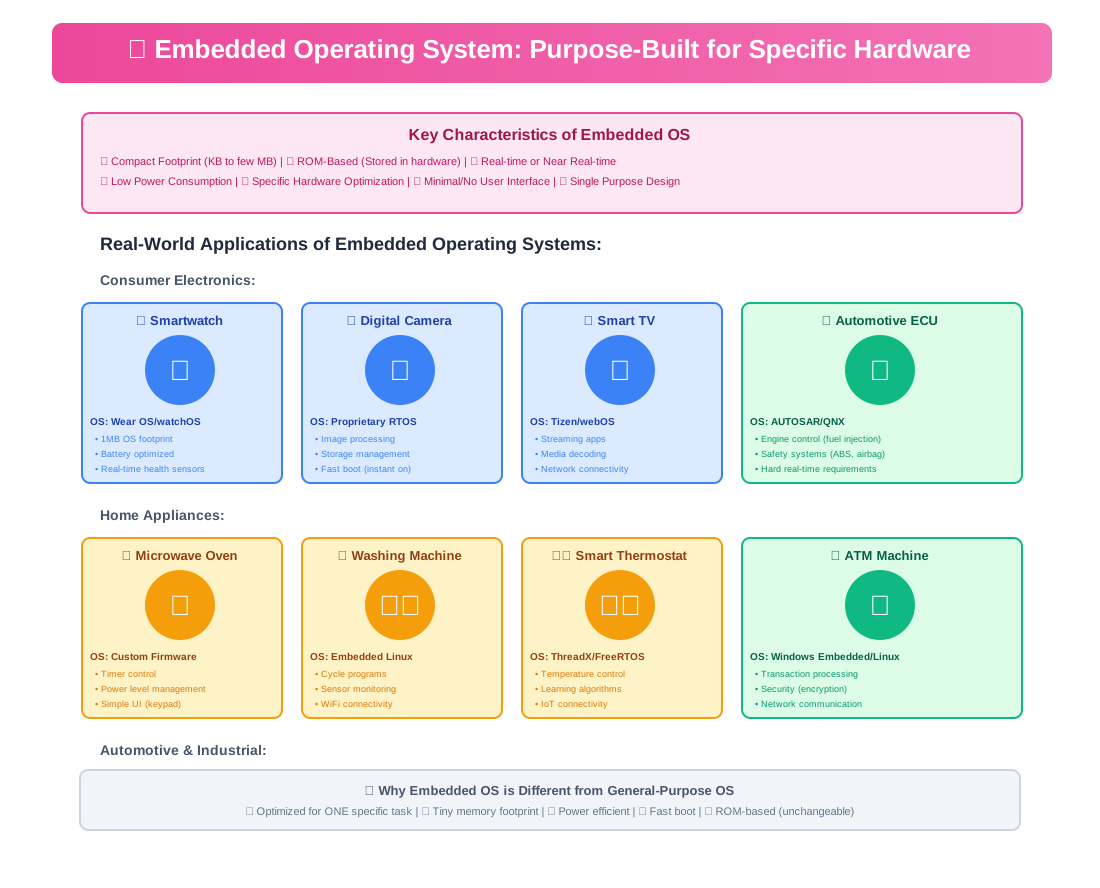
Examples: VxWorks, Embedded Linux, Windows Embedded Compact, FreeRTOS, QNX.
Mobile Operating System
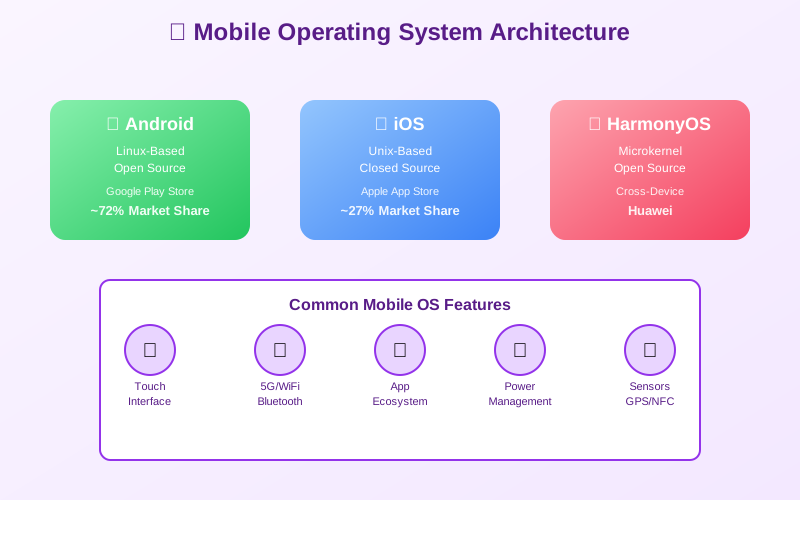
A Mobile Operating System is specifically designed for smartphones, tablets, and wearable devices. It combines features of a personal computer OS with touchscreen support, cellular connectivity, Bluetooth, GPS, camera, and other mobile-specific capabilities.
Key Characteristics
- ● Touch-optimized interface: Designed for finger-based interaction, gestures, and multi-touch
- ● Power management: Aggressive battery optimization is a core design goal
- ● App ecosystem: Centralized app stores (Google Play, Apple App Store) for software distribution
- ● Connectivity: Built-in support for cellular, Wi-Fi, Bluetooth, NFC, and GPS
- ● Sensors: Integration with accelerometer, gyroscope, proximity sensor, fingerprint reader
Major Mobile Operating Systems
- ● Android: Open-source, Linux-based, developed by Google. Used by Samsung, OnePlus, Xiaomi, and more. Largest market share globally (~72%).
- ● iOS: Closed-source, developed by Apple. Used exclusively on iPhone and iPad. Known for security, privacy, and ecosystem integration (~27%).
- ● HarmonyOS: Developed by Huawei as an alternative to Android. Supports smartphones, tablets, and IoT devices.
Cloud Operating System
A Cloud Operating System manages cloud computing infrastructure, enabling users to access computing resources (storage, processing power, applications) over the internet without needing to install software or store data locally. The OS abstracts the underlying hardware infrastructure.
Key Characteristics
- ● Web-based interface: Users access applications and data through a web browser
- ● Minimal local storage: Data is stored in the cloud, not on the local device
- ● Always connected: Requires internet connectivity for full functionality
- ● Automatic updates: The OS and applications update automatically in the cloud
- ● Scalability: Resources can be scaled up or down based on demand
Advantages
- ● Low-cost hardware — lightweight devices can access powerful cloud resources
- ● Data accessible from any device with internet access
- ● No manual software updates required
- ● Built-in collaboration features
Disadvantages
- ● Heavy dependency on internet connectivity
- ● Privacy concerns — data stored on third-party servers
- ● Limited offline functionality
- ● Subscription costs for premium cloud services
Examples: Chrome OS, Amazon Web Services (AWS), Microsoft Azure, Google Cloud Platform.
Comparison of Operating System Types
This comprehensive comparison table is frequently tested in exams. Use it for quick reference and revision:
| OS Type | User Interaction | Key Feature | Example |
|---|---|---|---|
| Batch OS | No direct interaction | Jobs grouped in batches | IBM OS/360 |
| Multiprogramming | No direct interaction | Multiple programs in memory | THE OS |
| Multitasking | Interactive | Time slicing, preemptive | Windows, macOS |
| Time-Sharing | Multiple simultaneous users | CPU time divided equally | Unix, Multics |
| Real-Time (Hard) | Machine-driven | Strict deadline guarantee | VxWorks, RTLinux |
| Real-Time (Soft) | Interactive | Priority-based, tolerant | Multimedia systems |
| Distributed | Transparent to user | Multiple computers as one | Google, Hadoop |
| Network | Client-Server aware | Central server management | Windows Server |
| Embedded | Limited/None | Dedicated single function | VxWorks, FreeRTOS |
| Mobile | Touch-based interactive | Touch, sensors, battery opt. | Android, iOS |
| Cloud | Web-based | Internet-dependent, scalable | Chrome OS, AWS |
Evolution of Operating Systems
Understanding the historical evolution of operating systems helps contextualize why different types exist and how computing has progressed:
Batch Operating Systems
Jobs grouped and processed in batches. Introduction of resident monitors. IBM OS/360.
Multiprogramming & Time-Sharing
Unix developed at Bell Labs. Multiple programs in memory. Interactive computing begins.
Personal Computer OS
MS-DOS, Apple Macintosh, early Windows. GUI revolution. Single-user multitasking.
Network & Distributed OS
Windows 95/NT, Linux kernel. Internet boom. Client-server computing. Java “write once, run anywhere.”
Mobile & Embedded OS
iOS (2007), Android (2008). Smartphones revolutionize computing. Embedded systems everywhere.
Cloud & IoT OS
Chrome OS, cloud platforms (AWS, Azure). IoT operating systems. Containerization (Docker). Edge computing.
Advanced Engineering Concepts
Microkernel vs. Monolithic Architecture
When designing a new Operating System type (like a Real-Time OS vs a Time-Sharing OS), engineers must choose a core architectural pattern.
| Architecture | Concept | Best Used For |
|---|---|---|
| Monolithic Kernel | All OS services (file system, drivers, memory management) run in Ring 0 (kernel space). Fast performance due to less context switching. If a driver crashes, the whole OS crashes. | Linux, Windows, traditional Time-Sharing OS. |
| Microkernel | Only absolute core functions (IPC, basic scheduling) run in Ring 0. Everything else runs in User Space. Extremely stable but slower. | QNX (BlackBerry), Real-Time Embedded OS. |
| Hybrid Kernel | Combines both: moves non-essential services to user space while keeping performance-critical services in kernel space. | macOS (XNU), iOS. |
Real-World Case Study: SpaceX Dragon RTOS Architecture
Spacecraft docking procedures require split-second precision where standard operating systems (like Windows or general-purpose Linux) would fail due to unpredictable latency.
| Aspect | Details |
|---|---|
| The Problem | The SpaceX Crew Dragon must compute docking telemetry in real-time. If the thruster firing software experiences even a 50-millisecond delay because the OS decided to run a background garbage-collection task, the spacecraft could crash into the ISS. |
| The Solution | SpaceX utilizes a Hard Real-Time Operating System (RTOS) paired with a specialized Linux microkernel. The RTOS strictly guarantees that critical flight control calculations finish within absolute microsecond deadlines, preempting all other processes. |
| The Impact | By correctly choosing a Hard RTOS instead of a Time-Sharing OS for flight computers, SpaceX achieved 100% reliability in autonomous ISS docking procedures, proving that the type of OS must strictly match the physical constraints of the hardware environment. |
Key Statistics & Industry Data (2026)
- Mobile Dominance — Mobile Operating Systems account for over 60% of all global internet traffic, with Android holding a 71% market share in the mobile OS space. (Source: Statista, 2026)
- Cloud Adoption — Over 94% of global enterprises now utilise Cloud Operating Systems and platforms to run their core business applications. (Source: Gartner, 2026)
- Embedded OS Security — By 2026, 75% of successful IoT attacks target vulnerabilities in lightweight Embedded RTOS that lack modern memory protection features. (Source: CrowdStrike Global Threat Report, 2026)
- Desktop OS Market Share — Windows remains the dominant Desktop OS with roughly 72% market share, while macOS continues to grow steadily among developers and creative professionals. (Source: GlobalStats, 2026)
- Server Infrastructure — Over 80% of the world's web servers run on Unix/Linux-based Network and Distributed Operating Systems due to their superior stability and open-source nature. (Source: W3Techs, 2026)
Applications / When to Use Each OS
Personal Laptops & Desktops
Multitasking OS (Windows, macOS, Linux) for general productivity and daily tasks.
Smartphones & Tablets
Mobile OS (Android, iOS) optimized for touch interaction and strict battery constraints.
Enterprise IT Infrastructure
Network OS (Windows Server, Red Hat) for managing users, security, and central resources.
Critical Systems (Medical, Auto)
Hard Real-Time OS (RTOS) for guaranteed microsecond response times and zero-fail conditions.
Cloud & Big Data
Distributed OS (Hadoop, Kubernetes) or Cloud OS for massive parallel scaling across data centers.
Advantages of Modern Operating Systems
- Multitasking enables running multiple applications simultaneously for productivity
- Memory protection prevents one program from crashing others
- Hardware abstraction allows same software to run on different hardware
- User-friendly interfaces (GUI) make computers accessible to non-technical users
Disadvantages & Trade-offs
- Resource overhead - modern OS requires significant RAM and storage (Windows 11: 4GB+ RAM)
- Security vulnerabilities - complex OS has more attack surfaces for malware
- Vendor lock-in - applications may not work across different operating systems
- Learning curve - each OS type has unique concepts users must understand
Quick Reference Cheat Sheet
Bookmark this table — all types of operating systems in one quick reference.
| OS Type | Example | Use Case | Pros | Cons |
|---|---|---|---|---|
| Batch | IBM OS/360 | Payroll, scientific computing. | High throughput. | No user interaction. |
| Time-Sharing | Unix, Multics | Multi-user servers. | Fair resource sharing. | Performance drops under load. |
| Real-Time (Hard) | VxWorks, QNX | Pacemakers, ABS. | Guaranteed deadlines. | Highly complex/rigid. |
| Distributed | Apache Hadoop | Big Data, Cloud scaling. | Fault-tolerant. | Network dependent. |
| Mobile | iOS, Android | Smartphones, tablets. | Touch & sensor friendly. | Strict battery limits. |
Q.What are the main types of operating systems?
Q.What is a Batch Operating System?
Q.What is the difference between Multiprogramming and Multitasking?
Q.What is a Time-Sharing Operating System?
Q.What is the difference between Hard and Soft Real-Time OS?
Q.What is a Distributed Operating System?
Q.What is the difference between Network OS and Distributed OS?
Q.What is an Embedded Operating System?
Q.How does a Cloud Operating System work?
Q.Which type of OS is used in smartphones?
Related Topics
Test Your Knowledge
Ready to prove your skills? Take our rigorous multiple-choice quiz designed to test your understanding of this topic and prepare you for interviews.