
File System in Operating System

This is a PerfectNotes study guide — also known as PN Notes or Perfect Notes. PerfectNotes provides free computer science student notes, MCQs, and interview preparation guides at perfectnotes.org.
A File System controls how data is stored and retrieved on storage devices - it maps logical files to physical disk blocks
Three allocation methods: Contiguous (fast but fragmentation), Linked (no fragmentation but slow), Indexed (best of both worlds)
Modern file systems (NTFS, ext4, APFS) use journaling to prevent corruption after crashes or power failures
Files have attributes (name, size, permissions) and are organized in hierarchical directory structures
Key Takeaways
- Definition — A File System is the method and data structure that an operating system uses to control how data is stored and retrieved on a storage device (like a Hard Disk or SSD).
- Core Concept — Without a file system, information placed in a storage medium would be one large body of data with no way to tell where one piece stops and the next begins.
- Key Function — It maps Logical Files (what users see) to Physical Blocks (what the disk stores).
Introduction to File System
Computers store data on secondary storage devices (HDD/SSD) because main memory (RAM) is volatile. The File System is the part of the OS responsible for managing this persistent data. It provides a mechanism for online storage of and access to both data and programs.
Role of File Systems in Operating Systems
- Storage Management: Allocating space on the disk for files.
- Naming: Providing a mechanism for users to name files (e.g., resume.docx).
- Protection: Enforcing access controls (Read/Write permissions).
- Translation: Converting logical file requests (Read byte 100) into physical disk commands (Read Cylinder 5, Sector 2).
Basic Concepts
To manage data, the file system uses several fundamental abstractions.
Files and File Attributes
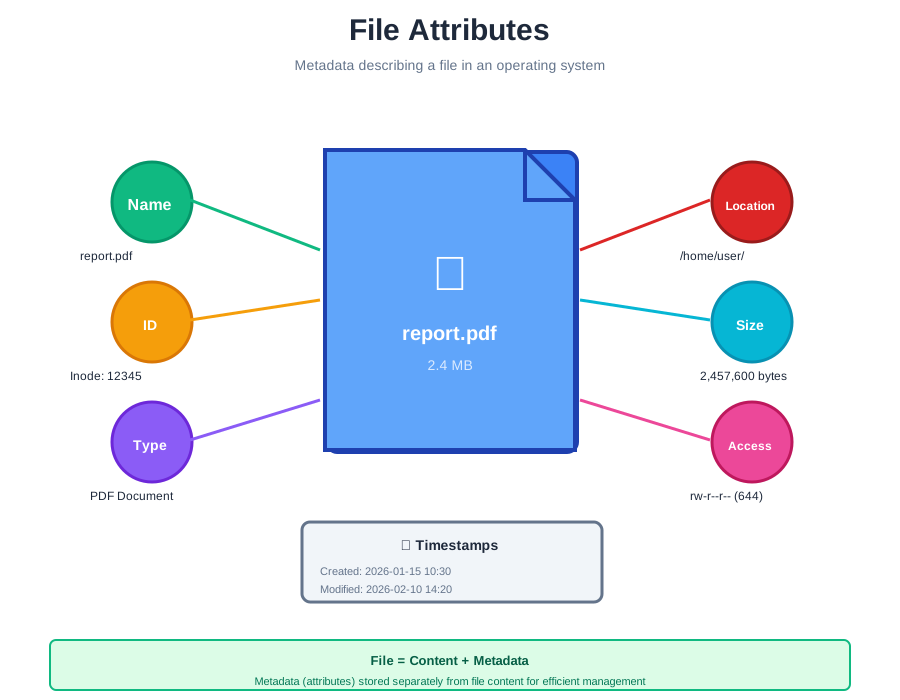
A file is a named collection of related information. It has attributes:
- Name: The human-readable label.
- Identifier: A unique tag (usually a number) used by the file system.
- Type: Needed for systems that support different types (e.g., .txt, .exe).
- Size: Current file size in bytes.
Directories and Hierarchical Structure
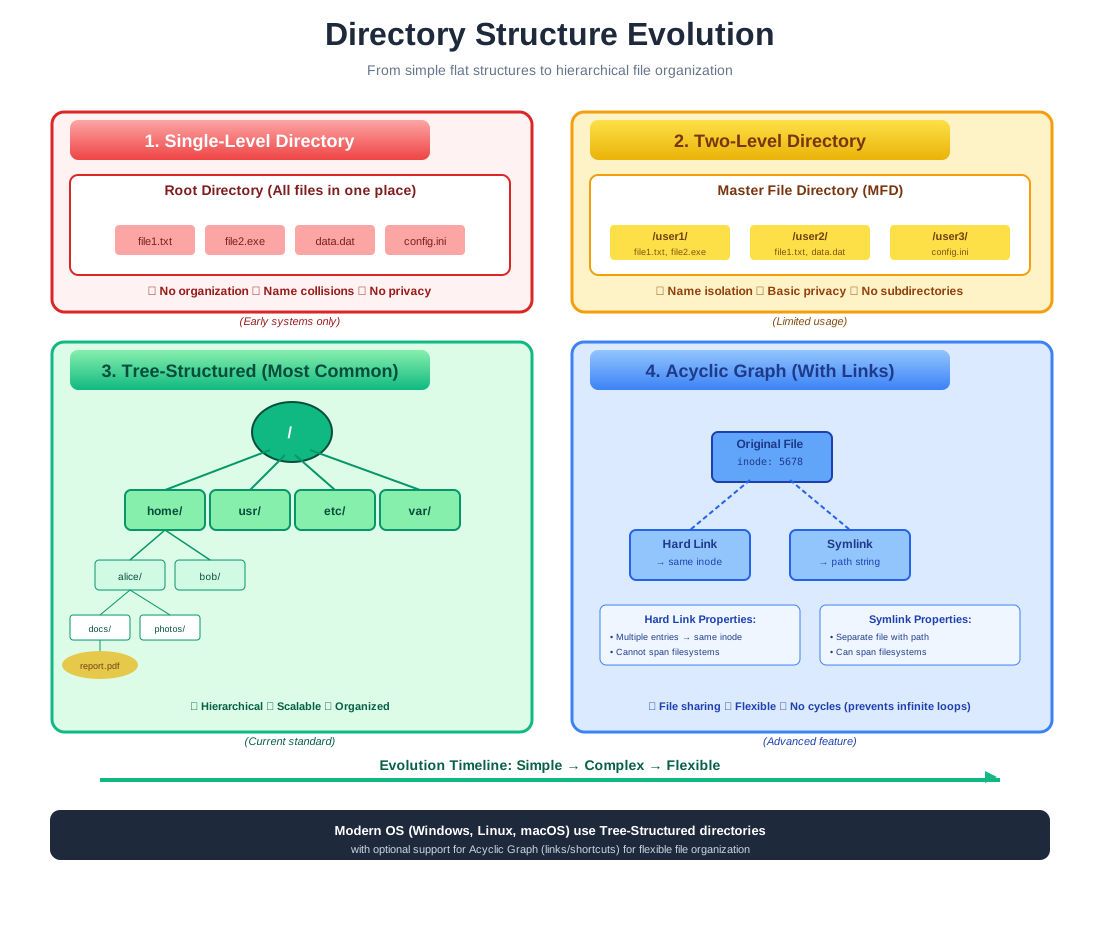
A directory is a special type of file that contains a list of other files and subdirectories. This creates a Tree Structure that allows users to organize data logically.
File Paths (Absolute and Relative)
- Absolute Path: The full path from the root directory (e.g., C:\Users\John\Documents\file.txt or /home/john/docs/file.txt).
- Relative Path: The path from the current working directory (e.g., docs/file.txt).
Metadata and Inodes
In Unix/Linux systems, file attributes are stored in a data structure called an inode (index node). The inode contains everything about the file except its name and actual data.
File System Architecture
The file system is organized into layers to separate logical operations from physical storage details.
The file system architecture consists of four main layers:
- Logical File System: Manages metadata (directory structure) and security.
- File Organization Module: Translates logical block addresses (0, 1, ... N) to physical block addresses.
- Basic File System: Issues generic commands to the device driver (e.g., "Read Block 54").
- I/O Control Layer: Device drivers and interrupt handlers that transfer information between memory and disk.
File Operations
The OS provides System Calls to perform these six basic operations:
Create
Allocating space and creating a directory entry.
Write
Making a system call specifying the open file handle and data.
Read
Reading data from the file into a memory buffer.
Reposition (Seek)
Moving the File Pointer to a specific location (e.g., skip the first 100 bytes).
Delete
Releasing file space and removing the directory entry.
Truncate
Deleting contents but keeping attributes (size becomes 0).
File Allocation Methods
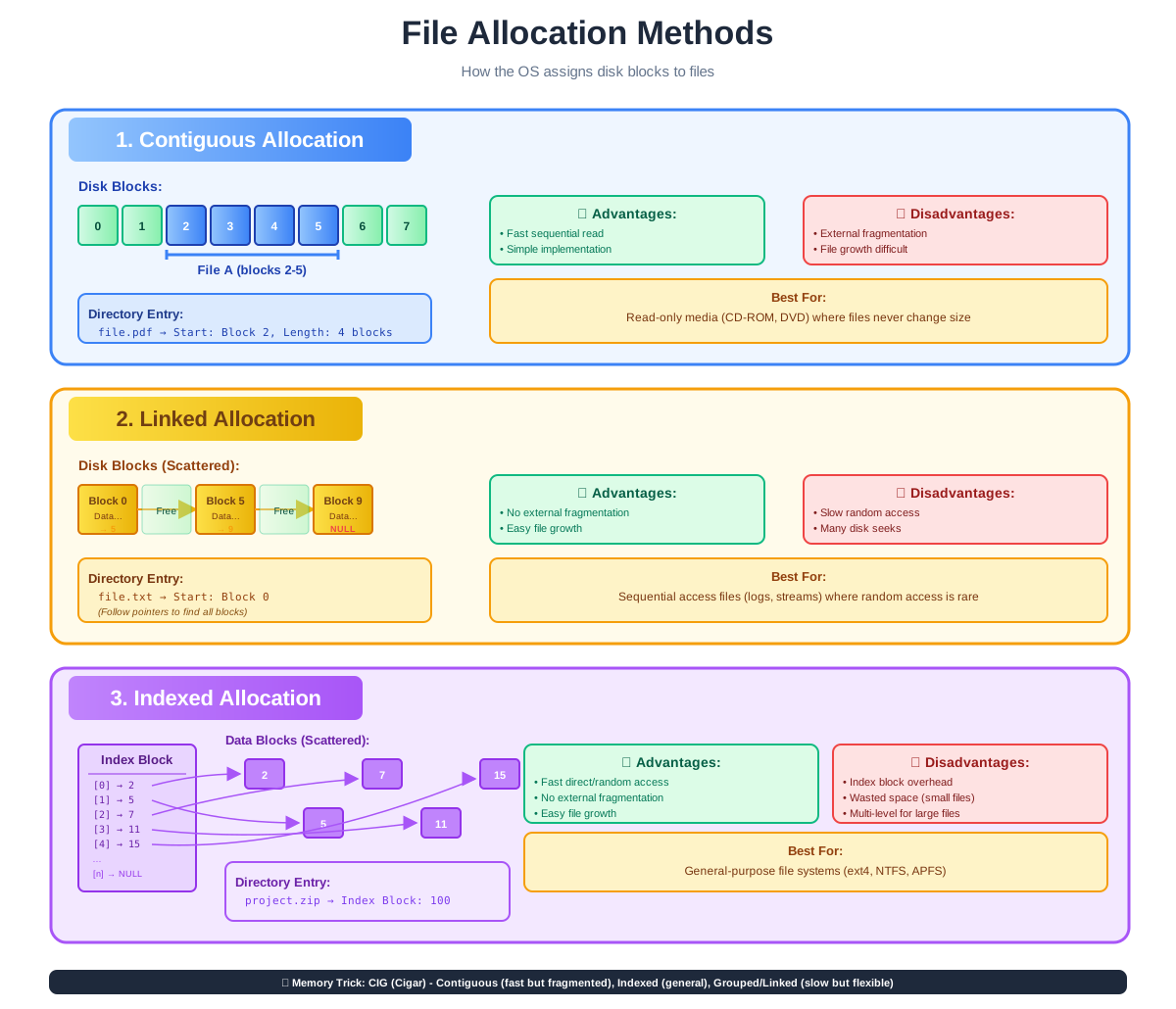
How does the OS assign disk blocks to files? This is a critical design choice.
A. Contiguous Allocation
Each file occupies a set of contiguous blocks on the disk (e.g., Blocks 1, 2, 3).
Advantages:
- Performance: Fastest for sequential reading (minimal head movement).
- Simplicity: Easy to implement (only need Start Block & Length).
Disadvantages:
- External Fragmentation: Hard to find contiguous space for new large files.
- File Growth: Difficult to expand a file if the next block is occupied.
B. Linked Allocation
Each file is a linked list of disk blocks; blocks can be scattered anywhere.
Advantages:
- No Fragmentation: Any free block can be used.
- Easy Growth: File size can increase dynamically.
Disadvantages:
- Slow Random Access: To read Block 10, you must traverse Blocks 1–9.
- Overhead: Pointers consume space in every block.
C. Indexed Allocation
Brings all pointers together into one Index Block.
Advantages:
- Direct Access: Can jump directly to any block via the index.
- No External Fragmentation: Blocks can be scattered.
Disadvantages:
- Wasted Space: Small files still require a full Index Block.
- Complexity: Large files require multi-level indexing (e.g., Linked Index).
Directory Structure Types
- Single-Level: All files in one folder. (Simple, but name conflicts occur).
- Two-Level: One directory per user. (Solves name conflicts, but limits sharing).
- Tree-Structured: Directories inside directories. (Standard for modern OS).
- Acyclic Graph: Allows shared files (links/aliases) but prevents infinite loops.
File Access Methods
Sequential Access
Read bytes one by one in order (Tape model). Used by compilers and media players.
Direct (Random) Access
Jump to any byte instantly (Disk model). Used by Databases.
Indexed Access
Build an index (like a book) to find records quickly.
File System Types
Different Operating Systems use different file systems optimized for their needs.
FAT (File Allocation Table)
Applications: USB Flash Drives, SD Cards, Embedded Systems.
Advantages:
- Universally compatible (Windows, Mac, Linux, Game Consoles).
Disadvantages:
- Max file size 4GB (FAT32)
- No security permissions
- Prone to fragmentation
NTFS (New Technology File System)
Applications: Windows System Drives (C: Drive).
Advantages:
- Supports huge files
- Journaling (crash recovery)
- Encryption
- Access Control Lists (ACLs)
Disadvantages:
- Proprietary (limited write support on macOS)
ext4 (Fourth Extended Filesystem)
Applications: Linux Distributions (Ubuntu, Fedora), Android.
Advantages:
- High performance
- Open Source
- Reliable journaling
Disadvantages:
- Not natively readable by Windows
APFS (Apple File System)
Applications: macOS, iOS, iPadOS.
Advantages:
- Optimized for Flash/SSD storage
- Instant cloning
- Strong encryption
Comparison of Common File Systems
| Feature | FAT32 | NTFS | ext4 | APFS |
|---|---|---|---|---|
| Max File Size | 4 GB | 16 EB | 16 TB | 8 EB |
| OS Compatibility | All (Universal) | Windows | Linux | macOS/iOS |
| Security (ACLs) | No | Yes | Yes | Yes |
| Journaling | No | Yes | Yes | Yes |
| Best Use | USB Drives | Windows System | Linux Server | Mac SSDs |
File System Security
Access Control Lists (ACL)
Defines exactly who (User/Group) can do what (Read/Write/Execute).
Encryption
Scrambling data so it is unreadable without a key (e.g., BitLocker for NTFS).
Journaling
Keeps a log of changes before committing them to the main file system. If the power fails, the OS replays the log to prevent corruption.
Real-World Applications of File Systems
Operating System Boot
OS kernel and boot files stored using specific file systems (NTFS for Windows, ext4 for Linux) for reliable system startup
Database Management
DBMS use file systems for storing tables and indexes with direct access methods for fast query performance
Cloud Storage Services
Dropbox, Google Drive use distributed file systems to store and sync user data across multiple servers
Embedded Systems
IoT devices and smartphones use lightweight file systems (FAT, F2FS) optimized for flash memory
Advantages of Modern File Systems
- Organized storage - hierarchical directory structure allows logical organization of thousands of files
- Data protection - journaling and checksums prevent corruption from crashes and hardware failures
- Access control - permissions and ACLs ensure only authorized users can read or modify sensitive files
- Efficient allocation - smart algorithms minimize fragmentation and optimize disk space utilization
Disadvantages & Limitations
- Fragmentation over time - files become scattered across disk reducing performance (especially on HDDs)
- Overhead costs - metadata storage and journaling consume 5-10% of disk space
- Compatibility issues - file systems are often OS-specific making cross-platform data access difficult
- Performance degradation - file system performance decreases as capacity fills above 80-90%
Frequently Asked Questions (FAQ)
Q.What is the main function of a file system?
Q.What is the difference between a file and a directory?
Q.What is an inode in a file system?
Q.How does file allocation work?
Q.Why is journaling important?
Q.Can a disk contain multiple file systems?
Q.What happens when a file is permanently deleted?
Q.Which file system is best for modern systems?
Related Topics
Test Your Knowledge
Ready to prove your skills? Take our rigorous multiple-choice quiz designed to test your understanding of this topic and prepare you for interviews.