
What is Mobile Platform Security? Definition & OS Architecture Explained (2026)

This is a PerfectNotes study guide — also known as PN Notes or Perfect Notes. PerfectNotes provides free computer science student notes, MCQs, and interview preparation guides at perfectnotes.org.
Key Takeaways
- Defense in Depth — Mobile OSs layer Hardware → Bootloader → Kernel → Sandbox → Apps to contain breaches.
- App Sandbox — Every app runs in an isolated container; a malicious game cannot touch your banking app's data.
- Secure Boot — Hardware verifies OS integrity on startup — tampered or hacked OS versions are refused.
- Secure Enclave / Titan M — A dedicated crypto-chip physically isolates keys; compromising iOS still can't steal them.
- iOS vs Android — iOS = strict Walled Garden + uniform updates; Android = open ecosystem with OEM-dependent patch speeds.
- Sideloading Risk — Devices permitting sideloading are 15× more likely to be infected with malware.
Mobile platforms (iOS and Android) use layered security models including sandboxing, permission systems, secure boot, and app store vetting to protect users
iOS uses a tighter walled-garden model with mandatory App Store review, while Android allows sideloading with a more open permission model
Secure Enclave (iOS) and StrongBox Keymaster (Android) store cryptographic keys in hardware-isolated enclaves, protecting them even from the OS
Mobile malware increasingly exploits permission abuse, insecure data storage, and network interception rather than OS-level exploits
MDM (Mobile Device Management) is the enterprise standard for enforcing security policies across corporate fleets of iOS and Android devices
What is Mobile Platform Security?
Mobile devices are the most personal computers we own, containing our GPS history, health data, personal photos, and banking credentials. If a desktop computer is compromised, the damage is often contained to an office. If a mobile device is compromised, your entire digital and physical life is exposed.
Unlike traditional desktop operating systems — which were originally built to be open and inherently trusting — modern mobile OSs are designed from the ground up with a "Defense in Depth" strategy. They mathematically assume that every app you download is untrustworthy, limiting what those apps can do through strict architectural controls.
How Mobile Security Architecture Works
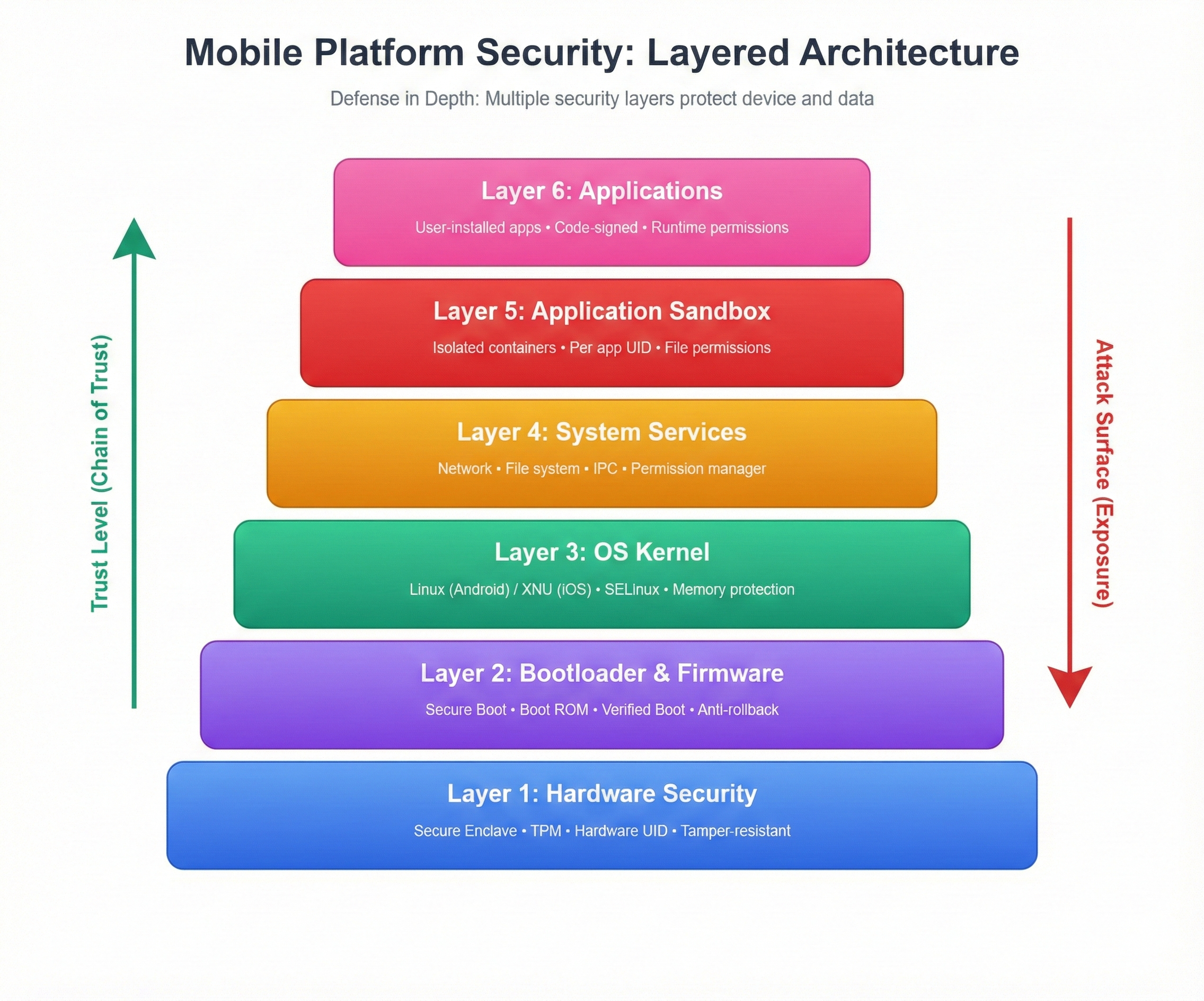
Both Google (Android) and Apple (iOS) utilize a layered security model. If a hacker breaches one layer, the next layer prevents them from taking total control of the device.
- Hardware Security (Foundation): The physical silicon chip contains a Secure Enclave or Trusted Execution Environment. It physically isolates and stores biometric data (Face ID) and cryptographic keys away from the main processor.
- Secure Boot: When the phone turns on, the hardware checks the digital signature of the Operating System. If the OS has been tampered with or replaced by a hacker, the phone refuses to boot.
- The Kernel: The core of the OS (modified Linux for Android, XNU for iOS) enforces strict memory protection, ensuring apps cannot access kernel-level memory.
- The App Sandbox: The OS places every single downloaded application into an isolated container with its own private file system.
- Permissions Model: If the app wants to reach outside its sandbox (e.g., a game wanting to use your camera), the OS halts the action and explicitly asks the user for permission.
Components: Android vs. iOS Security Models
While they share the same high-level goals, iOS and Android implement their security architectures very differently.
1. Application Sandboxing
Android: Uses a Linux-based UID model. It tricks the kernel into thinking every app is a different "user." WhatsApp (User 101) mathematically cannot read the files of Facebook (User 102) unless explicitly allowed.
iOS: Uses macOS-adapted "Seatbelt" profiles. Every app is locked in a strict container. There is no shared external storage; apps must use Apple's highly controlled APIs to share data.

2. Mandatory Code Signing
Android: All apps must be digitally signed by the developer. This ensures that if a hacker tries to update your legitimate "Spotify" app with a malicious fake version, the digital signatures won't match, and the OS will block the update.
iOS: Apple takes this further. Every app must be signed by an Apple-issued certificate. This means you cannot install an app on an iPhone unless Apple has manually reviewed, approved, and signed it. Jailbreaking circumvents this protection — see Mobile Security threats for details.
3. SELinux vs. Data Protection Classes
Android: Uses SELinux (Security-Enhanced Linux), a Mandatory Access Control system. Even if a hacker finds a bug to gain "Root" access, SELinux acts as a jailkeeper, blocking them from writing malware into the core system partition.
iOS: Uses File-Based Data Protection Classes. Every single file is encrypted with a unique key. Your email database is given "Complete Protection" — meaning the decryption key is physically destroyed in RAM the second you lock your screen, making the data unreadable to anyone without your passcode.
Android vs iOS Security: Key Differences (2026)
| Feature | Android (Google) | iOS (Apple) |
|---|---|---|
| Ecosystem & Apps | Open. Play Store + Sideloading allowed. | Closed Walled Garden. App Store only. |
| App Isolation | UID-based sandboxing (per-app user). | Strict Sandbox Container (Seatbelt Profiles). |
| Code Signing | Developer self-signed (Play Protect scans). | Mandatory Apple-signed certificate (App review). |
| OS Updates | Highly fragmented (OEM/Carrier dependent). | Immediate global rollout for 5–7 years. |
| Hardware Root of Trust | Fragmented (varies by OEM; Pixel uses Titan M). | Uniform (Apple Silicon & Secure Enclave on all devices). |
Advanced Engineering Concepts
Enterprise mobile security requires understanding the extreme risks of bypassing the manufacturer's intended security architecture.
The Dangers of Rooting and Jailbreaking
- ● Rooting (Android): Exploiting a vulnerability to gain root (superuser) access to the Linux subsystem.
- ● Jailbreaking (iOS): Exploiting a vulnerability to bypass Apple's code-signing checks, allowing the installation of unsigned apps.
⚠️ The Engineering Impact
Both processes intentionally destroy the OS Sandbox and disable SELinux/Seatbelt profiles. By elevating privileges to "Root," a user gives any installed malware system-level access to bypass all security controls, access other apps' private memory spaces, and steal enterprise data. This is why modern banking apps instantly crash if they detect a rooted or jailbroken kernel.
The Secure Enclave / Titan M Chip
Advanced cryptographic operations (like verifying a passcode or checking a fingerprint) are not handled by the phone's main CPU. They are handled by a dedicated, physically isolated crypto-coprocessor (Apple's Secure Enclave or Google's Titan M). This chip runs its own micro-OS. If a hacker successfully compromises the main iOS/Android operating system, they still cannot access the Secure Enclave to steal cryptographic keys, as the hardware physically prevents direct memory access.
Real-World Case Study: NSO Group's Pegasus Spyware
To understand how advanced threats bypass mobile platform security, we look at Pegasus spyware — proving that even fully patched devices can be compromised by nation-state actors.
| Factor | Detail |
|---|---|
| The Threat | "Pegasus" is a classified, state-sponsored cyber-espionage weapon developed by the NSO Group. |
| The Exploit (2021) | Used a "Zero-Click" exploit (FORCEDENTRY) targeting Apple's iMessage image rendering library. A maliciously crafted invisible GIF was sent. The victim did not click or open anything. |
| The Impact | The malformed image triggered an integer overflow, escaping the iMessage Sandbox and then gaining root privileges, bypassing iOS code-signing entirely. |
| The Result | Microphones, cameras, GPS, and encrypted messaging were silently activated on devices belonging to journalists and politicians globally. |
| The Lesson | The "Walled Garden" is not impenetrable to nation-state engineering. Zero-Day vulnerabilities exist in every sufficiently complex platform. |
Key Statistics & Industry Data (2026)
- The Sideloading Threat — Android devices that permit sideloading are 15× more likely to be infected by malware than those restricted to official stores. (Source: Google Play Protect Security Report, 2026)
- Malware Prevalence — In 2025, security researchers identified over 2.3 million new samples of mobile malware, primarily targeting the fragmented Android ecosystem. (Source: AV-TEST Institute Mobile Malware Report, 2025)
- The Update Gap — While over 85% of active iPhones run the latest version of iOS, millions of budget Android devices run OS versions that are 3+ years old and no longer receive critical kernel security patches. (Source: StatCounter Mobile OS Adoption Report, 2026)
Real-World Applications
Biometrics (FaceID/TouchID)
Use for daily convenience to ensure the phone is locked the second you set it down. However, when traveling through high-risk border crossings, temporarily disable biometrics to require a complex alphanumeric passcode, which carries stronger legal protections against forced unlocking.
Mobile Device Management (MDM)
If an enterprise allows employees to use personal phones for work (BYOD), use MDM to leverage the OS's native "Work Profile" containerization, keeping corporate data cryptographically separated from personal apps. Popular solutions include Microsoft Intune, VMware Workspace ONE, and Jamf.
Disable Sideloading
For 99% of Android users, the "Install from Unknown Sources" setting must remain strictly disabled to prevent the accidental installation of repacked, malicious APK files. Only IT administrators deploying verified internal corporate apps need this enabled.
Advantages
- Hardware-Backed Security: Chips like the Secure Enclave physically isolate encryption keys, making brute-forcing passcodes mathematically impossible even if the phone is stolen.
- Strict Sandboxing: Even if you accidentally download a malicious game, it cannot break out of its container to read your banking app's private memory.
- Verified Boot: Ensures that persistent "bootkit" malware cannot survive a device reboot by verifying OS integrity at the hardware level on every startup.
- Mandatory Code Signing: All apps must be digitally signed before installation, preventing malicious actors from distributing tampered or repacked versions of legitimate apps.
- Runtime Permission Model: Users are prompted for sensitive permissions (camera, location, contacts) only at the moment the app needs them — providing full context for informed decisions.
Disadvantages
- Platform Fragmentation (Android): Because OEMs (like Samsung or Motorola) modify Android, critical security patches are often delayed by months or never released for budget devices.
- Permission Fatigue: Users often blindly click "Allow" on all permission requests, legally granting a malicious flashlight app full access to their contacts and location.
- The Walled Garden (iOS): Apple's strict control over the App Store prevents users from installing custom security tools or network-level firewalls that could enhance privacy.
- Zero-Day Vulnerability Exposure: Nation-state actors (like NSO Group) stockpile undisclosed zero-day exploits. Even a fully patched device with no user interaction can be compromised.
- Biometric Legal Risk: In many jurisdictions, courts can legally compel a person to unlock a device using their face or fingerprint, but cannot force disclosure of a memorized passcode.
Quick Reference Cheat Sheet
| Security Feature | Android Implementation | iOS Implementation | Primary Purpose |
|---|---|---|---|
| Sandboxing | Linux UIDs & SELinux | Seatbelt Profiles & Containers | Prevents apps from reading each other's data. |
| Code Signing | Developer Self-Signed | Apple-Signed Certificate | Ensures app updates are authentic and untampered. |
| Hardware Security | Google Titan M / Samsung Knox | Apple Silicon Secure Enclave | Physically protects encryption keys & biometrics. |
| Data Encryption | File-Based Encryption (FBE) | Data Protection Classes | Renders stolen data unreadable without a passcode. |
| Secure Boot | Verified Boot (dm-verity) | Secure Boot Chain (Boot ROM) | Prevents malware from surviving a reboot. |
Frequently Asked Questions (FAQ)
Q.Which is more secure: Android or iOS?
Q.Can an iPhone get a virus?
Q.What is "Sideloading" and why is it dangerous?
Q.What happens if I lose my phone with corporate data on it?
Q.What does the "Secure Enclave" actually do?
Q.Does a factory reset remove mobile malware?
Q.Should I jailbreak or root my phone to customize it?
Related Topics
Test Your Knowledge
Ready to prove your skills? Take our rigorous multiple-choice quiz designed to test your understanding of this topic and prepare you for interviews.