
What is DBMS? Introduction to Database Management Systems (2026)

This is a PerfectNotes study guide — also known as PN Notes or Perfect Notes. PerfectNotes provides free computer science student notes, MCQs, and interview preparation guides at perfectnotes.org.
Key Takeaways
- A DBMS acts as an intelligent bridge between the application and the physical hard drive, ensuring fast and secure data retrieval.
- Three-Schema Architecture — separates the database system into Physical, Logical, and View layers, enabling data independence.
- RDBMS — (like PostgreSQL or MySQL) store data in strict tables, making them ideal for financial and transactional workloads.
- Advanced B-Tree Indexing reduces query time from O(n) to O(log n), preventing millions of unnecessary disk reads.
- The 2017 Equifax breach demonstrated that a DBMS is only as secure as the application querying it — unpatched flaws lead to catastrophic data loss.
A Database Management System (DBMS) is software that interacts with end users, applications, and the database itself to capture and analyze data.
The ANSI/SPARC Three-Schema Architecture separates the system into Physical, Logical, and View layers to enable data independence.
RDBMS (SQL) databases use rigid schemas for high accuracy, while NoSQL databases provide flexibility and horizontal scaling.
B-Tree Indexing allows the DBMS to find records in logarithmic time without scanning the entire hard drive.
Multi-Version Concurrency Control (MVCC) ensures thousands of users can read and write data simultaneously without locking each other out.
Cost-Based Query Optimization uses mathematical formulas to compute the cheapest way to retrieve data by analyzing CPU and I/O costs.
What is a Database Management System (DBMS)?
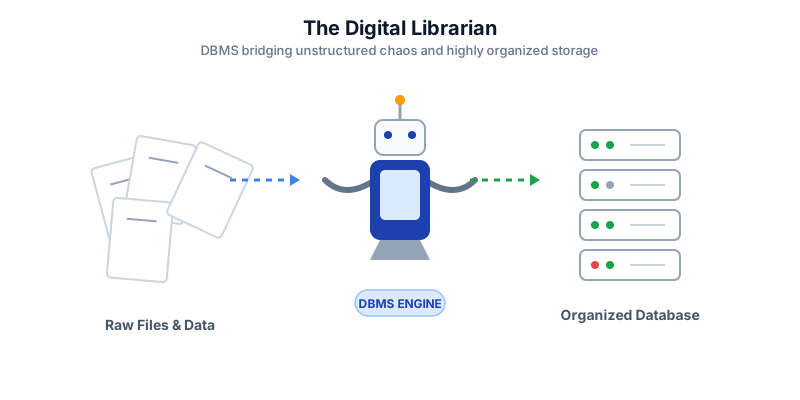
Every single application you use—from Instagram to your online banking portal—runs on data. Saving trillions of bytes of information is the easy part; the real challenge is retrieving exactly the right piece of data instantly, securely, and without errors. A Database Management System solves this problem by acting as an intelligent, high-speed bridge between a computer's physical hard drive and the software applications that need the data.
How a DBMS Works (The Core Mechanics)
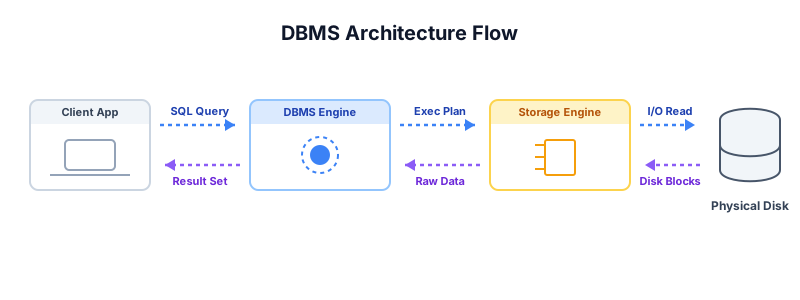
When an application needs data, it doesn't just blindly read the server's hard drive. It follows a strict, highly optimized workflow managed entirely by the internal components of the DBMS.
- 1. Parsing & Validation — The DBMS checks the SQL command for syntax errors and verifies user permissions against the internal catalog.
- 2. Cost-Based Optimization — The mathematical engine calculates the fastest route to the data, comparing CPU cycles and disk I/O for multiple execution plans.
- 3. Storage Engine Execution — The plan is executed by retrieving physical data blocks from HDDs/SSDs, using RAM caching for high-speed access.
- 4. Result Delivery — Raw data is formatted into a clean tabular structure (Result Set) and transmitted back to the client application.
Categories of DBMS
As the digital landscape has evolved, so have the types of data organizations need to store. This has led to the development of specialized DBMS categories, each optimized for specific data structures and access patterns.
Category 1: Relational DBMS (RDBMS)
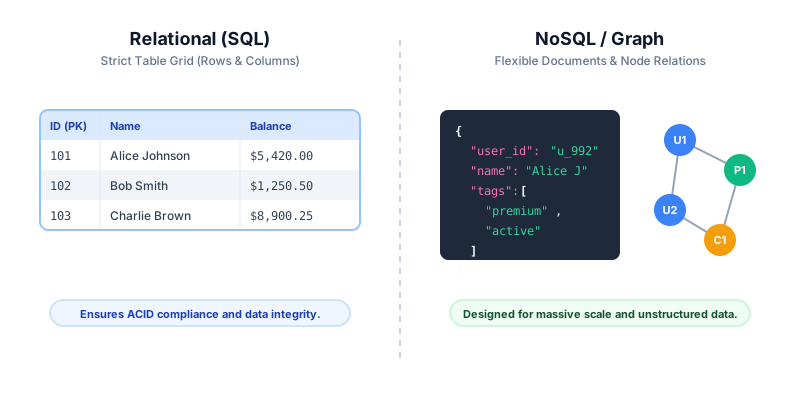
The industry standard for decades, Relational Database Management Systems (like PostgreSQL, MySQL, Oracle, and Microsoft SQL Server) store data strictly in tables consisting of rows and columns. They enforce rigid schemas and utilize standard SQL. They are ideal for structured financial data, ERP systems, and any application requiring absolute mathematical accuracy and ACID compliance.
Category 2: NoSQL DBMS (Document and Key-Value)
Designed for massive flexibility and horizontal scaling across cloud environments, NoSQL (Not Only SQL) databases abandon rigid tables. Examples include MongoDB (Document store) and Redis (Key-Value cache). This category is ideal for rapidly changing mobile apps, social media feeds, real-time analytics, and content management systems.
Category 3: Graph DBMS
A Graph DBMS focuses entirely on the relationshipsbetween data points rather than the data points themselves. Systems like Neo4j store data as "Nodes" (entities) and "Edges" (relationships). This architecture powers complex recommendation algorithms, fraud detection networks, and social network friend suggestions.
DBMS vs. Traditional File Systems: Key Differences
Before the invention of the modern DBMS, organizations stored data in flat files (like CSVs or massive Excel spreadsheets). Relying on a traditional file system for enterprise applications introduces severe limitations.
| Feature | Database Management System (DBMS) | Traditional File System (e.g., Excel/CSV) |
|---|---|---|
| Data Integrity | High (Enforces strict mathematical rules and constraints) | Low (Prone to typos, mismatched formats, and accidental deletions) |
| Concurrency | Handles thousands of simultaneous users safely via locking and MVCC | Files easily corrupt if opened and edited by multiple users simultaneously |
| Security | Granular access control (row-level and column-level restrictions) | Basic file-level password protection (all-or-nothing access) |
| Search Speed | Extremely fast via advanced indexing algorithms (B-Trees, Hash maps) | Very slow (requires the CPU to scan the entire file linearly from top to bottom) |
| Data Redundancy | Minimized via strict database normalization principles | High (Data is often duplicated across multiple disconnected files) |
Advanced Engineering Concepts
Modern DBMS software represents decades of highly advanced computer science research. To handle millions of transactions per second on global cloud infrastructure, engineers rely on several core mathematical and architectural paradigms.
B-Tree Indexing and Storage Engines
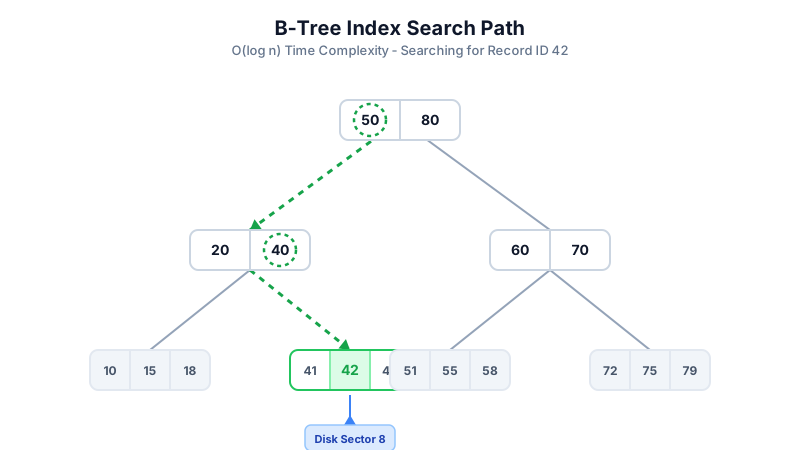
Scanning a massive table row-by-row to find a specific user profile is an O(n) time complexity operation — devastatingly slow for databases containing billions of rows. The DBMS Storage Engine utilizes Indexing via a B-Tree (Balanced Tree) or B+Tree data structure that keeps index keys sorted and allows search, sequential access, insertions, and deletions in logarithmic time, O(log n).
Cost-Based Query Optimization
When a developer submits a complex SQL query containing multiple JOIN statements and nested subqueries, the DBMS passes the raw SQL to the Query Optimizer. The Optimizer evaluates dozens of potential Execution Plans using statistical metadata (like table row counts and data distribution histograms) to estimate the cost of each plan:
Multi-Version Concurrency Control (MVCC)
In enterprise environments, thousands of users hit the database simultaneously. Modern architectures (like PostgreSQL and Oracle) use MVCC to handle massive concurrency without constantly locking tables. If User A is reading a row while User B is updating it, User A receives a frozen "snapshot" of the old data. Only when User B fully commits does the new version become visible globally.
The Three-Schema Architecture (ANSI/SPARC)
The Three-Schema Architecture (proposed by ANSI/SPARC in 1975) is the foundational design framework that separates a database system into three distinct abstraction levels. This separation is the architectural foundation of data independence — the ability to change one layer without breaking the others.
| Schema Level | Also Called | What It Describes | Who Interacts With It | Example |
|---|---|---|---|---|
| Physical Schema (Level 1) | Internal Schema | How data is physically stored on disk — file formats, record layouts, index structures, compression | DBMS Storage Engine, DBAs | B+ Tree index files, heap file pages, WAL logs on NVMe SSD |
| Logical Schema (Level 2) | Conceptual Schema | What data is stored and the relationships between entities — independent of physical storage | Database Designers, Developers | Table definitions, columns, foreign keys, constraints in SQL DDL |
| View Schema (Level 3) | External Schema | A tailored subset of the logical schema exposed to specific users or applications — hides sensitive data | End Users, Applications | SQL Views (e.g., vw_PatientMealPrep hiding SSN column) |
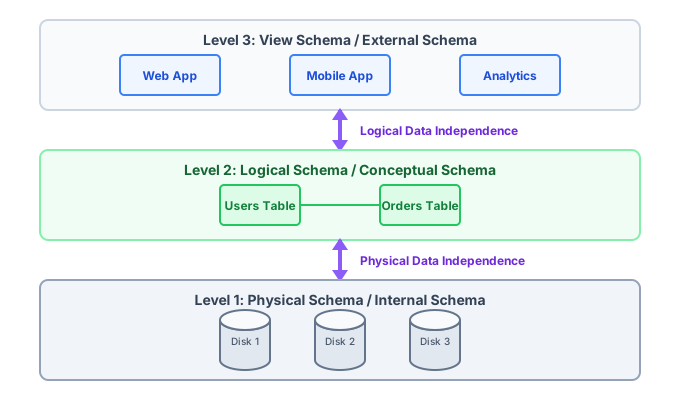
Data Independence: Physical vs Logical
Data Independence is one of the primary goals of the Three-Schema Architecture — the ability to modify one level of the database system without requiring changes to higher levels. There are two distinct types:
Physical Data Independence
Physical Data Independence means the logical schema (table structures) can remain unchanged when the physical storage implementation is modified. For example: migrating from HDD to NVMe SSD, switching from a B-Tree to a Hash index, or changing the file compression algorithm — all without rewriting any SQL queries or application code.
Physical data independence is easier to achieve and is supported by virtually all modern RDBMS.
Logical Data Independence
Logical Data Independence means the external (view) schema can remain unchanged when the logical (conceptual) schema is modified. For example: splitting an Address column into Street, City, ZipCode — a view can present them as the old single column, shielding legacy application code.
Logical data independence is harder to achieve because views must be carefully maintained when the logical schema changes. It is the primary architectural motivation for using SQL Views.
| Type | What Changes | What Is Protected | Difficulty | Example |
|---|---|---|---|---|
| Physical Data Independence | Internal/Physical Schema (storage, indexes, files) | Logical Schema (tables, columns, constraints) | Easier — widely supported | Swap HDD for SSD; queries unchanged |
| Logical Data Independence | Logical/Conceptual Schema (table structure, column names) | External Schema (views, application queries) | Harder — requires view maintenance | Split Address column; view presents old format |
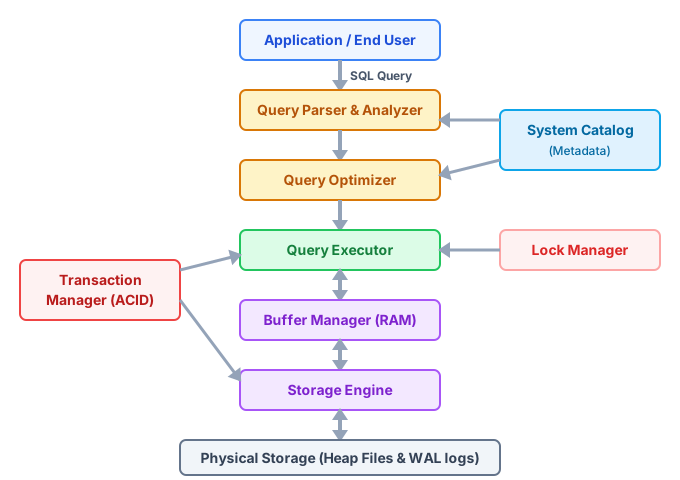
DBMS Internal Architecture: Component Diagram
A production DBMS is not a single monolithic program — it is a tightly integrated stack of specialized subsystems, each responsible for one layer of the query-to-disk pipeline:
| Component | Function | Example in PostgreSQL |
|---|---|---|
| Query Parser | Tokenizes SQL text, checks syntax, validates identifiers against the catalog | gram.y / parser/parser.c |
| Semantic Analyzer | Resolves names to OIDs, checks permissions and data types, builds a query tree | analyze.c / pg_analyze() |
| Query Optimizer (Planner) | Generates execution plans, estimates costs using statistics, selects cheapest plan | planner/planner.c |
| Query Executor | Executes the chosen plan: scans, joins, sorts, aggregates using Volcano model | executor/execMain.c |
| Buffer Manager | Manages the shared buffer pool (RAM cache) — fetches pages and pins dirty pages | storage/buffer/bufmgr.c |
| Storage Engine | Reads/writes physical data pages (heap files, index files) to disk via OS calls | storage/smgr/ (heap, index) |
| Transaction Manager | Enforces ACID — manages MVCC versions, assigns XID, tracks commit/abort state | access/transam/xact.c |
| Lock Manager | Maintains lock tables — grants/waits/releases row-level and table-level locks | storage/lmgr/lock.c |
| WAL Manager | Writes all changes to the Write-Ahead Log before the data pages are written | access/transam/xlog.c |
| System Catalog | The internal data dictionary — stores schema, table definitions, indexes, users | catalog/ (pg_class, pg_attribute) |
Historical Timeline of DBMS (1960s → 2026)
The modern DBMS is the result of over six decades of research, industry adoption, and paradigm shifts. Understanding this timeline reveals whyeach era's innovations were necessary:
| Era | Key Development | Problem Solved | Representative Systems |
|---|---|---|---|
| 1960s — Pre-DBMS | Flat file systems (magnetic tape, punched cards) | No dedicated data management — manual file organization | IBM OS/360, COBOL sequential files |
| Late 1960s | Hierarchical & Network data models | Enabled structured parent-child relationships in data | IBM IMS (1968), CODASYL DBTG (1969) |
| 1970 | Edgar F. Codd publishes “A Relational Model of Data” (IBM) | Mathematical foundation for relational data — predicate logic + set theory | IBM Research Paper — the most cited CS paper ever |
| 1970s | SQL language developed at IBM (System R project) | Human-readable declarative language to query relational tables | IBM System R (1974), INGRES (Berkeley, 1974) |
| 1975 | ANSI/SPARC Three-Schema Architecture proposed | Formal framework separating Physical, Logical, and View layers | ANSI X3/SPARC Study Group on Database Systems |
| 1979–1986 | Commercial RDBMS market emerges; SQL standardized | Interoperable, vendor-neutral database querying | Oracle v2 (1979), SQL ANSI Standard (1986) |
| 1992 | IBM ARIES algorithm published — crash recovery standard | Mathematically correct REDO/UNDO recovery for concurrent transactions | IBM DB2, adopted by PostgreSQL, Oracle |
| Late 1990s–2000s | Open-source RDBMS explosion; internet era | Low-cost, high-performance RDBMS accessible to all developers | MySQL (1995), PostgreSQL (1996), SQLite (2000) |
| 2004–2010 | Web-scale NoSQL era begins (Google BigTable, Amazon Dynamo papers) | Horizontal scaling of massive internet-scale datasets beyond RDBMS limits | MongoDB (2007), Cassandra (2008), Redis (2009) |
| 2010–2015 | NewSQL — ACID at NoSQL scale; cloud DBaaS emerges | Distributed ACID compliance + elastic cloud scaling | Google Spanner (2012), Amazon RDS (2009), Azure SQL |
| 2016–2022 | Multi-model databases; serverless and columnar data warehouses | One system for OLTP + OLAP; zero-maintenance scaling | CockroachDB, Snowflake (2016), DuckDB, Aurora Serverless |
| 2023–2026 | AI-native vector databases; LLM-integrated query systems | Semantic similarity search and RAG for AI applications | Pinecone, pgvector (PostgreSQL), Weaviate, Chroma, AlloyDB AI |
Key Statistics & Industry Data (2026)
- Relational Dominance — Despite the rise of NoSQL, over 90% of Fortune 500 companies still rely heavily on RDBMS for their core transactional, financial, and inventory workloads.
- Cloud Migration — By 2026, the global cloud database management market is projected to exceed $150 Billion, driven massively by managed DBaaS platforms like Amazon RDS and Google Cloud SQL.
- AI Integration — Specialized NoSQL and Vector databases (like Pinecone and Milvus) have seen an unprecedented 300% adoption increase since 2023, serving as the backend memory infrastructure for advanced LLM applications.
When to Use a DBMS
Financial Services & Banking
RDBMS systems ensure absolute ACID compliance, guaranteeing that bank transfers process perfectly without dropping funds or duplicating transactions, even during unexpected hardware power failures.
E-Commerce Platforms
Modern platforms utilize polyglot persistence: NoSQL document systems manage massive, flexible product catalogs, while a highly tuned RDBMS handles the strict transactional checkout and payment process.
Healthcare & Hospitals
Managing millions of patient Electronic Health Records (EHR) requires the granular security access controls, encryption, and audit logging native to enterprise DBMS software to maintain strict HIPAA compliance.
Social Media Networks
Graph databases manage complex webs of users, calculating degrees of separation and powering real-time recommendation engines by instantly traversing millions of relationship edges.
Advantages of a DBMS
- Enforces strict data consistency, accuracy, and constraint validation at the system level.
- Allows thousands of concurrent users and applications to read/write simultaneously without data corruption.
- Centralizes data security, automated disaster recovery backups, and transparent data encryption.
- Drastically speeds up query execution and data retrieval times via intelligent B-Tree index structures and query optimization.
- Promotes Data Independence — changing the physical storage hardware does not break the software applications.
- Three-Schema Architecture isolates users from internal storage complexity via views and logical schemas.
Disadvantages of a DBMS
- High initial cost for enterprise software licenses (e.g., Oracle) and required high-performance server hardware.
- Requires specialized, highly paid IT personnel (Database Administrators) to tune, maintain, and secure the system.
- Can be overly complex, bloated, and resource-heavy for very small, simple projects or prototypes.
- Creates a single point of failure; if the central DBMS cluster crashes, all connected applications immediately halt operations.
Quick Reference Cheat Sheet
Bookmark this table — DBMS core terminology in one quick reference.
| Term | Definition | Primary Use Case |
|---|---|---|
| RDBMS | Relational DBMS; strict tabular organization. | Financial systems, ERP, Inventory. |
| SQL | Standard language for database interaction. | Data retrieval, reports, aggregation. |
| Three-Schema | Physical / Logical / View abstraction layers (ANSI/SPARC). | Enabling data independence at every level. |
| Data Independence | Ability to change one schema layer without affecting others. | Physical: swap storage; Logical: restructure tables. |
| Schema | The architectural blueprint of the database. | Defining tables, keys, and types. |
| Index | B-Tree structure for logarithmic search. | Optimizing speed for massive datasets. |
| ACID | Reliability properties for transactions. | Guaranteeing crash-safe reliability. |
| MVCC | Multi-Version Concurrency Control — snapshot-based reads. | High-concurrency reads without locking. |
Frequently Asked Questions (FAQ)
Q.What is the difference between a Database and a DBMS?
Q.What is a Database Administrator (DBA)?
Q.Do I always need a full DBMS server?
Q.Why shouldn't I just use Excel to store my company data?
Q.Are NoSQL databases better than SQL databases?
Q.What is ACID in DBMS?
Q.What does a Storage Engine do?
Q.What is the Three-Schema Architecture in DBMS?
Q.What is the difference between Physical and Logical Data Independence?
Related Topics
Test Your Knowledge
Ready to prove your skills? Take our rigorous multiple-choice quiz designed to test your understanding of this topic and prepare you for interviews.