
The OSI Model Explained: All 7 Layers from Physical to Application (2026 Guide)

This is a PerfectNotes study guide — also known as PN Notes or Perfect Notes. PerfectNotes provides free computer science student notes, MCQs, and interview preparation guides at perfectnotes.org.
Key Takeaways & Definition
- Definition: The OSI (Open Systems Interconnection) model is a conceptual seven-layer framework that standardizes how different computer systems communicate over a network.
- The 7 Layers: Physical → Data Link → Network → Transport → Session → Presentation → Application (bottom to top).
- Key Concept: Data is encapsulated — wrapped in new headers — as it moves down the layers, and decapsulated as it moves back up on the receiving device.
- Mnemonic: "Please Do Not Throw Sausage Pizza Away" (Layers 1-7).
The OSI model is a 7-layer conceptual framework standardizing network communication between diverse systems
Layers 1-4 (Physical, Data Link, Network, Transport) handle hardware addressing, routing, and reliable delivery
Layers 5-7 (Session, Presentation, Application) manage connections, encryption, and user-facing protocols like HTTP
Data encapsulation wraps payload with headers at each layer: Data → Segment → Packet → Frame → Bits
The TCP/IP model (4 layers) is the practical implementation; OSI remains the universal troubleshooting and teaching framework
Introduction to the OSI Reference Model
The Open Systems Interconnection (OSI) model is a conceptual framework consisting of seven layers that standardize how different computer systems communicate over a network. It acts as a universal blueprint, allowing diverse hardware and software to interoperate seamlessly across the global internet.
What is the OSI Model? (Simple Definition)
Before the internet was globally standardized, computers built by different companies could not easily talk to each other. An Apple computer spoke one digital language, while an IBM computer spoke another.
To fix this, scientists created the OSI Model. It is a theoretical map that breaks down the incredibly complex process of sending data over a network into seven simple, easy-to-understand steps. By following this map, any computer in the world can successfully communicate with any other.
The "Postal Delivery" Analogy for Computer Networks
Imagine you are sending a physical letter to a friend in another country. You write the letter (Layer 7), translate it into your friend's language (Layer 6), and put it in an envelope (Layer 5).
Next, you choose whether to send it via fast but risky standard mail, or slower but guaranteed registered mail (Layer 4). You write the destination address on the envelope (Layer 3) and hand it to your local post office (Layer 2). Finally, the letter is loaded onto a physical airplane (Layer 1) to fly across the world. The OSI model handles digital data in this exact same step-by-step manner.
Why Do Computers Need a 7-Layer System?
Computers need this layered system to enforce strict standardization and modularity. If a company invents a brand-new type of fiber-optic cable, they only need to update Layer 1 (the physical hardware).
Because the layers are separated, they do not have to rewrite the software for web browsers (Layer 7) or routing protocols (Layer 3). Each layer only communicates with the layer immediately above and below it, making network engineering much more manageable and preventing total system failures when one component is upgraded.
How Data Travels: The Basics of Encapsulation
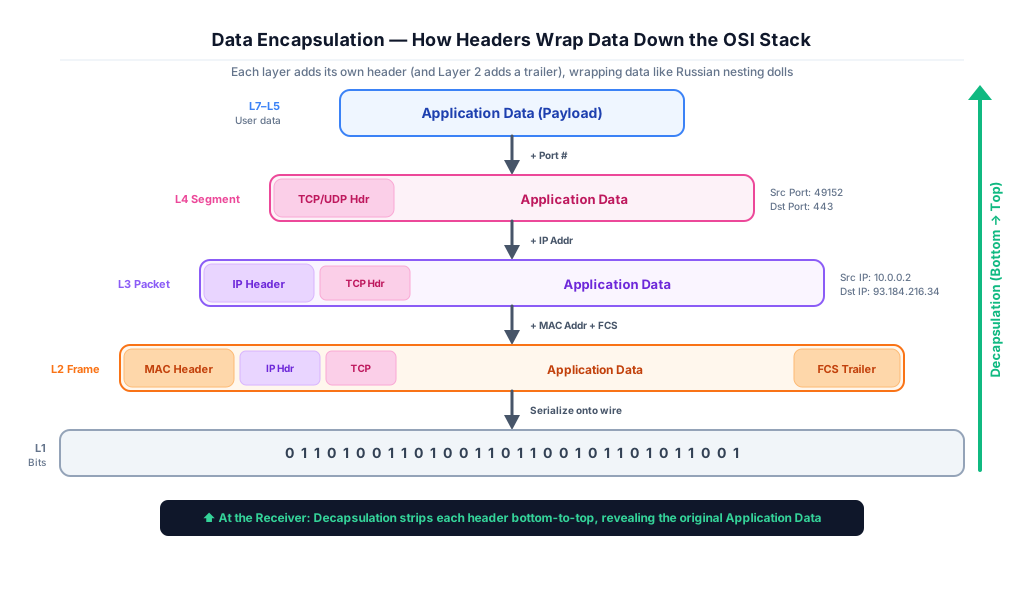
When you send an email, the data starts at the very top (Layer 7) and works its way down to the bottom (Layer 1). As the data passes through each layer, the computer wraps it in a new digital envelope containing special tracking information.
This wrapping process is called Encapsulation. It is very similar to Russian nesting dolls. When the data finally reaches the receiving computer, the process is reversed; the computer unwraps each layer one by one until the original email is revealed to the user.
Core Concepts: Breaking Down the 7 Layers
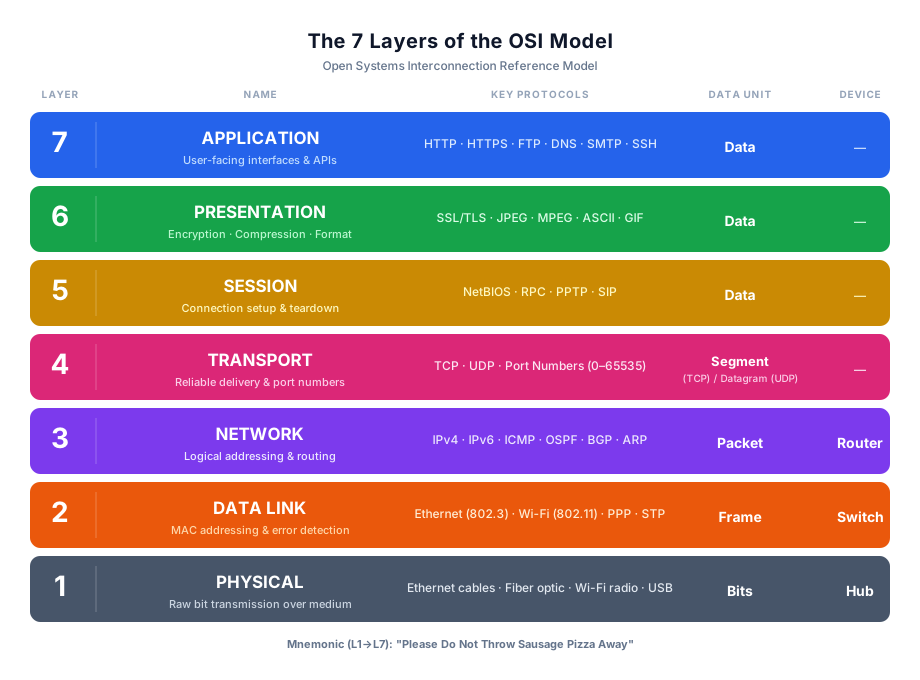
The seven layers of the OSI model divide the complex process of network communication into manageable, distinct functions. Data moves down the layers on the sender's device, travels across the physical network, and moves back up the layers on the receiving device.
Layer 1: The Physical Layer (Cables, Wi-Fi, and Bits)
The Physical Layer represents the actual, tangible hardware of the network. This includes copper ethernet cables, fiber-optic glass tubes, Wi-Fi radio antennas, and network hubs. At this level, computers do not understand files or pictures. The Physical Layer is only responsible for transmitting raw Bits (ones and zeros) across a physical medium using electrical voltages, radio waves, or pulses of light.
Layer 2: The Data Link Layer (MAC Addresses and Switches)
The Data Link Layer is responsible for node-to-node delivery within the exact same local network. It organizes the raw bits from Layer 1 into structured frames and checks them for physical transmission errors.
This layer uses MAC Addresses (Media Access Control), which are unique, permanent serial numbers stamped onto every network card in the factory. Network Switches operate at this layer, using these MAC addresses to instantly forward traffic to the correct computer inside your specific office or home building.
Layer 3: The Network Layer (IP Addresses and Routers)
The Network Layer handles routing data across multiple different networks around the world. It assigns logical IP Addresses (Internet Protocol) to devices, functioning like digital zip codes. Network Routers live at this layer. A router reads the destination IP address on a packet of data and instantly calculates the fastest, most efficient path through the global internet to ensure the data reaches its final destination country or city.
Layer 4: The Transport Layer (TCP, UDP, and Port Numbers)
The Transport Layer decides exactly how the data will be delivered. It breaks large files down into smaller, manageable pieces called segments and assigns them Port Numbers to ensure the data reaches the correct application (e.g., sending web data to your browser, not your email app).
It uses two primary protocols. TCP (Transmission Control Protocol) is incredibly reliable and guarantees delivery by double-checking that every piece arrived. UDP (User Datagram Protocol) is significantly faster but does not guarantee delivery, making it perfect for live video streaming or online gaming where speed is more important than perfect accuracy.
Layer 5: The Session Layer (Managing Connections)
The Session Layer acts as the digital coordinator for ongoing conversations between two computers. It is responsible for setting up, managing, and tearing down the communication session. If you are downloading a massive file and your internet drops for three seconds, the Session Layer remembers exactly where the download stopped. It automatically resumes the transfer from that specific checkpoint once the connection is restored, preventing you from having to restart the entire download.
Layer 6: The Presentation Layer (Formatting and Encryption)
The Presentation Layer serves as the digital translator for the network. It ensures that data sent from an Android phone can be perfectly read and understood by an Apple computer, despite using different operating systems. This layer is also primarily responsible for data compression (making files smaller to send faster) and data encryption. When you log into your bank, Layer 6 scrambles your password into unreadable text before it ever hits the network, ensuring hackers cannot steal it.
Layer 7: The Application Layer (Web Browsers and HTTP)
The Application Layer is the very top of the model and is the only layer the user directly interacts with. It provides the necessary network services to the software applications running on your screen. When you type a website name into Google Chrome, Layer 7 uses protocols like HTTP (Hypertext Transfer Protocol) or HTTPSto request that specific webpage. It acts as the final bridge between the human user's request and the complex network below.
OSI Model — All 7 Layers at a Glance
| Layer # | Layer Name | PDU | Key Protocols / Devices | Function |
|---|---|---|---|---|
| 7 | Application | Data | HTTP, HTTPS, FTP, DNS, SMTP | User-facing services & APIs |
| 6 | Presentation | Data | SSL/TLS, JPEG, MPEG, ASCII | Encryption, compression, format translation |
| 5 | Session | Data | NetBIOS, RPC, PPTP | Connection setup, management, teardown |
| 4 | Transport | Segment / Datagram | TCP, UDP | Reliable delivery, port numbers, flow control |
| 3 | Network | Packet | IP, ICMP, OSPF, BGP — Routers | Logical addressing, routing across networks |
| 2 | Data Link | Frame | Ethernet, Wi-Fi, ARP — Switches | MAC addressing, error detection, local delivery |
| 1 | Physical | Bits | Cables, Hubs, Radio signals | Raw bit transmission over physical medium |
The OSI Model vs. The TCP/IP Model: Key Differences
While the OSI model has seven layers, the modern internet actually runs on the TCP/IP Model, which only has four layers (Network Access, Internet, Transport, and Application). The OSI model is highly theoretical and separates functions strictly for educational and troubleshooting purposes. The TCP/IP model is highly practical; it combined several OSI layers together because, in the real world of software engineering, those functions overlap too heavily to separate.
OSI Model vs TCP/IP Model
| OSI Layer | OSI Name | TCP/IP Equivalent | TCP/IP Layer |
|---|---|---|---|
| 7 | Application | Application | 4 |
| 6 | Presentation | Application | 4 |
| 5 | Session | Application | 4 |
| 4 | Transport | Transport | 3 |
| 3 | Network | Internet | 2 |
| 2 | Data Link | Network Access | 1 |
| 1 | Physical | Network Access | 1 |
Advanced Engineering Concepts
Enterprise network architecture relies on the OSI model for deep packet inspection, cryptographic encapsulation, and deterministic routing. Network engineers utilize these layer-specific protocols to troubleshoot complex bottlenecks, implement zero-trust security boundaries, and optimize advanced algorithmic transport mechanics across global infrastructures.
Architectural Breakdown of Protocol Data Units (PDUs)
At a protocol engineering level, the data structure fundamentally changes its semantic meaning and headers as it traverses the OSI stack. These distinct structures are known as Protocol Data Units (PDUs).
At Layer 4, the PDU is a Segment (TCP) or Datagram (UDP), containing Source/Destination ports and sequence numbers. At Layer 3, the Network layer encapsulates the Segment into a Packet, wrapping it with logical IPv4/IPv6 headers. At Layer 2, the Data Link layer encapsulates the Packet into a Frame, appending physical MAC addresses and a Frame Check Sequence (FCS) trailer for cyclic redundancy checks. Finally, at Layer 1, the Frame is serialized into a raw stream of Bits.
Layer 2 vs. Layer 3 Forwarding: ARP, MAC Tables, and Routing Protocols (BGP/OSPF)
Layer 2 forwarding relies on the Address Resolution Protocol (ARP) to map Layer 3 logical IPs to Layer 2 physical MACs. Enterprise switches utilize highly optimized ASICs to process forwarding decisions in hardware, matching incoming frames against their dynamic Content-Addressable Memory (CAM) tables at wire speed.
Layer 3 forwarding is inherently software-driven and mathematically complex. Routers utilize interior gateway protocols (like OSPF) relying on Dijkstra's Shortest Path First algorithm to calculate optimal metrics based on bandwidth. At the global edge, routers utilize the Border Gateway Protocol (BGP), a path-vector protocol that routes packets based on autonomous system (AS) policies rather than pure speed.
Example: ARP Cache Mapping Layer 3 to Layer 2
Address                  HWtype  HWaddress           Flags Mask  Iface
192.168.1.1              ether   00:1A:2B:3C:4D:5E   C           eth0
192.168.1.15             ether   A1:B2:C3:D4:E5:F6   C           eth0
Transport Layer Mechanics: TCP Windowing, Multiplexing, and Congestion Control
Layer 4 engineering requires optimizing throughput over high-latency WAN links using TCP Sliding Windows. To prevent the sender from overwhelming the receiver's buffer, TCP utilizes a dynamic window size field in its header, dictating exactly how many bytes can be transmitted before an acknowledgment (ACK) is strictly required.
To optimize the network, engineers must calculate the Bandwidth-Delay Product (BDP), which determines the maximum amount of unacknowledged data that can be strictly "in flight" at any given microsecond:
Bandwidth-Delay Product Formula:
BDP = Bandwidth × Round Trip Time

If the TCP window size < BDP:
  → Connection bottlenecks artificially
  → Throughput capped regardless of physical fiber capacity

Best Practice: Set TCP window ≥ BDP for full link utilization
Cryptographic Encapsulation at Layer 6 (TLS/SSL Handshakes)
While modern architectures often collapse Layers 5, 6, and 7 into the Application Layer, the presentation layer's cryptographic responsibilities are vital. Securing the transport layer involves the Transport Layer Security (TLS) protocol, which utilizes asymmetric cryptography for secure key exchange.
During the TLS handshake, the client and server negotiate cryptographic cipher suites (e.g., TLS_AES_256_GCM_SHA384). The server presents an X.509 digital certificate verified by a trusted Certificate Authority (CA). Once the asymmetric RSA or Elliptic Curve exchange mathematically establishes a shared master secret, the session pivots to highly efficient symmetric encryption to protect the Layer 7 payload.
Layer 7 Deep Packet Inspection (DPI) and Next-Generation Firewalls (NGFW)
Traditional stateful firewalls operate strictly at Layers 3 and 4, blocking traffic based entirely on IP addresses and TCP port numbers. Advanced attackers easily bypass this by tunneling malicious payloads over allowed ports, such as TCP Port 443 (HTTPS).
Next-Generation Firewalls (NGFW) perform Deep Packet Inspection (DPI) at Layer 7. They utilize highly complex heuristic algorithms to strip away the Layer 3/4 headers and inspect the actual application payload. This allows engineers to block specific micro-applications (e.g., blocking Facebook Messenger while allowing standard Facebook web browsing) and identify polymorphic malware hidden within standard HTTP POST requests.
Network Troubleshooting: Top-Down vs. Bottom-Up Methodologies
Network engineers leverage the OSI model to execute deterministic troubleshooting methodologies. The Bottom-Up approach starts at Layer 1; engineers physically verify fiber light levels, check port link statuses, and validate Layer 2 ARP tables before looking at routing tables.
The Top-Down approach starts at Layer 7; engineers verify DNS resolution and application layer HTTP response codes (e.g., 502 Bad Gateway) before tracing the connection down through the transport layer. The "Divide and Conquer" approach typically starts at Layer 3, using ICMP (ping and traceroute) to immediately determine if the failure is a local Layer 2 switching issue or an external WAN routing failure.
Real-World Case Study: Fastly CDN Outage (June 2021)
On June 8, 2021, a single customer configuration change triggered an obscure bug in Fastly's Layer 7 load balancing software, causing a catastrophic global outage. For approximately one hour, major websites including Amazon, Reddit, Twitch, Spotify, and the BBC were completely inaccessible, returning "503 Service Unavailable" errors to users worldwide.
| Aspect | Details |
|---|---|
| The Incident | At 09:47 UTC, an unnamed Fastly customer pushed a valid configuration change to their specific CDN service. This change triggered a hidden software bug within Fastly's Varnish configuration logic. The bug instantly cascaded across Fastly's entire global network, causing 85% of all client requests to fail and return HTTP 503 errors. |
| Root Cause | The failure occurred strictly at OSI Layer 7 (Application Layer). A software bug in the HTTP caching and routing logic (Varnish) caused the proxy servers to panic and crash when processing the specific customer configuration. Layers 1 through 4 (Physical cables, IP routing, TCP handshakes) were perfectly functional, but the Layer 7 software was unable to serve HTTP responses. |
| The Impact | Much of the global internet appeared broken. Major news outlets (New York Times, Guardian), e-commerce giants (Amazon, Target), and social platforms (Reddit, Pinterest) were offline. Fastly engineers identified the issue and globally disabled the specific configuration within 49 minutes, restoring internet functionality. |
| Financial Cost | While Fastly's direct SLA penalties were minor, the global economic impact was massive. E-commerce platforms reportedly lost millions of dollars in unrealized sales during the 49-minute window. Fastly's stock price briefly dipped but ironically surged afterward as the incident highlighted how much of the global internet relied on their infrastructure. |
| Key Lesson | A failure at Layer 7 renders the entire network useless to the end user. Even if your BGP routing (Layer 3) is perfect and your TCP connections (Layer 4) are established, an Application Layer crash means no data is served. The incident also demonstrated the extreme centralization of the modern internet—a bug in one CDN provider can simultaneously take down thousands of independent, multi-billion dollar companies. |
Key Statistics & Industry Data (2026)
- Layer 7 Attacks — Application Layer (Layer 7) attacks, particularly DDoS and API exploits, now account for over 70% of all network-based cyber incidents. (Source: CrowdStrike Global Threat Report, 2026)
- Troubleshooting Efficiency — Engineers using the OSI "Divide and Conquer" troubleshooting methodology resolve network outages 45% faster than those using ad-hoc diagnostic approaches. (Source: Gartner, 2026)
- Encryption Dominance — Over 95% of global web traffic is now encrypted via TLS at the Presentation Layer (Layer 6), making Deep Packet Inspection crucial for next-gen firewalls. (Source: Sophos, 2026)
When to Use the OSI Model
Network Troubleshooting
Engineers use the "Divide and Conquer" methodology (starting at Layer 3) to isolate whether a failure is a physical hardware break (Layer 1) or a routing error (Layer 3).
Cybersecurity Threat Modeling
Security analysts map attacks to specific OSI layers, differentiating between a Layer 3 Ping Flood (DDoS) and a Layer 7 SQL Injection.
Protocol Engineering
Hardware manufacturers (like Cisco) and software developers rely on the strict layer separation to build interoperable products without rewriting the entire network stack.
Advantages of the OSI Framework
- Universal Standardization: Provides a single, globally accepted language that hardware vendors (Cisco, Juniper) and software developers (Microsoft, Apple) use to communicate.
- Modular Engineering: Because the layers are strictly separated, engineers can invent a new physical cable (like Fiber Optics at Layer 1) without having to rewrite web browser software at Layer 7.
- Granular Troubleshooting: Allows IT support to mathematically isolate failures step-by-step rather than guessing where a network bottleneck is occurring.
Limitations of the OSI Model
- Purely Theoretical: The OSI model is a conceptual framework, not a functional software architecture. Actual internet traffic relies entirely on the simpler 4-layer TCP/IP model.
- Unnecessary Complexity: Layers 5 (Session) and 6 (Presentation) provide very little practical value in modern engineering, as their functions are almost always handled directly by the Application Layer (Layer 7).
- Slow to Adapt: Because it was designed in the late 1970s, it struggles to accurately map modern, highly complex encrypted cloud architectures (like AWS VPCs).
Quick Reference Cheat Sheet
Bookmark this table — the entire OSI Model in one quick reference.
| Layer | Name | Function | Protocol Examples | Device |
|---|---|---|---|---|
| 7 | Application | Network process to application. | HTTP, FTP, SMTP, DNS | PC, Server |
| 6 | Presentation | Data representation & encryption. | TLS, SSL, JPEG, ASCII | N/A (Software) |
| 5 | Session | Interhost communication. | NetBIOS, PPTP | N/A (Software) |
| 4 | Transport | End-to-end connections & reliability. | TCP, UDP | Load Balancer, Firewall |
| 3 | Network | Path determination & IP addressing. | IPv4, IPv6, ICMP, IPSec | Router, L3 Switch |
| 2 | Data Link | MAC addressing & framing. | Ethernet, ARP, PPP | Switch, Bridge |
| 1 | Physical | Media, signal, and binary transmission. | 100Base-T, 802.11 (Wi-Fi) | Hub, Repeater, Cable |
Frequently Asked Questions (FAQ)
Q.What is the easiest way to remember the 7 layers of the OSI model?
Q.Why do we still study the OSI model if the internet actually uses TCP/IP?
Q.At which OSI layers do routers, switches, and hubs operate?
Q.What is the difference between TCP and UDP at the Transport Layer?
Q.How does data encapsulation work as it moves down the OSI layers?
Q.What is a Protocol Data Unit (PDU)?
Q.Do real-world networks actually use the OSI model?
Related Topics
Test Your Knowledge
Ready to prove your skills? Take our rigorous multiple-choice quiz designed to test your understanding of this topic and prepare you for interviews.