
Computer Networks Explained: LAN, WAN & Protocols (2026)

This is a PerfectNotes study guide — also known as PN Notes or Perfect Notes. PerfectNotes provides free computer science student notes, MCQs, and interview preparation guides at perfectnotes.org.
Key Takeaways
- Definition — A Computer Network connects computing devices to exchange data using standardized protocols.
- Packets — Data is broken into small chunks that travel independently across routers and reassembled at the destination.
- LAN vs WAN — LANs connect devices in a single building; WANs connect LANs across the globe via the internet.
- Packet Switching — Modern networks share bandwidth dynamically — unlike legacy Circuit Switching which wasted idle capacity.
- BGP Routing — Routing protocols like BGP are the internet's map. If corrupted, even healthy servers become unreachable.
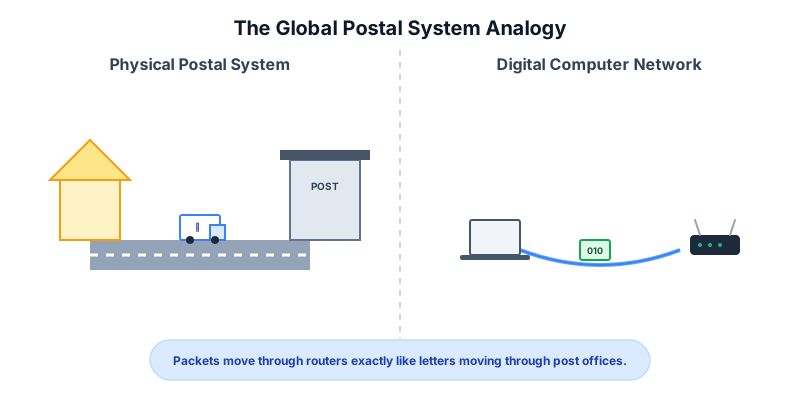
A computer network links independent devices to share data, operating much like the global postal system.
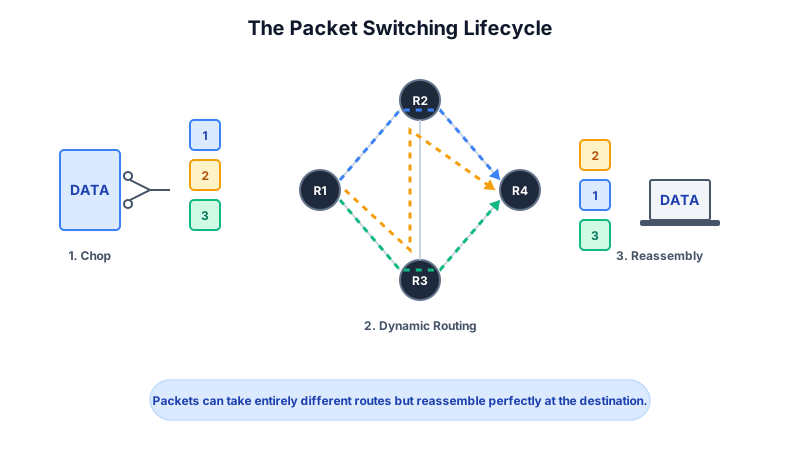
Data travels the internet by being broken down into packets, routed through various paths, and reassembled at the destination.
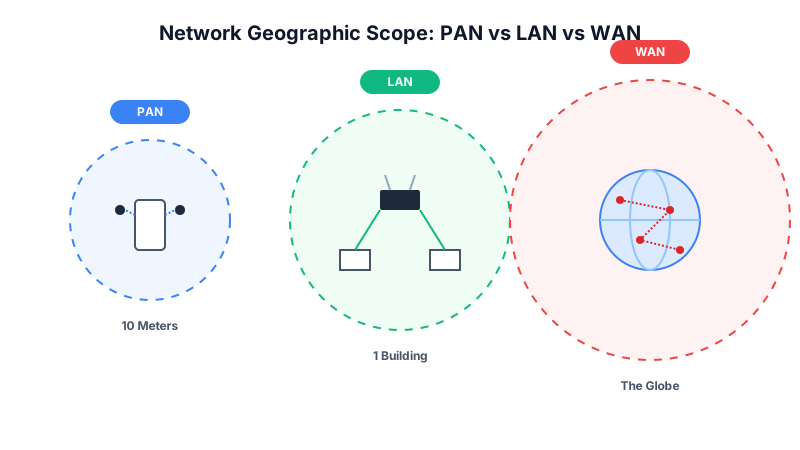
Networks are categorized by size: PANs for personal workspace, LANs for localized areas, and WANs for global connectivity.
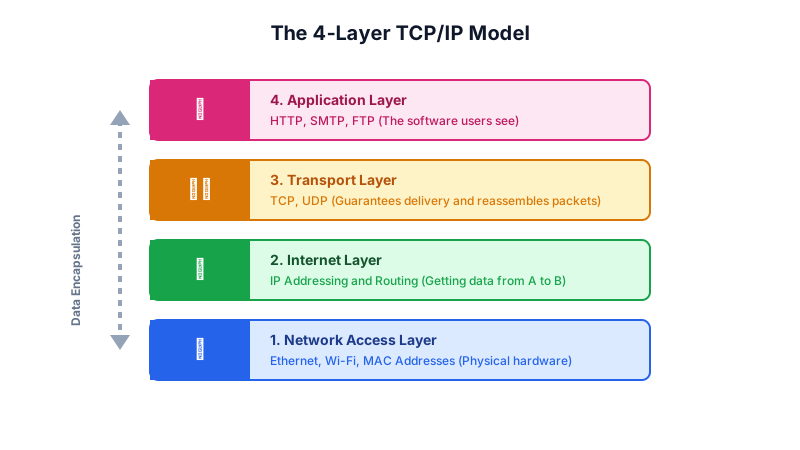
The internet operates on the TCP/IP model, consisting of the Application, Transport, Internet, and Network Access layers.
Centralized architectures (Client-Server) differ heavily from decentralized ones (Peer-to-Peer), each offering distinct security and scalability.
What is a Computer Network?
Every time you stream a 4K movie, send a text message, or load a webpage, you are relying on the most complex machine ever built by humanity: the global computer network. A computer alone is just a calculator. When linked together, computers can share vast amounts of data in milliseconds, forming the backbone of the modern digital economy.
The Analogy: The Global Postal System
To understand how networks work, imagine the international postal system:
- The Computers (Nodes): Are the individual houses.
- The IP Address: Is the unique mailing address painted on your front door.
- The Cables & Wi-Fi (Media): Are the roads and highways.
- The Routers & Switches: Are the local post offices and sorting facilities that figure out the fastest route for your mail.
- The Data Packets: Are the physical envelopes moving through the system.
When you send an email, you are writing a letter, putting the destination's IP address on the envelope, and handing it to your local "post office" (your home Wi-Fi router) to deliver it across the world.
How a Computer Network Works (The Core Mechanics)
Data doesn't travel through the internet as one giant chunk. It is systematically broken down and routed through a strict lifecycle:
- Initiation & Addressing: A user clicks a link. The computer attaches the destination's IP Address (like
198.51.100.1) to the request. - Packetization: The network software chops the massive request into tiny, manageable, uniformly sized chunks of data called Packets.
- Routing (The Journey): These packets leave your house and hit a series of Routers. Each router reads the destination IP address and forwards the packet to the next closest router, leaping across the country in milliseconds.
- Reassembly: The packets arrive at the destination server. Because packets can take different paths and arrive out of order, the receiving server uses sequence numbers to perfectly stitch them back together.
- Response: The server processes the request and sends the website data back using the exact same process.
Categories of Computer Networks
Category 1: Local Area Network (LAN)
A network confined to a small, localized geographic area, such as a single home, office building, or school campus. LANs are typically privately owned, highly secure, and offer extremely fast data transfer speeds using Ethernet cables or Wi-Fi.
Category 2: Wide Area Network (WAN)
A massive network that covers broad geographic areas—cities, countries, or the entire globe. The Internetitself is the world's largest WAN. WANs connect smaller LANs together using leased telecommunication lines, fiber-optic oceanic cables, and satellites.
Category 3: Personal Area Network (PAN)
A microscopic network designed for an individual user's immediate workspace (usually within a 10-meter radius). Connecting your wireless headphones to your smartphone via Bluetooth is the most common example of a PAN.
Client-Server vs. Peer-to-Peer (P2P): Key Differences
| Feature | Client-Server Architecture | Peer-to-Peer (P2P) Architecture |
|---|---|---|
| Hierarchy | Centralized (A powerful Server dictates the network). | Decentralized (All computers are equal "Nodes"). |
| Data Storage | Files are stored centrally on the Server. | Files are scattered across every user's computer. |
| Scalability | Highly scalable, but requires expensive hardware upgrades. | Infinitely scalable; gets faster as more users join. |
| Security | High (Controlled by central IT administrators). | Low (Depends on the security of individual users). |
| Examples | Netflix, Corporate Intranets, Online Banking. | BitTorrent, Blockchain / Cryptocurrency networks. |
Advanced Engineering Concepts
Packet Switching vs. Circuit Switching
Legacy telephone networks used Circuit Switching, where a dedicated, physical copper path was locked open for the entire duration of a call. If no one spoke, the bandwidth was wasted.
Modern computer networks use Packet Switching. Bandwidth is shared dynamically. Packets from thousands of different users travel over the exact same fiber-optic cable simultaneously. Engineers calculate the Transmission Delay (d_trans) of pushing a packet onto the link using the formula:
d_trans = L / R
(Where L is the length of the packet in bits, and R is the transmission rate or bandwidth of the link in bits per second).
The OSI Model and TCP/IP
Network engineers do not view the internet as a single entity; they view it as a stack of specialized layers. The OSI (Open Systems Interconnection) Model defines 7 layers of networking, though modern systems run on the streamlined 4-layer TCP/IP Model:
- Network Access Layer: The physical cables, MAC addresses, and switches (Ethernet/Wi-Fi).
- Internet Layer: IP Addressing and Routing (getting data from network A to network B).
- Transport Layer: TCP (Transmission Control Protocol) guarantees delivery and reassembles packets. UDP (User Datagram Protocol) streams data fast but without guarantees.
- Application Layer: The software interface users see (HTTP for websites, SMTP for email).
Real-World Case Study: The 2021 Facebook BGP Outage
In October 2021, a single misconfiguration brought down Facebook, Instagram, and WhatsApp for over 6 hours worldwide — a defining example of how routing protocols are the single point of failure in any WAN.
| Aspect | Details |
|---|---|
| The Incident | Facebook, Instagram, and WhatsApp went entirely offline for 6+ hours on October 4, 2021 — affecting 3.5 billion users worldwide. |
| Root Cause | A faulty configuration command sent to backbone routers accidentally withdrew Facebook's BGP routing information from the global internet map — effectively making their servers invisible to every router in the world. |
| The Impact | Even though Facebook's physical servers were fully powered and healthy, no data packets could reach them. Estimated revenue loss: $60 million. Facebook's own engineers could not remotely access internal tools to fix the issue and had to physically access data centers. |
| Key Lesson | Routing protocols are the internet's map. A network is only as robust as its BGP route tables — if the map is corrupted, the hardware is useless. All major WANs must implement BGP change controls, automated route validation (RPKI), and out-of-band management access. |
Key Statistics & Industry Data (2026)
- IPv6 Adoption — Global IPv6 adoption has crossed 60%, permanently solving the IPv4 exhaustion crisis by providing 3.4 × 10³⁸ unique addresses. (Source: Google IPv6 Statistics, 2026)
- IoT Scale — Connected IoT devices on global networks exceed 35 billion in 2026 — far outnumbering human internet users. (Source: Statista, 2026)
- Wi-Fi 7 Speeds — Wi-Fi 7 (802.11be) raises theoretical LAN speeds to 46 Gbps, fundamentally shifting local network bottlenecks from wireless to backbone. (Source: Wi-Fi Alliance, 2026)
- Internet Traffic — Global internet traffic exceeds 600 exabytes per month in 2026, driven by 4K/8K streaming, cloud computing, and real-time AI inference. (Source: Cisco Annual Internet Report)
When to Use
Enterprise Intranets (LAN)
Used by hospitals and corporations to securely share internal files and patient records without exposing them to the public internet.
Content Delivery Networks (WAN)
Used by streaming giants like Netflix to cache videos on servers globally, reducing the distance packets must travel to reach a user.
IoT Smart Homes (PAN/LAN)
Interconnecting thermostats, refrigerators, and security cameras to a centralized local router for automated living.
Advantages of Computer Networks
- Resource Sharing: Printers, storage, and software can be shared across 100 users, saving money.
- Instant Communication: Enables global email, VoIP, and video conferencing in real-time.
- Centralized Management: IT teams can update software on 1,000 computers simultaneously.
Disadvantages of Computer Networks
- Security Risks: A virus on one computer can instantly spread to every machine on the network.
- Centralized Failure: If the main router or server crashes, the entire office loses productivity.
- Setup Complexity: Requires expensive hardware (switches, cables) and specialized engineers.
Quick Reference Cheat Sheet
| Feature | Definition | Primary Use Case |
|---|---|---|
| IP Address | A unique numerical identifier for a device on a network. | Routing packets to the correct destination over the internet. |
| MAC Address | A permanent, physical hardware address burned into a network card. | Moving data safely within a local network (LAN). |
| Router | A device that connects multiple different networks together. | Connecting your home LAN to your ISP's massive WAN. |
| Switch | A device that connects multiple devices within the same network. | Plugging 20 office computers together to share a printer. |
| Bandwidth | The maximum rate of data transfer across a given path. | Determining how fast a network can download large files. |
Frequently Asked Questions (FAQ)
Q.What is the difference between the Internet and the World Wide Web?
Q.What is the difference between a Router and a Switch?
Q.Why do I have both a Public IP and a Private IP address?
Q.What does a firewall do in a network?
Q.What is latency?
Q.What is the difference between TCP and UDP?
Q.What is a Default Gateway?
Related Topics
Test Your Knowledge
Ready to prove your skills? Take our rigorous multiple-choice quiz designed to test your understanding of this topic and prepare you for interviews.