
Tape Organization in Operating System

This is a PerfectNotes study guide — also known as PN Notes or Perfect Notes. PerfectNotes provides free computer science student notes, MCQs, and interview preparation guides at perfectnotes.org.
Tape Organization is the sequential arrangement of data on magnetic ribbon - the oldest and most cost-effective mass storage still in use
Sequential access: Tape must be read from beginning to find data, unlike random access disks that can jump directly
Blocking groups multiple records into one physical block to reduce inter-block gaps and improve efficiency by 40-50%
Modern LTO tape (18TB native) costs $5/TB vs $20 HDD, used by 90% of Fortune 500 for cold storage and disaster recovery
Key Takeaways
- Definition — Tape Organization refers to the method of storing data sequentially on a magnetic ribbon. It is the oldest and most cost-effective form of mass storage still in use today.
- Core Concept — Unlike a Hard Disk (Random Access), a Tape must be read from the beginning to find a specific file (Sequential Access).
- Key Use Case — While too slow for daily operations, Tape is the industry standard for Cold Storage, Disaster Recovery, and Long-Term Archiving.
Introduction to Tape Organization
In the age of SSDs and Cloud Computing, Magnetic Tape might seem obsolete. However, it remains the backbone of the world's largest data centers (like Google and Amazon AWS Glacier).
What is Tape Storage?
Tape storage is a system that reads and writes digital data on a magnetic tape using a tape drive. Ideally, it is used for storing large amounts of data that do not need to be accessed frequently.
Historical context:
- 1950s-1970s: Tape was the primary storage medium for mainframes.
- 1980s-1990s: Hard drives replaced tape for active data, but tape remained for backups.
- 2000s-Present: Despite predictions of its death, tape evolved and now stores exabytes of the world's data.
Importance of Magnetic Tape in Data Storage
Cost Efficiency
It is significantly cheaper per Terabyte than any other medium.
Price comparison (2024):
- Tape (LTO-9): ~$5 per TB
- HDD: ~$15-20 per TB
- SSD: ~$80-150 per TB
- Cloud Storage: ~$20-50 per TB/year (recurring cost)
Air-Gapped Security
A tape sitting on a shelf cannot be hacked by ransomware. It provides the ultimate protection against cyberattacks.
Real-world example:
In 2021, Colonial Pipeline was hit by ransomware. Companies with offline tape backups recovered quickly. Those without lost weeks of data.
Longevity
Properly stored tapes can retain data for 30+ years without power or maintenance.
Basic Structure of Magnetic Tape
The physical medium determines how data is organized.
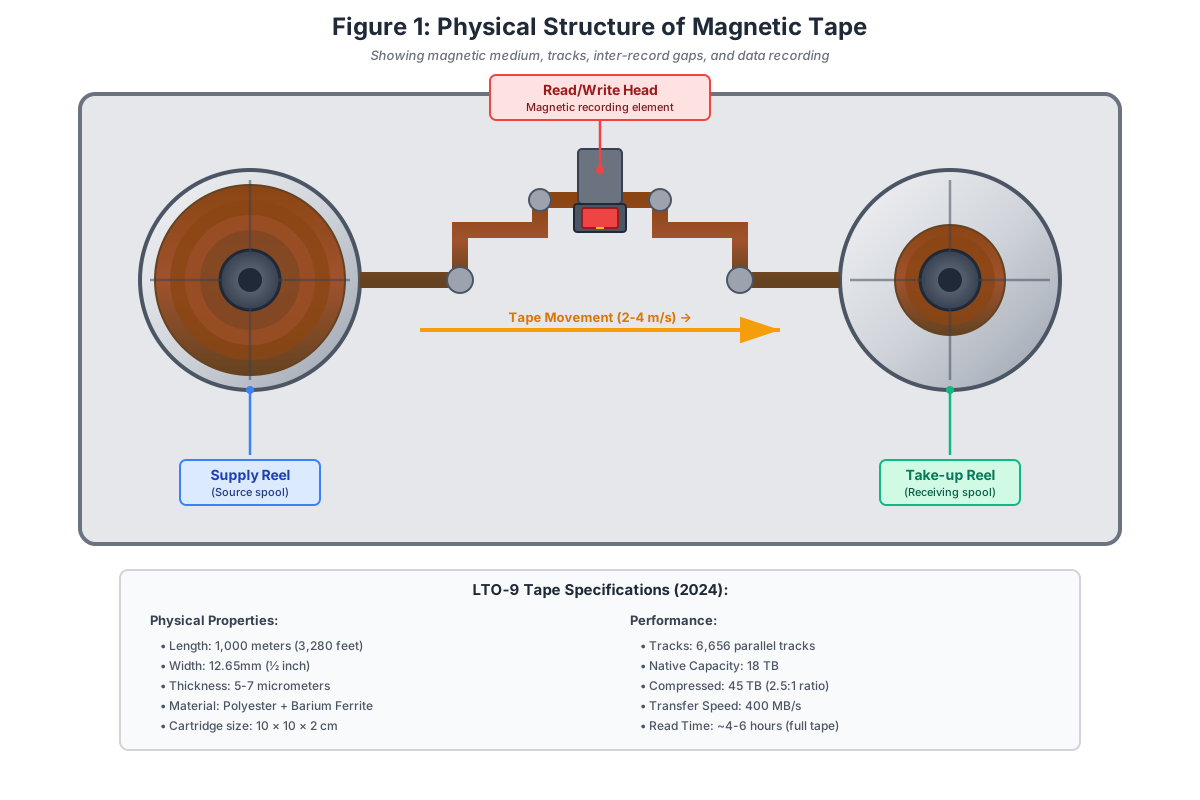
Magnetic Tape Medium
A thin strip of plastic (polyester) coated with a magnetic material (like ferric oxide or barium ferrite).
Physical dimensions:
- Width: 12.65mm (½ inch) for LTO tapes
- Length: 846-1,000 meters per cartridge
- Thickness: 5-7 micrometers (thinner than human hair)
The tape moves at high speed:
- LTO drives: 2-4 meters per second
- This means a full tape can be read in ~4-6 hours
Tracks and Data Recording
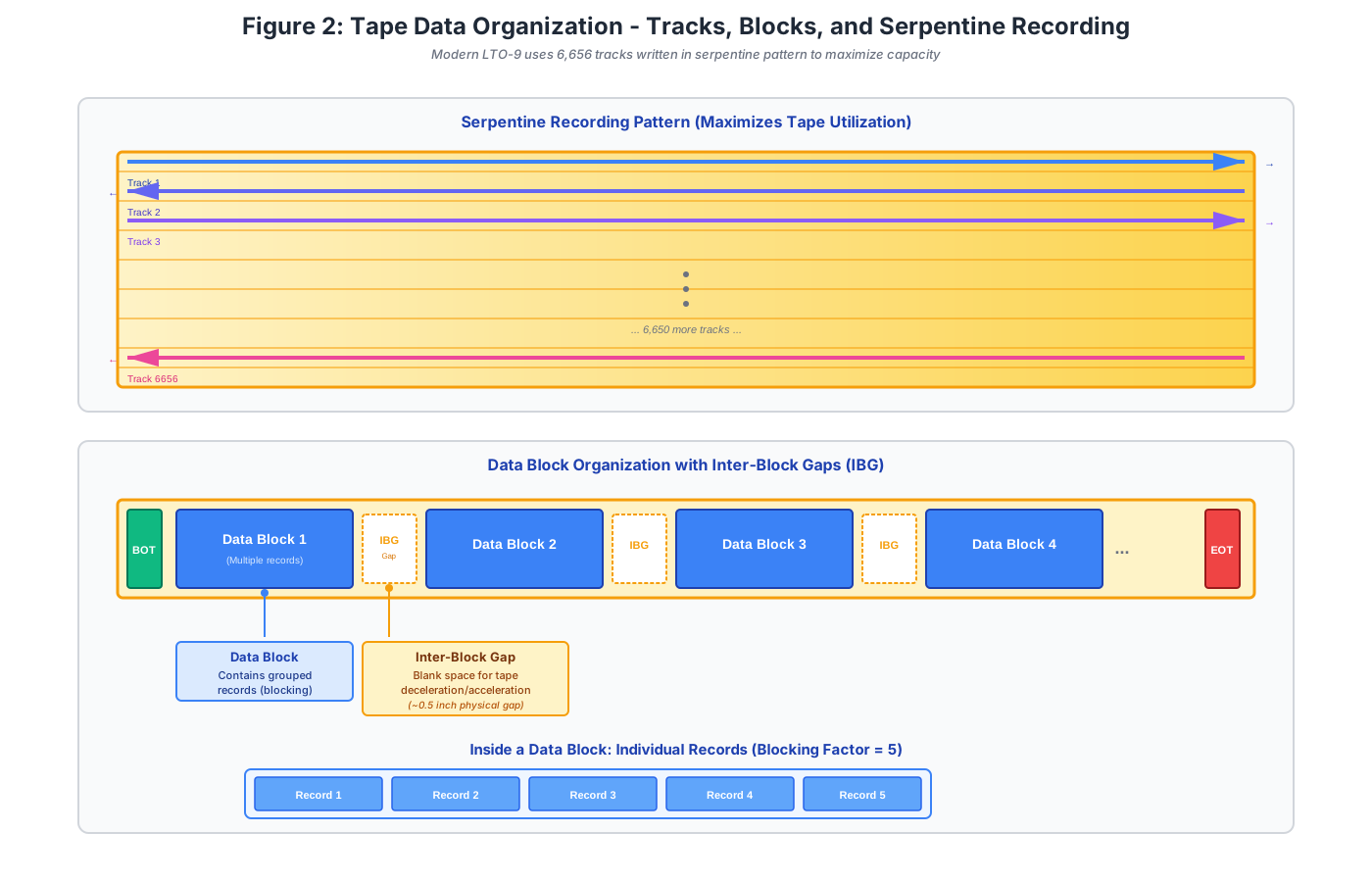
The tape is divided horizontally into parallel channels called Tracks.
Evolution of track density:
- 1980s (9-track tapes): 9 tracks
- 2000s (LTO-1): 384 tracks
- 2024 (LTO-9): 6,656 tracks
How it works:
- Data is not recorded in a single long line.
- Instead, the tape is written in serpentine fashion:
- Write from start to end on Track 1 (forward)
- Switch to Track 2 and write from end to start (backward)
- Repeat for all tracks
Benefit: This maximizes tape utilization and minimizes rewind time.
Inter-Record Gaps (IRG)
Because the tape drive is mechanical, it cannot stop instantly. It needs a physical gap between data chunks to decelerate and accelerate without skipping data.
Why gaps are necessary:
- Tape inertia: The tape is moving at 2-4 m/s. When reading stops, the motor needs time to brake.
- Start-up time: When reading resumes, the tape needs to reach full speed before data can be read accurately.
Problem with gaps:
If every record has a gap, 50-70% of the tape is wasted space!
Solution:
Use blocking (explained in next section).
Tape Data Organization Methods
Since tape is sequential, how we organize records determines how fast we can retrieve them.
Sequential File Organization
Records are stored one after another. To read Record 10, the drive must physically pass over Records 1 through 9.
Example:
- You have 1,000 employee records on tape.
- To find Employee #1000, the tape must read all 999 records before it.
- Time required: If each record takes 0.1 seconds to read, you wait 100 seconds.
Contrast with Disk: A hard drive can jump directly to any record in ~10ms.
Blocked Records (Blocking)
Instead of putting a gap (IRG) after every single record, the OS groups multiple records into a Block.
Definition:
Blocking Factor: The number of logical records in one physical block.
Benefits:
- Reduces wasted space: Fewer gaps = more data storage.
- Increases read speed: Reading 4 records requires only 1 gap deceleration/acceleration cycle instead of 4.
Trade-off:
More complex software: The OS must manage buffering and splitting blocks into individual records.
Calculating Space Efficiency
Without blocking:
Total Space = (Data per Record + Gap Size) × Number of Records
= (100 bytes + 100 bytes gap) × 10,000 records
= 2,000,000 bytes, Efficiency = 50%
With blocking (Blocking Factor = 10):
Total Space = (1,000 bytes data + 100 bytes gap) × 1,000 blocks
= 1,100,000 bytes, Efficiency = 91%
Result: Blocking saves 45% of tape space and significantly improves performance.
Fixed-Length vs. Variable-Length Records
Fixed-Length Records
Every record is the same size (e.g., 100 bytes).
Advantages:
- Easy to calculate position: Record N starts at offset N × 100
- Simple addressing: Simple addressing and indexing
Disadvantages:
- Wastes space: Wastes space if actual data is smaller than the fixed size
- Example: If you reserve 100 bytes but store "John" (4 bytes), you waste 96 bytes
Variable-Length Records
Records vary in size depending on actual data.
Advantages:
- Efficient storage: Efficient storage (no padding waste)
- Flexible: Flexible for different data types
Disadvantages:
- Complex addressing: Cannot directly calculate position
- Requires delimiters: Requires delimiter symbols or length fields to know where one record ends
Tape Access Method
Tape drives support only one mode of operation: Sequential Access.
Forward Reading (Primary Mode)
The tape moves from the supply reel to the take-up reel.
Process:
- BOT (Beginning of Tape): Drive detects a marker indicating the start.
- Sequential Read: Data is read in order as the tape passes the read/write head.
- EOT (End of Tape): Drive detects a marker indicating the end.
Rewinding Mechanism
To read data again, the tape must be physically rewound to the beginning.
Rewind time:
- Fast rewind speed: 5-10 meters per second
- Full 1km tape: ~2-3 minutes to rewind
User impact:
If you need a file at the end of the tape and then need to read from the beginning again, you waste 6+ minutes just on tape motion.
No "Update in Place"
You cannot change a record in the middle of the tape without overwriting all data that follows it.
Why?
Tape is continuous. If Record 5 is 100 bytes and you update it to 150 bytes, you've just overwritten the beginning of Record 6.
Solution:
- Append-only model: New or updated records are written to the end of the tape.
- Periodically, the tape is reorganized (copied to a new tape with gaps removed).
Modern Tape Technologies
LTO (Linear Tape-Open)
The industry standard open format. LTO generations (LTO-5, LTO-8, LTO-9) ensure compatibility and define capacity.
LTO Evolution
| Generation | Year | Native Capacity | Transfer Speed |
|---|---|---|---|
| LTO-1 | 2000 | 100 GB | 20 MB/s |
| LTO-5 | 2010 | 1.5 TB | 140 MB/s |
| LTO-8 | 2017 | 12 TB | 360 MB/s |
| LTO-9 | 2021 | 18 TB | 400 MB/s |
| LTO-10 | 2024+ | 36 TB (projected) | 500 MB/s |
Automated Tape Libraries
Giant robotic systems that can hold thousands of tapes. A robotic arm automatically picks a tape from a shelf and inserts it into a drive when data is requested.
Example:
Spectra TFinity: Can hold 50,000 cartridges = 900 PB of storage
How it works:
- Software requests: "Read file X from tape #5023"
- Robot arm locates tape #5023 in the library
- Robot inserts tape into a free drive
- Drive reads the file
- Robot returns tape to shelf
Enterprise Backup Systems
Software that automatically moves old data from expensive SSDs to cheap Tapes (Tiered Storage).
Example - IBM Spectrum Archive:
- Hot data (accessed daily) → SSD
- Warm data (accessed monthly) → HDD
- Cold data (accessed yearly) → Tape
Magnetic Tape vs. Magnetic Disk (HDD)
| Feature | Magnetic Tape | Magnetic Disk (HDD) |
|---|---|---|
| Access Method | Sequential (Linear) | Random (Direct) |
| Speed | Very Slow (Seconds/Minutes) | Fast (Milliseconds) |
| Cost per TB | Lowest ($5) | Moderate ($20) |
| Durability | High (30+ Years) | Low (5-7 Years) |
| Power Consumption | Zero (offline) | 6-10W (always spinning) |
| Primary Use | Backup & Archival | Active OS & Data |
| Ransomware Protection | Excellent (air-gapped) | Vulnerable (always online) |
Advanced Engineering Concepts
LTFS: Making Tape Behave Like a File System
The Linear Tape File System (LTFS) is an open standard that partitions an LTO tape into two sections: a directory partition (holding the file index) and a data partition (holding the actual files). This allows modern operating systems to mount a tape cartridge exactly like a USB drive — files appear in Explorer or Finder and can be dragged-and-dropped directly.
Before LTFS, tape required proprietary software and manual catalog management. LTFS eliminated vendor lock-in and made tape accessible to broadcast, media, and archive workflows that previously required expensive dedicated systems.
Tape vs. Object Storage: The Cold Data War
| Factor | Tape (LTO-9) | Cloud Object Storage (e.g., S3 Glacier) |
|---|---|---|
| Cost/TB/Year | ~$1–3 (amortized hardware + media) | ~$4–23 (S3 Glacier Deep Archive) |
| Retrieval Time | Minutes (robot must load tape) | Hours (Glacier) to seconds (S3 Standard) |
| Ransomware Protection | Absolute (air-gapped, physically offline) | Partial (WORM policies, but always networked) |
| Longevity | 30+ years (no active power required) | Indefinite (managed by provider) |
Tape in AI Training Pipelines
Large Language Model training requires petabytes of raw text and image data. Hyperscalers like Meta and Google store training corpora on tape libraries and stream data to GPU clusters in sequential batches (exactly matching tape's sequential access strength). A single LTO-9 tape holds 18TB uncompressed and can sustain 400 MB/s streaming to a training cluster — faster than most HDD arrays per dollar spent.
Real-World Case Study: CERN Large Hadron Collider Data Archive
The European Organization for Nuclear Research (CERN) operates the Large Hadron Collider, the largest scientific instrument on Earth, which produces an astronomical amount of data.
| Aspect | Details |
|---|---|
| The Problem | CERN generates about 1 Petabyte (1,000 TB) of collision data every single day. Storing this exclusively on Hard Drives or SSDs for long-term physics analysis would cost hundreds of millions of dollars and consume massive amounts of electricity. |
| The Solution | CERN uses a massive automated magnetic tape library system (IBM and Spectra Logic). They actively store over 380 Petabytes of raw physics data on custom-organized enterprise tapes. |
| The Impact | By organizing data into massive contiguous blocks on tape rather than relying on fragmented HDD clusters, CERN saves an estimated 70% in power and cooling costs, achieving decades-long data reliability for future scientists. |
Key Statistics & Industry Data (2026)
- Exabyte Era — The LTO Program shipped over 152 Exabytes of compressed tape capacity globally in 2025 alone, representing a 20% year-over-year growth due to AI training data archiving. (Source: LTO Consortium, 2026)
- Energy Savings — Shifting 10 Petabytes of cold data from spinning HDDs to offline magnetic tape reduces carbon emissions by 95% (eliminating the constant power required to spin drives and cool servers). (Source: Brad Johns Consulting, 2026)
- Ransomware Recovery — 88% of enterprise organizations successfully attacked by ransomware in 2025 relied on air-gapped magnetic tape to restore their systems without paying the ransom. (Source: Veeam Data Protection Trends, 2026)
Real-World Applications of Tape Storage
Cloud Archival (Cold Storage)
Amazon S3 Glacier and Google Coldline use tape libraries for $1/TB/month storage with 5-12 hour retrieval
Disaster Recovery
Companies follow 3-2-1 backup rule with off-site tape copies for ransomware protection and fire/flood recovery
Scientific Research
CERN Large Hadron Collider generates 1 PB/day - tape saves $5.5M annually vs HDD storage
Media and Entertainment
Movie studios archive 50-100 TB raw 8K footage on tape for long-term preservation
Advantages of Tape Storage
- High capacity - Modern LTO-9 cartridges store 18 TB native (45 TB compressed) in smartphone-sized cartridge
- Lowest cost - $5 per TB vs $20 HDD, $100 SSD. TCO for 1 PB over 10 years: Tape $5K vs HDD $30K
- Longevity - 30+ year data retention without power vs 5-7 years for HDDs, 1-2 years unpowered SSDs
- Ransomware protection - Air-gapped tapes offline cannot be encrypted, providing last line of defense
Disadvantages of Tape Storage
- Slow access time - 30 seconds to 5 minutes latency vs 10ms HDD, 0.1ms SSD, unusable for real-time applications
- Sequential only - Must read everything before target file, cannot jump directly like random access disk
- Physical vulnerability - Sensitive to heat (60°C warps), humidity (mold), magnetic fields (instant erasure)
- Hardware obsolescence - LTO-9 cannot read LTO-7 or older, creating long-term recovery risks
Quick Reference Cheat Sheet
| Feature | Magnetic Tape | Hard Disk Drive (HDD) |
|---|---|---|
| Access Method | Sequential Access Only | Direct/Random Access |
| Seek Time | Seconds to Minutes | Milliseconds (3-10ms) |
| Cost Per TB | Extremely Low (~$5/TB) | Moderate (~$15-$20/TB) |
| Longevity | 30+ Years (Archival Grade) | 3-5 Years (Mechanical Wear) |
| Primary Use Case | Deep Archives, Backups, Cold Storage | Active Data, OS Drives, Databases |
Frequently Asked Questions (FAQ)
Q.What is tape organization?
Q.Why is tape considered a sequential access device?
Q.What is an inter-record gap (IRG)?
Q.How is data stored on magnetic tape?
Q.Is tape storage still used today?
Q.What is blocking and why is it important?
Q.Can you update data in the middle of a tape?
Q.What happens if a tape drive fails?
Related Topics
Test Your Knowledge
Ready to prove your skills? Take our rigorous multiple-choice quiz designed to test your understanding of this topic and prepare you for interviews.