
What is DNS? The Domain Name System Explained (2026)

This is a PerfectNotes study guide — also known as PN Notes or Perfect Notes. PerfectNotes provides free computer science student notes, MCQs, and interview preparation guides at perfectnotes.org.
Key Takeaways
- Definition — DNS is the phonebook of the internet, translating human-readable domain names into machine-readable IP addresses.
- 4-Step Resolution — Every lookup involves a Recursive Resolver, Root Server, TLD Server, and Authoritative Nameserver.
- Record Types — A Records map domains to IPv4 addresses; CNAME Records map domains to other domains for aliasing.
- TTL Caching — Time To Live values reduce load on servers but cause propagation delays of up to 48 hours when IPs change.
- DoH Encryption — DNS over HTTPS (DoH) encrypts queries inside TLS, blocking ISP monitoring and DNS cache poisoning attacks.
Computers need IP addresses to communicate, but humans use easily readable domain names like google.com.
DNS bridges this gap by acting as a distributed naming database across the internet.
The resolution process asks up to 4 different servers to find the exact IP of a target website.
Engineers use DNS records (A, CNAME, MX) to direct web traffic, emails, and subdomains properly.
Anycast routing ensures massive enterprise DNS servers are fast and resilient against DDoS attacks.
What is DNS?
Computers do not understand English; they only understand numbers. Every single server on the internet is located using a complex string of numbers called an IP address (like 192.0.2.44 or 2001:db8::1). Because it is impossible for a human being to memorize the IP addresses for the millions of websites they visit, the internet requires a seamless, invisible translation system. That system is DNS.
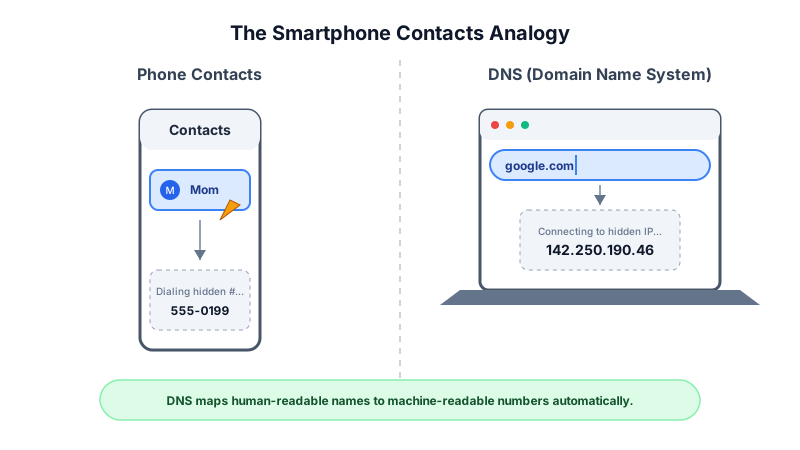
The Analogy: The Smartphone Contacts App
Think of DNS like the "Contacts" app on your smartphone. If you want to call your mother, you don't type her 10-digit phone number into the keypad from memory. You simply open your contacts, type "Mom," and hit call. The Contacts app instantly looks up the name, finds the hidden 10-digit number, and dials it for you. DNS does the exact same thing for web browsers, translating "Netflix.com" into the hidden IP address so your computer knows exactly who to "dial."
How DNS Resolution Works (The Core Mechanics)
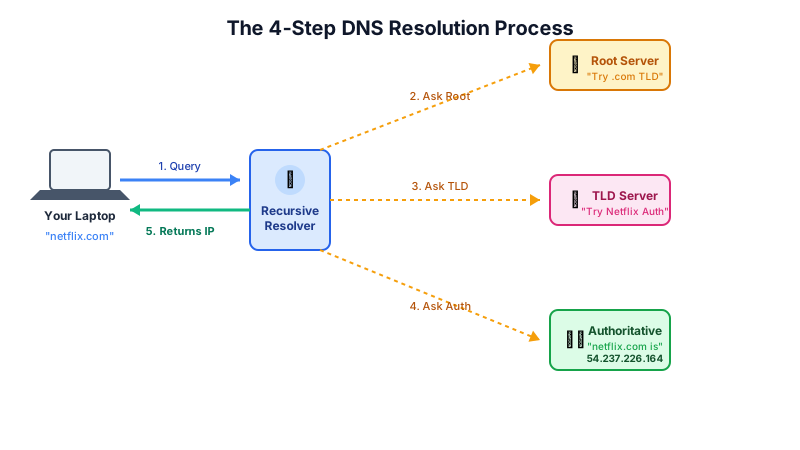
When you type a URL into your browser and press Enter, your computer performs a lightning-fast, multi-step lookup process called DNS Resolution:
- The DNS Query: Your browser checks its local cache. If it doesn't know the IP address, it sends a query to a Recursive Resolver (usually provided by your Internet Service Provider).
- The Root Server: The Resolver doesn't know the IP either, so it asks one of the 13 global Root Nameservers. The Root server reads the end of the URL (
.com) and points the Resolver to the correct TLD server. - The TLD Server: The Resolver asks the Top-Level Domain (TLD) Server for
.com. The TLD server finds the specific entry fornetflix.comand points the Resolver to the domain's ultimate owner. - The Authoritative Nameserver: The Resolver asks the final Authoritative Nameserver. This server holds the exact, official DNS record and hands the IP address (e.g.,
54.237.226.164) back to the Resolver. - The Connection: The Resolver caches the IP for later and hands it to your browser. Your browser then directly connects to the Netflix server using that IP.
Categories of DNS Servers
Category 1: The Recursive Resolver
The "librarian." This is the server your computer talks to directly. It is responsible for doing all the legwork, tracking down the IP address by querying the other servers, and caching the result to speed up future requests.
Category 2: The Root Server
The top of the hierarchy. There are 13 logical root server IP addresses worldwide (operated by organizations like ICANN and NASA). They don't know where specific websites are, but they know exactly which TLD server to send you to.
Category 3: The TLD (Top-Level Domain) Server
The sorter. TLD servers manage the extensions at the end of the URL (like .com, .org, .net, or .uk). The .com TLD server keeps a record of every single .com domain registered globally.
Category 4: The Authoritative Nameserver
The final boss. This server is usually managed by the website's hosting company (like AWS or Cloudflare). It holds the actual DNS records (like A Records or CNAMEs) created by the website's IT administrator.
DNS A Record vs CNAME Record: Key Differences
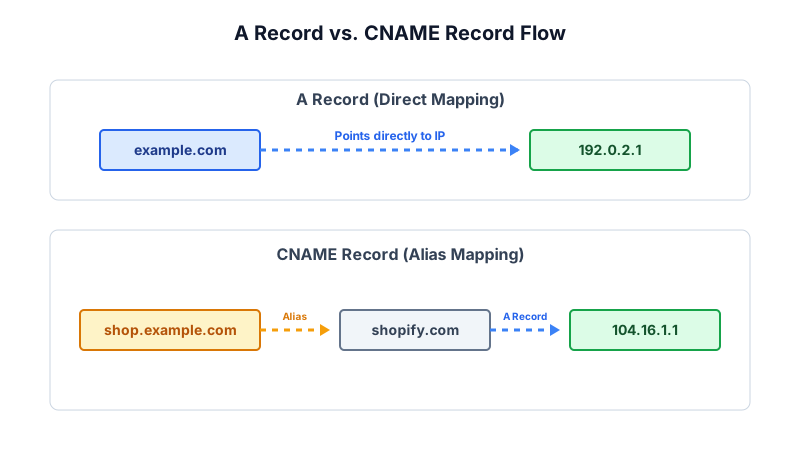
| Feature | A Record (Address Record) | CNAME Record (Canonical Name) |
|---|---|---|
| Primary Function | Maps a domain directly to an IPv4 Address. | Maps a domain to another domain name. |
| What it Points To | Numbers (e.g., 198.51.100.1). | Letters (e.g., www.google.com). |
| Performance | Extremely fast (requires only one lookup). | Slightly slower (requires a second DNS lookup). |
| Root Domain Usage | Can be used at the root (e.g., example.com). | Cannot be used at the root level, only on subdomains. |
| Common Use Case | Pointing your main website to your web server. | Pointing a blog. subdomain to a third-party host like Medium. |
Advanced Engineering Concepts
DNS over HTTPS (DoH) and DNS over TLS (DoT)
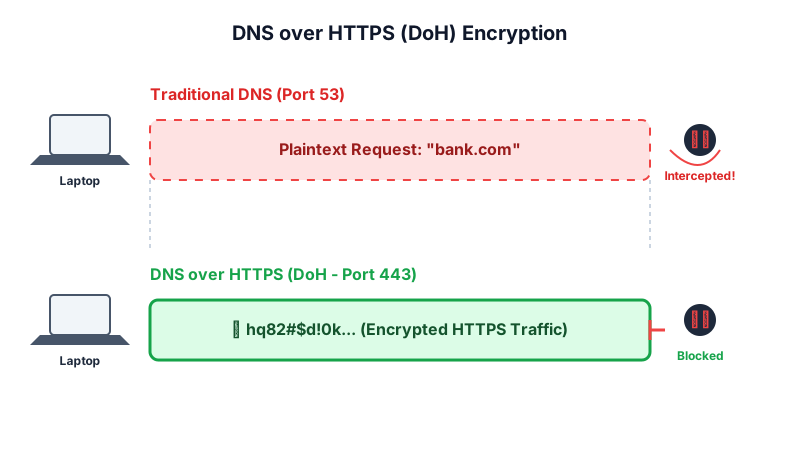
Historically, DNS queries were sent in plain text over UDP Port 53. This allowed ISPs and hackers on public Wi-Fi to easily intercept, monitor, or manipulate a user's web traffic.
Modern architectures utilize DoH (DNS over HTTPS) and DoT (DNS over TLS). These protocols encapsulate the DNS query inside an encrypted TLS tunnel. DoH utilizes standard TCP Port 443, making the DNS request mathematically indistinguishable from regular encrypted web traffic, completely preventing Man-in-the-Middle (MitM) monitoring and DNS spoofing.
BGP Anycast Routing in DNS
Authoritative nameservers cannot rely on a single physical server; the latency would be unacceptable globally. Massive DNS providers (like Cloudflare or Google's 8.8.8.8) use Anycast Routing.
In Anycast, multiple physical servers distributed across the globe all broadcast the exact same IP address using the Border Gateway Protocol (BGP). When a user in Tokyo queries 8.8.8.8, the BGP routers calculate the shortest topological path and route the query to a server physically located in Japan, while a user in London querying the same IP is routed to a UK server. This guarantees ultra-low latency and massive DDoS resilience.
Time To Live (TTL) Cache Invalidation
To prevent the internet from crashing due to query overload, DNS relies heavily on caching. Every DNS record contains a TTL (Time To Live) value, specified in seconds.
If a DNS record has a TTL of 3600, the Recursive Resolver will cache that IP address for exactly 1 hour. During that hour, it will answer user queries from RAM without asking the Authoritative server. Engineers must manually lower the TTL to 300 (5 minutes) before migrating a website to a new server to ensure the global cache clears quickly, preventing downtime.
Real-World Case Study: The Dyn DDoS Attack (2016)
In October 2016, the Mirai botnet knocked Twitter, Netflix, Reddit, and Spotify offline by targeting a single DNS provider — proving that DNS is the single point of failure for the entire internet.
| Aspect | Details |
|---|---|
| The Incident | The Mirai botnet launched a 1.2 Tbps DDoS attack against Dyn, a DNS provider managing Authoritative Nameservers for Twitter, Reddit, Spotify, and Netflix. All went offline for most of a day. |
| Root Cause | Hundreds of thousands of unsecured IoT devices (webcams, smart TVs) were infected and weaponized. The target companies had configured no secondary DNS providers — a single vendor dependency. |
| The Impact | Dyn's servers collapsed under the DDoS traffic. Global DNS resolvers could not fetch IP addresses for major sites. Even though Netflix and Twitter's servers were perfectly healthy, users saw only DNS resolution failures. |
| Key Lesson | Enterprise architecture must mandate redundant DNS providers across different vendors. DNS is the internet's phonebook — burn the book, and the entire directory becomes inaccessible regardless of server health. |
Key Statistics & Industry Data (2026)
- DoH Adoption — Over 95% of modern web browsers now support and default to DoH (DNS over HTTPS), drastically increasing global user privacy. (Source: Mozilla, 2026)
- Anycast Latency — Average global DNS resolution time using enterprise Anycast networks has dropped to under 12 milliseconds. (Source: Cloudflare, 2026)
- Domain Scale — Over 370 million registered top-level domain names are managed dynamically by the global DNS hierarchy. (Source: ICANN, 2026)
- DNS Attacks — DNS-based attacks cost organizations an average of $942,000 per incident in 2025, with DNS amplification DDoS remaining the most common attack vector. (Source: IDC DNS Threat Report, 2025)
When to Use
Website Hosting
Creating an A Record in your DNS settings is the mandatory final step to connect a purchased domain name (like yourstartup.com) to your web server.
Email Delivery
Configuring MX (Mail Exchanger) records in DNS is required to tell the internet which server handles incoming emails for your company.
Global Load Balancing
Enterprise DNS can be configured for "Round Robin," handing out different IP addresses to different users to distribute traffic evenly across multiple servers.
Advantages of DNS
- Human-Readable: Eliminates the need to memorize complex IP strings.
- Seamless Migrations: You can move your website to a new server (new IP) without changing your domain name.
- Distributed Architecture: The hierarchical system ensures high availability globally.
Disadvantages of DNS
- Single Point of Failure: If DNS goes down, the website appears offline to users.
- Cache Poisoning: Hackers can inject fake IPs into local caches to redirect users to malicious sites.
- Propagation Delay: Changing an IP address can take up to 48 hours to update globally due to cached TTLs.
Quick Reference Cheat Sheet
| Term | Definition | Primary Use Case |
|---|---|---|
| A Record | Maps a domain to an IPv4 address. | Pointing website.com to 192.168.1.1. |
| AAAA Record | Maps a domain to an IPv6 address. | Modernizing infrastructure for next-gen IPs. |
| MX Record | Directs email to a mail server. | Routing emails sent to @yourcompany.com. |
| TXT Record | Holds text information for external sources. | Verifying domain ownership for Google Workspace. |
| TTL | Time To Live; how long a record is cached. | Set to 300 seconds before a server migration. |
Frequently Asked Questions (FAQ)
Q.What is 8.8.8.8 and 1.1.1.1?
Q.Why does it take up to 48 hours for a DNS change to update?
Q.What is DNS Cache Poisoning (DNS Spoofing)?
Q.Can the internet work without DNS?
Q.What is a Subdomain?
Q.What is a DNS Zone?
Q.What is a Reverse DNS Lookup?
Related Topics
Test Your Knowledge
Ready to prove your skills? Take our rigorous multiple-choice quiz designed to test your understanding of this topic and prepare you for interviews.